How to Choose Heatsinks: A Complete Buying Guide for 2026
As an Amazon Associate we earn from qualifying purchases. Links on this page are affiliate links.
Selecting proper cooling hardware requires matching physical thermal components directly to your processor footprint. This heatsink buying guide breaks down key thermal specifications so you can pick the most effective cooler for your system build. You will learn how to choose between active fan-driven heatsinks and passive server blocks based on internal chassis clearance, socket support, and directed airflow volume.
This guide walks you through critical socket compatibility standards, low-profile chassis heights like compact 1U server enclosures, and material properties such as dense copper bases versus lightweight aluminum fin stacks. After reading, you will be able to decide which retention mechanisms, physical dimensions, and cooling types match your motherboard and layout without clearance issues. The 8 recommended products featured on this list were evaluated and chosen strictly from their published specifications.
Our top pick: Supermicro 1U Processor Heatsink.
Key Heatsink Specifications and Selection Factors
Socket and Platform Compatibility
You must verify your motherboard socket before choosing any heatsink. Processors feature distinct physical layouts, pin counts, and mounting hole configurations. A cooler designed for modern configurations will not attach to legacy sockets or server motherboards. For example, the Supermicro 1U Passive Server Heatsink specifically lists compatibility for Intel LGA 1150 and LGA 1155 sockets. Other options focus on architectures like Socket 478, Socket F with 1207 pins, or LGA 1366. Matching the exact platform ensures proper surface contact across the integrated heat spreader and keeps mounting pressure within correct limits. Buying a cooler for the wrong socket means it will not mount to your motherboard bracket. The trade-off centers on flexibility. A socket-specific heatsink delivers precise mechanical fit and retention pressure, but you cannot transfer it if you upgrade your hardware later. Check socket specs first.
- Motherboard socket designation matching your processor model
- Published hardware compatibility list from the cooler manufacturer
Active Versus Passive Cooling
You must decide whether your system requires active cooling with an attached fan or passive heat dissipation. Active coolers incorporate a dedicated fan or blower unit directly onto the fin stack. For instance, the Dynatron Copper LGA1156 Blower Heatsink uses an integrated double ball bearing blower fan to force air across its metal fins. In contrast, passive heatsinks rely entirely on external airflow supplied by chassis fans or dedicated server ducting. Passive heatsinks are standard in dense rackmount enclosures where high-speed case fans channel high-pressure air through the chassis. Choosing passive cooling eliminates a point of mechanical failure on the processor block. However, passive heatsinks will fail to manage thermal loads if your enclosure lacks dedicated system fan banks. Active coolers provide self-contained airflow, which suits standard enclosures and desktop cases, but they introduce mechanical moving parts that require maintenance over time.
- Presence of an integrated fan or blower mechanism
- Enclosure airflow adequacy for passive heatsink fin stacks
Chassis Height and Form Factor
You must evaluate your enclosure clearance before selecting a heatsink. Server enclosures follow standard vertical unit measurements, where 1U represents 1.75 inches of total rack height. Standard desktop towers accommodate tall coolers, but rackmount chassis demand strictly low-profile designs. For example, the Supermicro 1U Processor Heatsink is designed specifically for 1U rack environments with a height of 4.6 inches in its package dimensions and targeted low-profile hardware geometry. Other compact server coolers drop as low as 1.12 inches in height. If you select a heatsink that exceeds your internal chassis ceiling, the top cover cannot close, risking chassis damage. The trade-off with low-profile heatsinks involves thermal dissipation volume. A 1U cooler has limited fin surface area compared to multi-fan desktop towers. It must compensate with denser fin arrangements or high-velocity airflow from adjacent fans to maintain safe operating temperatures.
- Rack unit specification matching your 1U or tower chassis
- Total physical cooler height relative to internal clearance
Thermal Material Construction
You should check the thermal metals used in the heatsink base and fin array. Pure copper offers high thermal conductivity, making it effective for rapid heat transfer directly from the processor die. Aluminum provides lower thermal conductivity but weighs significantly less and dissipates heat effectively when paired with high airflow. Some hybrid designs combine both materials. For example, the Intel Socket 478 Copper Core CPU Cooler uses a copper core base paired with an aluminum fin structure. This hybrid configuration captures heat rapidly at the central contact point while shedding heat through lightweight aluminum fins. Pure copper heatsinks, such as solid copper 1U units, maximize thermal transfer within tiny spaces. However, the trade-off is physical weight. An all-copper unit adds noticeable mass to the motherboard, whereas an aluminum or hybrid heatsink reduces board strain but requires greater overall volume to match equivalent thermal performance.
- Solid copper construction for compact, high-intensity heat transfer
- Hybrid copper base with aluminum fins for balanced weight
Mounting Mechanism and Retention Hardware
You need to inspect how the heatsink fastens to the motherboard socket. Secure retention ensures consistent clamping pressure between the heatsink contact plate and the processor heat spreader. Server and enterprise heatsinks commonly employ rigid screw and spring retention mechanisms. For instance, the Supermicro 1U Passive Server CPU Heatsink relies on integrated screw and spring mounting to secure directly to Socket F 1207-pin hardware. Springs provide steady, calibrated downward tension that prevents motherboard warping while keeping thermal interface material evenly distributed. Other systems use retention clips or plastic push-pins. The trade-off with screw-and-spring mechanisms is installation complexity. Threaded retention requires compatible backplates or dedicated chassis mounting standoffs built into the enclosure tray. If your chassis lacks the exact threaded socket backplate, you cannot mount the cooler securely without acquiring secondary adapter brackets.
- Screw and spring hardware for calibrated mounting pressure
- Motherboard backplate compatibility or chassis standoff alignment
Target Device and Application Type
You must verify whether your cooling project requires a complete CPU heatsink assembly or specialized thermal interface shims for specific hardware. Standard desktop and server builds require full fin stacks to cool central processors. However, custom electronics repairs and console maintenance involve targeted thermal components. For example, the NEW Games Order PS3 Copper Heatsink Shims provide 1.2 mm thick bronze-colored copper spacers specifically designed for GPU gap repairs inside gaming consoles. These shims bridge physical clearances between existing console heat spreaders and stock heatsinks when factory thermal pads degrade. Choosing targeted shims allows you to restore thermal contact in proprietary enclosures without replacing custom cooling assemblies. The trade-off is narrow specialization. Shims do not dissipate heat into the air on their own; they only bridge physical gaps. If you need a comprehensive processor cooler, buying interface shims will not replace a dedicated finned heatsink.
- Target component type such as CPU die or GPU interface
- Complete finned heatsink assembly versus gap-filling copper shims
Common Heatsink and Cooler Types
Passive Server Heatsinks
Passive server heatsinks provide fanless thermal dissipation designed specifically for dense 1U rackmount chassis and blade servers. These units feature solid metal fin structures with secure screw and spring mounting mechanisms. Models such as the Supermicro 1U Passive Server Heatsink fit specific sockets like LGA 1366, LGA 1150, LGA 1155, or Socket F. They suit system builders configuring 1U rack enclosures and multi-blade enterprise nodes that already possess directed internal system fans. Weights range from 0.5 pounds up to 4 pounds. The primary trade-off is the total lack of an integrated cooling fan, making them completely reliant on continuous external chassis airflow.
Active Blower Server Heatsinks
Active blower server heatsinks combine an all-copper cooling frame with an integrated double ball bearing blower fan. These units feature compact dimensions, such as a low 1.12-inch profile height, engineered to fit inside low-profile 1U server chassis. A clear example is the Dynatron Copper LGA1156 Blower Heatsink, which weighs 0.78 to 0.95 pounds. This style suits administrators building compact rack systems on Intel LGA 1155 and LGA 1156 sockets for Core i5 and i7 processors who need dedicated airflow right over the copper base. The primary trade-off is mechanical fan wear and tight socket specificity that prevents installation on other processor footprints.
Desktop CPU Air Coolers
Desktop CPU air coolers utilize a traditional top-down cooling arrangement consisting of a metal heatsink base paired with a dedicated fan. An example is the Intel Socket 478 Copper Core CPU Cooler, which combines a copper core with aluminum fins and a standard 3-pin fan setup. This design suits you if you maintain or repair legacy desktop systems running older hardware like Pentium 4 and Celeron processors. The integrated fan delivers direct active dissipation without requiring high-velocity rack airflow. The chief trade-off is that these units target baseline stock thermal demands and lack physical mounting compatibility with modern processor sockets.
Thermal Shims and Compounds
Thermal shims and compound kits provide mechanical gap bridging between processors and existing heatsinks. These packages feature precise solid metal spacers, such as 1.2 mm bronze-colored copper shims, paired with thermal paste like Arctic Silver 5 compound. An example is the NEW Games Order PS3 Copper Heatsink Shims kit, engineered for GPU and processor contact repair. This solution suits you if you need to fix thermal gap defects in specialized hardware or gaming consoles like the PS3. The main trade-off is that shims do not dissipate heat independently. You must pair them with an intact heatsink, and incorrect thickness can prevent proper mounting contact.
Common CPU Heatsink Buying Mistakes
Ignoring RAM clearance beneath asymmetric heatsink fin stacks
Large air coolers often overhang memory slots on standard motherboards. Tall heat spreaders on your memory modules can block the cooler fins or front fan. Check the specified RAM clearance dimension on the cooler specification sheet before buying. If you use tall memory modules, choose a heatsink with an offset fin design or an adjustable front fan mount.
Leaving the protective plastic peel on the heatsink baseplate
Manufacturers ship heatsinks with clear plastic films over the copper or aluminum base to protect the contact surface. Forgetting to peel this sticker prevents thermal paste from touching the metal directly. Plastic acts as a thermal insulator, causing immediate thermal throttling. Always verify the baseplate is bare metal and clean with isopropyl alcohol before mounting.
Overlooking maximum cooler height limits inside your PC chassis
Tower heatsinks rely on vertical heat pipes that add substantial height above the motherboard. If your cooler height exceeds your PC case maximum CPU cooler clearance specification, you cannot install the side panel. Always check the case specification sheet for maximum clearance height. Ensure the cooler specification provides at least a few millimeters of extra margin.
Reusing old thermal paste when reseating a cooler
Whenever you detach a heatsink, the cured thermal compound breaks its uniform contact pattern. Reclamping without cleaning introduces trapped air bubbles across the CPU heat spreader. Air pockets significantly degrade thermal transfer efficiency between surfaces. Completely wipe away old compound using isopropyl alcohol and apply fresh paste in a small, even pattern before reattaching the cooler.
Mounting heatsink fans against your chassis airflow direction
Heatsink fans must move air along the same path as your PC chassis fans. Orienting the heatsink fan to pull against incoming airflow creates turbulence and traps hot air inside the fin stack. Align the fan direction arrows toward your rear or top exhaust points. This design ensures heated air immediately exits the system without recirculating.
Quick picks
Our 8 picks

Supermicro 1U Processor Heatsink
Best for: 1U rackmount server chassis deployments
- Server Height
- 1U
- Dimensions
- 10.4 x 7.2 x 4.6 inches
- Weight
- 4 pounds
This Supermicro heatsink provides cooling for 1U server chassis configurations. Its package measures 10.4 inches long, 7.2 inches wide, and 4.6 inches high, with a total weight of 4 pounds. You get a dedicated rackmount cooling solution built strictly for 1U server enclosures. It suits you if you need a heavy-duty cooling component sized for standard server deployment and want a unit built by Supermicro for specific rackmount installations.
Pros
- Designed for 1U server height
- Substantial 4-pound weight
- Compact 4.6-inch height profile
Cons
- Specific 1U form factor limits desktop case compatibility
- Heavy 4-pound weight puts load on the mounting bracket
Good fit if
- You need a dedicated heatsink designed for a 1U server chassis.
- You have an enclosure that accommodates a 4-pound cooling unit.
Skip if
- You require a cooler for a standard consumer desktop PC case.
- You need a lightweight heatsink under 4 pounds.
Verdict: Supermicro 1U Server Processor Heatsink delivers a dense 4-pound cooling structure designed specifically for 1U rack environments. It provides standard enterprise server sizing for system builders utilizing compatible rackmount hardware.
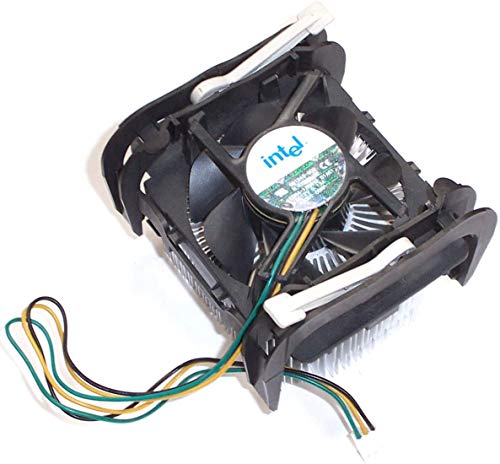
Intel Socket 478 Copper Core CPU Cooler
Best for: Socket 478 Pentium 4 system repairs
- Socket Compatibility
- Socket 478
- Material
- Aluminum, Copper core
- Compatible Device
- Intel Pentium 4, Celeron processors
- Fan Size
- 2.5-inch
- Mounting Type
- Heat sink retention clip
- Features
- Fan
This Intel CPU cooler pairs an aluminum heatsink with a copper core and an attached 2.5-inch fan. Built specifically for Socket 478 platforms, it accommodates Intel Pentium 4 and Celeron processors running between 2.8E and 3.40 GHz. You connect the fan through a standard 3-pin connector with an 11-inch cord. An integrated retention clip secures the assembly directly to the motherboard, making it a direct-fit replacement for older desktop setups.
Pros
- Copper core embedded within aluminum heatsink
- Integrated 2.5-inch cooling fan
- Includes retention clip for installation
- Long 11-inch 3-pin fan power cable
Cons
- Limited to legacy Socket 478 motherboards
- 3-pin fan connector lacks 4-pin PWM control
- Supports only Pentium 4 and Celeron processors up to 3.40 GHz
Good fit if
- You need a replacement cooler for a Socket 478 system.
- You run an Intel Pentium 4 or Celeron CPU between 2.8E and 3.40 GHz.
- You need an 11-inch fan cord to reach your 3-pin header.
Skip if
- You use modern processor sockets such as LGA or AMD platforms.
- You require a 4-pin PWM fan connector for variable speed control.
Verdict: Intel Socket 478 Copper Core CPU Cooler provides dedicated cooling for compatible legacy Pentium 4 and Celeron systems using its copper-base aluminum design. It delivers reliable stock-level thermal dissipation with a straightforward 3-pin fan setup.

Supermicro 1U Passive Server Heatsink
Best for: 1U Xeon 5500 series blade servers
- Socket Compatibility
- LGA1366
- Server Height
- 1U
- Cooling Method
- Passive
- Compatible Device
- 1U DP & 10-Blade Servers
- Dimensions
- 3.6 x 25 x 3.6 inches
- Mounting Type
- Screw & Spring
This Supermicro unit provides fanless cooling for rackmount hardware. Built for 1U dual-processor and 10-blade server layouts, it secures to the motherboard via screw and spring mounts. The hardware supports Intel Xeon Processor 5500 series chips on LGA1366 sockets. You require dedicated internal chassis airflow to move air across the passive fins. It suits you if you service dense enterprise hardware.
Pros
- Fits compact 1U and 10-blade server racks
- Screw and spring mounting method ensures firm contact
- Passive design has zero moving parts or fan failures
- Weighs 0.8 pounds
Cons
- Requires chassis fans because unit has no integrated fan
- Restricted to LGA1366 server sockets
- Official CPU support lists only Xeon Processor 5500 series
Good fit if
- You deploy Intel Xeon Processor 5500 series processors.
- You build or maintain 1U dual-processor rack servers.
- You need a dedicated LGA1366 screw and spring heatsink.
Skip if
- You require an active heatsink with an attached fan.
- You use non-LGA1366 processor sockets.
Verdict: Supermicro 1U Passive LGA1366 Heatsink delivers specialized passive thermal dissipation for Xeon 5500 series processors in 1U racks. Its screw and spring mounting provides firm retention for high-density blade systems.
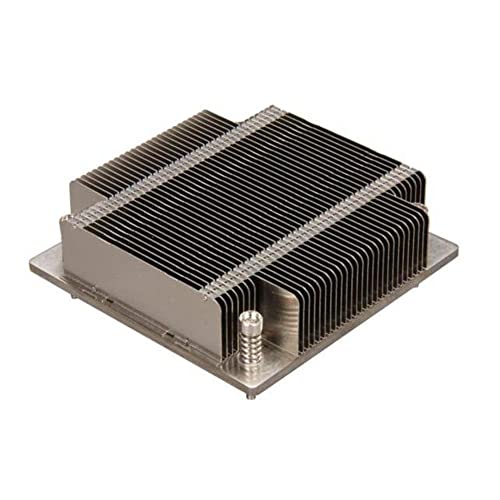
Supermicro 1U Passive Server Heatsink
Best for: 1U Supermicro servers on LGA 1150/1155 sockets
- Socket Compatibility
- LGA1150, LGA1155, LGA1156
- Server Height
- 1U
- Cooling Method
- Passive
- Compatible Device
- X8, X9 1U UP Servers
- Dimensions
- 3.6 x 1.1 x 3.6 inches
- Mounting Type
- Screw Spring, Mounting Bracket
This Supermicro 1U passive heatsink cools select Intel processors without an integrated fan. Built for X8 and X9 server platforms, it fits LGA 1150, LGA 1155, and LGA 1156 sockets. You get a low-profile design measuring 3.6 inches long, 3.6 inches wide, and 1.1 inches high, weighing 0.5 pounds. It mounts via included screw springs and a BKT-0028L bracket. It suits your compact rackmount chassis that relies on directed internal system airflow.
Pros
- Compact 1U form factor measuring 1.1 inches high
- Includes mounting bracket BKT-0028L and screw springs
- Lightweight 0.5-pound passive construction
- Compatible with Intel Xeon X3400, E3-1200, and Core i3 series
Cons
- No integrated cooling fan included
- Limited socket compatibility restricted to older LGA 1150, 1155, and 1156
- Requires dedicated chassis airflow for passive cooling operation
Good fit if
- You need a 1.1-inch tall heatsink for a 1U Supermicro X8 or X9 server chassis.
- You run an Intel Xeon X3400, E3-1200, or Core i3 processor on LGA 1150, 1155, or 1156.
Skip if
- You require an active heatsink with a built-in cooling fan.
- You use modern desktop sockets outside LGA 1150, 1155, or 1156.
Verdict: Supermicro 1U Passive Server CPU Heatsink provides low-profile passive cooling for specific 1U Intel LGA 1150, 1155, and 1156 deployments. It fits tightly spaced enclosures using the bundled bracket and screw springs.
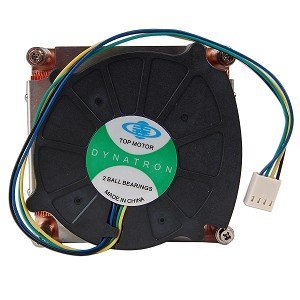
Dynatron Copper LGA1156 Blower Heatsink
Best for: compact Intel LGA 1156 processor builds
- Socket Compatibility
- LGA1156
- Material
- Copper
- Compatible Device
- Intel i5 & i7 CPUs
- Fan Size
- 3-inch
- Dimensions
- 3.35 x 3.21 x 1.12 inches
- Features
- Fan
This Dynatron unit is a solid copper heatsink equipped with an integrated three-inch double ball bearing blower fan. It measures 1.12 inches in height, 3.21 inches in width, and 3.35 inches in length, weighing 0.78 pounds. Designed for Socket LGA1156 Intel Core i5 and i7 processors, it connects using a standard 4-pin connector. It suits you if you need a compact copper cooling solution for an LGA1156 setup.
Pros
- Solid copper heatsink build
- Low profile 1.12-inch overall height
- Double ball bearing 3-inch blower fan
- Standard 4-pin power connector
Cons
- Compatible only with Socket LGA 1156 motherboards
- Delivers 3.533 CFM airflow at 0 to 20 percent duty cycle
Good fit if
- You need a low-height 1.12-inch cooler for an Intel LGA 1156 socket.
- You require an all-copper heatsink for an Intel Core i5 or i7 CPU.
- You want an integrated double ball bearing blower fan with 4-pin control.
Skip if
- You use an AMD CPU or a different Intel socket platform.
- You need higher low-speed airflow than 3.533 CFM at 0 to 20 percent duty cycle.
Verdict: Dynatron Copper Heatsink with Blower Fan provides an all-copper build and a 1.12-inch profile height for Socket LGA 1156 installations. Its integrated double ball bearing blower fan delivers active cooling for supported Intel Core i5 and i7 processors.

Supermicro 1U Passive Server CPU Heatsink
Best for: Socket F 1U blade servers
- Socket Compatibility
- Socket G34, Socket F(1207 Pin)
- Server Height
- 1U
- Cooling Method
- Passive
- Compatible Device
- 10-Blade Server
- Dimensions
- 3.94 x 1.02 x 3.54 inches
- Mounting Type
- Screw and Spring
Supermicro 1U Passive Server Heatsink provides passive thermal management designed for 1U chassis and 10-blade servers. It measures 3.94 inches in length, 1.02 inches in width, and 3.54 inches in height, with an overall weight of 0.9 pounds. The heatsink attaches using a screw and spring mounting method onto Socket F 1207-pin hardware. This unit suits you if you run 10-blade rack infrastructure requiring a dedicated passive heatsink.
Pros
- Passive cooling configuration operates without an onboard fan
- Screw and spring mounting method keeps the heatsink securely fastened
- Compact dimensions of 3.94 by 1.02 by 3.54 inches for 1U space
- Built for Socket F 1207-pin hardware and 10-blade servers
Cons
- Passive cooling design provides no integrated fan mechanism
- Limited to Socket F 1207-pin configurations
Good fit if
- You need a heatsink sized for a 1U 10-blade server.
- You install hardware onto a Socket F 1207-pin motherboard.
Skip if
- You need an active heatsink with a built-in fan.
- You use a socket type other than Socket F 1207-pin.
Verdict: Supermicro 1U Passive Server Heatsink delivers a fanless cooling structure designed specifically for 1U 10-blade servers. Its screw and spring mounting system ensures direct attachment to Socket F 1207-pin hardware.

Dynatron 1U Active Copper Heatsink
Best for: 1U Intel LGA 1155 and 1156 server builds
- Socket Compatibility
- LGA1155, LGA1156
- Material
- Copper
- Server Height
- 1U
- Cooling Method
- Active
- Dimensions
- 5 x 5 x 2.5 inches
- Features
- Fan
This Dynatron cooler is an all-copper active heatsink designed for compact 1U server chassis. It features an integrated two-ball-bearing fan and measures 5 inches long, 5 inches wide, and 2.5 inches tall. Weighing 0.95 pounds, it mounts directly to Intel LGA 1155 and LGA 1156 sockets. You get dedicated airflow across a solid copper base, making it suitable if you run compatible Intel Xeon or Core processors in low-profile rackmount systems.
Pros
- All-copper construction for high thermal conductivity
- Integrated active cooling fan with dual ball bearings
- Compact 2.5-inch height built for 1U rackmount enclosures
- Compatible with Intel LGA 1155 and LGA 1156 sockets
Cons
- Socket compatibility limited strictly to Intel LGA 1155 and LGA 1156
- No support for AMD processor platforms
Good fit if
- You need an active heatsink with a built-in fan for a 1U chassis.
- You run an Intel Xeon or Core processor on an LGA 1155 or LGA 1156 motherboard.
- You require an all-copper heatsink measuring 2.5 inches in height.
Skip if
- You use modern Intel sockets or an AMD platform.
- You need a fanless passive heatsink reliant solely on external rack airflow.
Verdict: Dynatron Copper 1U Heatsink with Fan provides dedicated active airflow across an all-copper structure for low-profile chassis. It is a targeted cooling solution built specifically for Intel LGA 1155 and LGA 1156 rackmount systems.

NEW Games Order PS3 Copper Heatsink Shims
Best for: PS3 console heatsink gap repair
- Material
- 100% copper
- Compatible Device
- Sony Playstation 3 PS3 Fat Slim
- Dimensions
- 6.7 × 4.1 × 1.4 inches
- Weight
- 1 pounds
This kit contains two cut and polished 100% copper shims and a 3.5-gram tube of Arctic Silver 5 thermal paste. Measuring 42 mm by 42 mm with a 1.2 mm thickness, these shims sit directly between your Sony PS3 Fat or Slim CPU or GPU and the stock heatsink. You get dedicated thermal interface hardware built specifically to bridge console heatsink gaps rather than standard desktop PC cooler mounts.
Pros
- Includes two 100% cut and polished copper shims
- Supplied with a 3.5 g tube of Arctic Silver 5 thermal compound
- Precise 42 mm x 42 mm x 1.2 mm shim sizing for console chips
Cons
- Designed specifically for PS3 consoles rather than PC CPU sockets
- Does not include a heatsink or cooling fan unit
Good fit if
- You need 42 mm x 42 mm copper shims to service a PS3 Fat or Slim console.
- You want bundled Arctic Silver 5 thermal compound included with your spacer shims.
Skip if
- You need a complete heatsink assembly for a desktop or server CPU.
- You require mounting hardware or active fans.
Verdict: NEW Games Order PS3 Copper Shims Kit provides 1.2 mm thick copper spacers and Arctic Silver 5 compound to bridge gaps between PS3 processors and existing console heatsinks.
Specifications side by side
| Spec | Supermicro 1U Processor Heatsink | Intel Socket 478 Copper Core CPU Cooler | Supermicro 1U Passive Server Heatsink | Supermicro 1U Passive Server Heatsink | Dynatron Copper LGA1156 Blower Heatsink | Supermicro 1U Passive Server CPU Heatsink | Dynatron 1U Active Copper Heatsink | NEW Games Order PS3 Copper Heatsink Shims |
|---|---|---|---|---|---|---|---|---|
| Socket Compatibility | not specified | Socket 478 | LGA1366 | LGA1150, LGA1155, LGA1156 | LGA1156 | Socket G34, Socket F(1207 Pin) | LGA1155, LGA1156 | not specified |
| Material | not specified | Aluminum, Copper core | not specified | not specified | Copper | not specified | Copper | 100% copper |
| Server Height | 1U | not specified | 1U | 1U | not specified | 1U | 1U | not specified |
| Cooling Method | not specified | not specified | Passive | Passive | not specified | Passive | Active | not specified |
| Compatible Device | not specified | Intel Pentium 4, Celeron processors | 1U DP & 10-Blade Servers | X8, X9 1U UP Servers | Intel i5 & i7 CPUs | 10-Blade Server | not specified | Sony Playstation 3 PS3 Fat Slim |
| Fan Size | not specified | 2.5-inch | not specified | not specified | 3-inch | not specified | not specified | not specified |
| Dimensions | 10.4 x 7.2 x 4.6 inches | not specified | 3.6 x 25 x 3.6 inches | 3.6 x 1.1 x 3.6 inches | 3.35 x 3.21 x 1.12 inches | 3.94 x 1.02 x 3.54 inches | 5 x 5 x 2.5 inches | not specified |
| Mounting Type | not specified | Heat sink retention clip | Screw & Spring | Screw Spring, Mounting Bracket | not specified | Screw and Spring | not specified | not specified |
| Features | not specified | Fan | not specified | not specified | Fan | not specified | Fan | not specified |
| Weight | 4 pounds | not specified | 12.8 ounces | 8 ounces | 12.5 ounces | 14.4 ounces | 15.2 ounces | 1 pounds |
| Model | SNK-0032 | CS91249-002 | SNK-P0037P | SNK-P0046P | K199 | SNK-P0042P | K199 | 8541600992 |
| Size | not specified | not specified | not specified | not specified | not specified | not specified | not specified | Small |
| Color | not specified | not specified | not specified | not specified | not specified | not specified | not specified | Bronze |
Frequently asked questions
Can you use a passive server heatsink in a standard desktop PC?
No, you should not use a passive server heatsink in an unventilated desktop case. Server heatsinks like the Supermicro SNK-P0037P or SNK-P0046P rely on forced chassis airflow from high-speed rack fans. Without dedicated chassis airflow pushing through dense fins, the processor overheats quickly. Standard desktop computer cases lack the directed static pressure that 1U rackmount enclosures generate across fanless cooler blocks.
What is the difference between active and passive heatsinks?
Active heatsinks include an attached fan to move air directly across the cooling fins, whereas passive heatsinks rely entirely on external chassis airflow. For example, the Dynatron K199 uses an integrated blower fan for direct active cooling on LGA 1156 processors. In contrast, passive units like the Supermicro SNK-P0042P have no fan and require high-velocity server fans to force air through their metal fins.
Why does heatsink weight matter when selecting a cooler?
Heatsink weight determines the mechanical stress placed on your motherboard socket and mounting bracket. Heavy units, such as the 4-pound Supermicro SNK-0032, require sturdy backplates and rigid chassis mounting to prevent board bending. Lighter alternatives, like the 0.5-pound Supermicro SNK-P0046P or 0.78-pound Dynatron K199, reduce strain during transport while still delivering dense metal construction for heat dissipation.
What material is best for heatsink construction?
Copper delivers higher thermal conductivity than aluminum, making it ideal for compact and high-heat environments. Coolers like the Dynatron K199 utilize solid copper construction to pull heat rapidly away from processors within constrained 1U heights. Many desktop coolers combine a copper base with aluminum fins, as seen on legacy Intel Socket 478 units, balancing efficient heat transfer with lower overall hardware weight.
Why are server heatsink dimensions measured in rack units?
Server heatsinks specify rack unit heights like 1U to ensure they fit within standard low-profile server chassis. A 1U rack enclosure has a strict vertical limit of 1.75 inches. Low-profile coolers, such as the Dynatron K199 with its 1.12-inch profile height, are engineered to prevent physical contact with the chassis lid while directing air along the length of the server enclosure.
When do you need copper shims instead of a standard heatsink?
You use copper shims to fill wide physical gaps between processors and existing thermal assemblies. Products like the NEW Games Order 1.2 mm copper shims kit restore direct contact when factory thermal pads fail or heat sinks do not sit flush against chips. You apply them with thermal compound to bridge clearance voids on devices such as console processing units.