Choosing CPU Coolers in 2026: The Specs That Matter and 8 Picks
As an Amazon Associate we earn from qualifying purchases. Links on this page are affiliate links.
Finding the right thermal solution starts with matching your specific processor platform to physical clearance limits and intake airflow requirements. This CPU cooler buying guide walks you through essential motherboard socket standards, heatsink heights, and fan mounting configurations. After reading, you will be able to decide which cooler format fits your chassis enclosure and whether specialized intake ducting or compact multi-pipe arrays suit your hardware requirements.
The 8 featured picks were chosen strictly from their published specifications to provide an objective look at physical dimensions and mounting support. This guide walks through crucial decisions between aluminum fin blocks, copper heatpipes, and connector types such as PWM or classic TX3 leads. By evaluating these published specifications, you can select the exact replacement heatsink or airflow accessory needed for your machine in 2026.
Our top pick: Noctua SFF Foam CPU Cooler Fan Duct Kit.
Key Specs for Choosing CPU Coolers
Socket and Platform Compatibility
Motherboard socket compatibility dictates whether a heatsink physically mounts to your processor mounting holes. CPU sockets feature distinct mounting hole spacing, clip designs, and keep-out zones defined by manufacturers. Matching the cooler bracket to your exact socket standard ensures direct contact and proper mounting pressure.
If you maintain legacy systems, you must select coolers made for historical sockets such as Socket 7, Socket 370, Socket 478, or LGA 775. Other dedicated systems, such as gaming consoles, require proprietary cooling designs.
Choosing a socket-specific unit gives you direct hardware alignment without custom mounting brackets. The trade-off is zero versatility across generations. Sockets change dimensions frequently, so a cooler built for older retention frames cannot migrate to modern desktop builds. Always check motherboard specifications before purchase to ensure mechanical alignment.
For example, the Ultra Socket 775 Copper Core CPU Cooler targets LGA 775 retention layouts directly.
- Exact socket standard match for your motherboard retention bracket
- Proprietary console mounting requirements versus standard desktop socket layouts
Heatsink Base and Core Material
Heatsink materials determine how efficiently heat transfers away from the processor heat spreader. Most basic heatsinks utilize extruded or bonded aluminum fin arrays, while advanced units embed copper base plates or solid copper cores.
Aluminum is lightweight and sheds heat easily to passing air, making it suitable for lower-wattage processors and vintage systems with delicate socket clips. Solid copper conducts heat significantly faster than aluminum, making copper cores ideal for hot processors that experience sudden thermal spikes.
The trade-off comes down to weight and structural load. Solid copper and copper-core assemblies weigh substantially more than pure aluminum designs. Excessive cooler mass puts mechanical stress on vertical motherboards during transport. Conversely, pure aluminum blocks handle thermal spikes more slowly, requiring higher fan speeds to maintain safe temperatures under sustained processor load.
For example, the Socket 478 Aluminum 70mm CPU Cooler uses an aluminum fin block to provide reliable heat dissipation without excessive mass.
- Solid copper cores for managing sudden processor temperature spikes
- All-aluminum construction to minimize overall heatsink weight and mounting stress
Heat Pipe Architecture
Heat pipes transfer thermal energy directly from the base plate to upper fin stacks using internal vapor phase changes. A heatsink with embedded heat pipes spreads heat across a wider surface area much faster than solid metal blocks.
If you run performance processors or compact systems with restricted airflow, heat pipe configurations provide effective thermal management. Designs utilizing multiple copper heat pipes distribute thermal loads evenly through dual fin towers or dense fin arrays.
The trade-off involves physical clearance and structural complexity. Heat pipe arrays increase the overall depth and width of the cooler, which can crowd motherboard components or memory slots. Solid metal heatsinks are more compact and durable, but they cannot match the rapid thermal transfer of heat pipes. For heavier compute workloads, heat pipes prevent heat buildup at the base plate.
For example, the Thermaltake 92mm Triple Heatpipe CPU Cooler integrates three heat pipes with dual sawtooth fin stacks for rapid heat dissipation.
- Multiple copper heat pipes extending through the fin assembly
- Fin stack clearance around memory modules and motherboard VRM heatsinks
Fan Diameter and Airflow Orientation
Fan diameter dictates how much air moves across heatsink fins at a given rotational speed. Standard cooler fans range from compact 50mm and 70mm units to larger 92mm side-flow fans. Airflow orientation also matters, dividing into top-down blowing fans and horizontal side-flow designs.
Compact 50mm or 70mm fans fit inside low-profile computer cases and legacy chassis where overhead clearance is strictly limited. Larger 92mm fans suit standard towers where higher CFM ratings are required for multi-fin heatsinks.
The trade-off centers on noise profiles and operating speeds. Small fans must spin at high speeds, such as 3500 RPM, to generate sufficient airflow through dense aluminum fins. This produces noticeable high-frequency motor pitch. Larger 92mm fans deliver superior airflow at moderate speeds with less noise, but their extended frame height requires broader chassis clearance.
For example, the StarTech.com 50mm Socket 7/370 Aluminum Cooler uses a compact 50mm fan to fit legacy chassis dimensions.
- Fan diameter matched to your chassis height limits and airflow needs
- Side-flow designs for tower cases or top-down fans for low clearance
Power Connection and Speed Control
The fan power connector dictates how your motherboard monitors and controls cooler rotational speeds. Common connection types include 4-pin pulse-width modulation (PWM) headers, 3-pin TX3 motherboard connectors, and legacy 4-pin LP4 peripheral power leads.
Modern and late-era legacy boards support 4-pin PWM fans, enabling automatic speed adjustments based on real-time processor temperature sensors. Vintage platforms lacking PWM headers rely on standard 3-pin TX3 connectors or direct LP4 connections to deliver constant power.
The trade-off affects acoustic comfort and fan longevity. A 4-pin PWM connection keeps fan speeds low during idle tasks, lowering noise levels and extending bearing life. However, PWM requires compatible motherboard headers. Fixed 3-pin TX3 or LP4 connections ensure universal compatibility with vintage hardware, but fans frequently spin at continuous maximum RPM, producing constant operating noise unless regulated through analog voltage reduction.
For example, the StarTech.com 65x60x45mm Socket 7/370 CPU Cooler utilizes a TX3 connector for direct legacy motherboard power delivery.
- 4-pin PWM support for automated motherboard fan speed curves
- Legacy 3-pin TX3 or LP4 connectors for vintage power delivery
Physical Clearance and Airflow Ducting
Physical dimensions and airflow isolation govern cooler effectiveness inside tight computer chassis. In small-form-factor builds, low-profile coolers often sit inches away from perforated case panels, risking the recirculation of heated internal air back through the heatsink.
If you assemble compact or small-form-factor desktop systems, closing the air gap between your cooler fan and the outer chassis panel maximizes cooling efficiency. Specialized modular ducting kits create a sealed intake path, pulling fresh ambient air directly from outside the case rather than drawing pre-warmed internal air.
The trade-off lies in clearance planning and modular fitting. Adding foam ducting or height extensions requires exact measurement of the distance between your fan frame and side panel. Miscalculating spacing can cause chassis panel bulge or create mechanical vibration against the side wall. However, direct intake isolation significantly lowers processor temperatures in constrained spaces.
For example, the Noctua SFF Foam CPU Cooler Fan Duct Kit bridges panel gaps using customizable EVA foam spacers.
- Modular foam spacers to bridge gaps to exterior case panels
- Total cooler height clearance beneath closed computer chassis side panels
Types of CPU Cooling Hardware
Side-Flow Heatpipe Coolers
Side-flow heatpipe coolers use copper heatpipes to transfer thermal energy away from your processor into vertical fin stacks. A side-mounted fan moves air horizontally through the heatsink toward your system exhaust. This design suits you when running sustained processor workloads requiring directed heat dissipation within standard cases. Products like the Thermaltake 92mm Triple Heatpipe CPU Cooler pair three heatpipes with dual sawtooth fin stacks and automated PWM speed control. The primary trade-off is vertical clearance. These tall towers require deep PC enclosures and can restrict motherboard memory space.
Top-Down Downdraft Coolers
Top-down downdraft coolers position an axial fan directly over a metal heatsink block to push air down toward your motherboard. This airflow orientation suits you when cooling vintage or compact platforms, including Socket 478, Socket 370, or LGA 775 motherboards. Models like the Ultra Socket 775 Copper Core CPU Cooler use an integrated copper core and a 3600 RPM PWM fan, whereas options like the Socket 478 Aluminum 70mm CPU Cooler feature an aluminum fin block operating at 3500 RPM. The main trade-off is thermal capacity. Solid metal heatsinks lack heatpipes, which limits overall heat dissipation under high loads.
Low-Profile Fan Duct Kits
Low-profile fan duct kits span the open gap between a compact CPU cooler and an external chassis intake panel. This hardware suits you when building small-form-factor systems where tight clearances trap hot air inside the case. The Noctua SFF Foam CPU Cooler Fan Duct Kit uses stackable EVA foam spacers tailored for Noctua NH-L9 series coolers to guide intake air directly to the fan without internal mixing. The main trade-off is component scope. A duct kit is an accessory rather than an active cooling unit, meaning you must pair it with a compatible heatsink and case perforation.
Common CPU Cooler Installation Mistakes
Leaving the baseplate protective peel sticker on the cooler
Many coolers ship with a clear plastic sticker over the copper base. Leaving it on creates a barrier that prevents direct thermal transfer from your integrated heat spreader to the heatsink. Always inspect the base before installation and peel the film completely away before applying thermal paste.
Applying an excessive amount of thermal paste on the processor
Using too much thermal paste forces excess compound over the edges onto your motherboard surface when mounting pressure is applied. Conversely, too little compound leaves dry air gaps between the mating surfaces. Apply a small pea-sized dot or thin spread across the center to ensure complete die coverage under pressure.
Overlooking memory module height and first PCIe slot clearance
Wide heatsinks and front fans often overhang motherboard memory slots. Tall RAM heatspreaders can block the fan or force you to mount it higher, exceeding your chassis width. Check published cooler clearance specs against your RAM module height, and confirm the heatsink base does not block your top PCIe slot.
Installing heatsink fans in the wrong airflow direction
CPU cooler fans must align with your chassis airflow path. If your fan pushes air toward the front intake instead of the rear exhaust, it fights system airflow and recirculates trapped heat. Check the directional arrows embossed on the fan frame to ensure exhaust flows directly toward your rear case fan.
Tightening mounting bracket screws unevenly during heatsink installation
Fastening one side completely before the other creates uneven mounting pressure across the processor heat spreader. This tilts the base, spreads thermal compound unevenly, and reduces contact area. Alternate turns across opposing screws in a diagonal pattern until each spring screw bottoms out smoothly according to manufacturer torque specifications.
Quick picks
Our 8 picks

Noctua SFF Foam CPU Cooler Fan Duct Kit
Best for: Noctua NH-L9 small-form-factor intake ducting
- Features
- Fan
- Dimensions
- 4.72 × 3.9 × 1.89 inches
- Weight
- 1.9 ounces
The Noctua Low-Profile Cooler Fan Duct Kit is a modular EVA foam spacer set designed for small-form-factor PC builds. You can adjust the duct height between 5mm and 45mm in 1mm increments to bridge the space between your cooler fan and the case panel. It pairs with NH-L9i and NH-L9a series coolers to draw outside air directly into your chassis.
Pros
- Modular EVA foam spacers adjust from 5mm to 45mm in 1mm increments
- Bridges the clearance gap between cooler fan and perforated case panels
- Compatible with Noctua NH-L9i and NH-L9a cooler series
- Includes a 6-year manufacturer warranty
Cons
- Does not include a heatsink or fan
- Fits only Noctua NH-L9 series coolers
- Maximum supported duct distance is 45mm
Good fit if
- You use a compatible Noctua NH-L9i or NH-L9a CPU cooler.
- You have between 5mm and 45mm of clearance to your perforated case panel.
Skip if
- You need a complete CPU heatsink and fan assembly.
- You run a non-Noctua cooler or a gap wider than 45mm.
Verdict: Noctua Low-Profile Cooler Fan Duct Kit bridges the gap between your low-profile cooler and case intake panel using customizable EVA foam spacers. It is an effective accessory if you need direct external airflow for an NH-L9 series cooler.

StarTech.com 65x60x45mm Socket 7/370 CPU Cooler
Best for: legacy Socket 7 and 370 desktop builds
- Socket Compatibility
- Socket 7/370
- Features
- Fan
- Weight
- 4.8 ounces
View on Amazon: StarTech.com 65x60x45mm Socket 7/370 CPU Cooler
This StarTech.com CPU cooler provides a combined heatsink and fan designed specifically for vintage Socket 7 and Socket 370 motherboards. It measures 65x60x45mm and weighs 0.3 pounds, making it a compact cooling unit for tight system layouts. Power connects directly via a standard TX3 connector. If you maintain legacy desktop hardware requiring dedicated Socket 7 or Socket 370 cooling dimensions, this black cooler fits your specific platform requirements.
Pros
- Built for legacy Socket 7 and Socket 370 CPU sockets
- Compact dimensions of 65x60x45mm
- Lightweight construction at 0.3 pounds
- Uses a standard TX3 fan power connector
Cons
- Restricted to older Socket 7 and Socket 370 interfaces
- Lacks modern 4-pin PWM speed control
Good fit if
- You need a dedicated heatsink and fan for a Socket 7 or Socket 370 processor.
- You require a compact 65x60x45mm profile to clear tight motherboard components.
- You have an available TX3 motherboard fan header.
Skip if
- You use modern CPU sockets such as contemporary LGA or AM platforms.
- You require 4-pin PWM variable speed control.
Verdict: StarTech.com 65x60x45mm Socket 7/370 Cooler delivers dedicated cooling for legacy platforms using its compact heatsink and TX3 connector. It provides a direct replacement when you need to maintain operational Socket 7 or Socket 370 hardware.

StarTech.com Socket 7/370 Bonded Fin Cooler
Best for: legacy Socket 7 and Socket 370 systems
- Socket Compatibility
- Socket 7/370
- Dimensions
- 8 × 6 × 4 inches
- Weight
- 4.8 ounces
This StarTech.com air cooler is built for Socket 7 and Socket 370 processors using bonded fin construction. Its physical package measures 8 inches long, 6 inches wide, and 4 inches tall, while the entire unit weighs 0.3 pounds. This design suits you if you maintain legacy desktop hardware that requires dedicated socket support and a lightweight heatsink.
Pros
- Supports Socket 7 and Socket 370 configurations
- Weighs 0.3 pounds for minimal motherboard strain
- Bonded fin heatsink construction
- Compact height of 4 inches
Cons
- Restricted to legacy Socket 7 and Socket 370 mounts
- Large 8-inch by 6-inch footprint may interfere with nearby components
- No modern socket mounting hardware listed
Good fit if
- You need a dedicated heatsink and fan for a Socket 7 or Socket 370 build.
- You want a lightweight 0.3-pound assembly that limits stress on legacy motherboards.
Skip if
- You use a modern processor socket such as AM4, AM5, or LGA 1700.
- You have limited case clearance for its 8-inch by 6-inch overall footprint.
Verdict: StarTech.com Socket 7/370 Bonded Fin CPU Cooler delivers targeted support for legacy platforms with a lightweight 0.3-pound bonded-fin frame. It provides essential cooling dimensions for classic Socket 7 and 370 motherboards without unnecessary bulk.

Ultra Socket 775 Copper Core CPU Cooler
Best for: LGA 775 desktop socket replacements
- Socket Compatibility
- Socket 775
- Fan Speed
- 3600 RPM
- Material
- Copper
- Features
- Fan
- Dimensions
- 9.7 × 3.7 × 7.1 inches
- Weight
- 1 pounds
The Ultra LGA 775 Copper Core CPU Cooler is an air cooler designed specifically for LGA 775 processors. It pairs a copper core with aluminum fins to pull heat away from your chip. The included fan runs up to 3600 RPM and features PWM speed control for dynamic adjustments. You will find it suits your system if you maintain an older LGA 775 desktop build and need a direct-fit replacement cooler.
Pros
- Copper core construction with aluminum fins
- PWM fan speed control
- Fan speed reaches up to 3600 RPM
Cons
- Limited strictly to LGA 775 socket mounting
- Uses a sleeve bearing fan mechanism
Good fit if
- You need a dedicated cooler for an LGA 775 motherboard.
- You want PWM fan control to manage a fan running up to 3600 RPM.
Skip if
- You require mounting hardware for sockets other than LGA 775.
- You prefer cooling fans that do not use sleeve bearings.
Verdict: Ultra LGA 775 Copper Core CPU Cooler delivers targeted cooling for LGA 775 builds using a copper core and a 3600 RPM PWM fan. It provides a direct hardware match for compatible legacy motherboards.

Socket 478 Aluminum 70mm CPU Cooler
Best for: Socket 478 Pentium and Celeron D systems
- Socket Compatibility
- Socket 478
- Fan Size
- 70 mm
- Features
- Fan
This unit is a Socket 478 aluminum CPU heatsink paired with a 70x70x15 mm sleeve bearing cooling fan. It runs at 3500 RPM via a 3-pin motherboard connector, drawing 2.16W at 12V. You get hardware rated for Intel Pentium processors up to 3.2 GHz and Intel Celeron D chips up to 2.8 GHz. It suits you if you need a direct replacement cooler for legacy Socket 478 desktop builds.
Pros
- 3500 RPM fan speed for active airflow
- Solid aluminum heatsink build
- Standard 3-pin motherboard fan connector
- Rated for Intel Pentium up to 3.2 GHz and Celeron D up to 2.8 GHz
Cons
- 10,000 hours sleeve bearing lifetime rating
- No 4-pin PWM control listed
- Limited strictly to Socket 478 processors
Good fit if
- You run a Socket 478 motherboard.
- You need cooling for an Intel Pentium up to 3.2 GHz or Celeron D up to 2.8 GHz.
- You have a 3-pin motherboard fan header available.
Skip if
- You use modern processor sockets.
- You require 4-pin PWM variable speed control.
Verdict: Socket 478 Aluminum CPU Cooler with 70mm Fan delivers dedicated cooling for legacy Intel platforms using an aluminum fin block. It runs at 3500 RPM through a standard 3-pin connection to maintain compatible Socket 478 hardware.
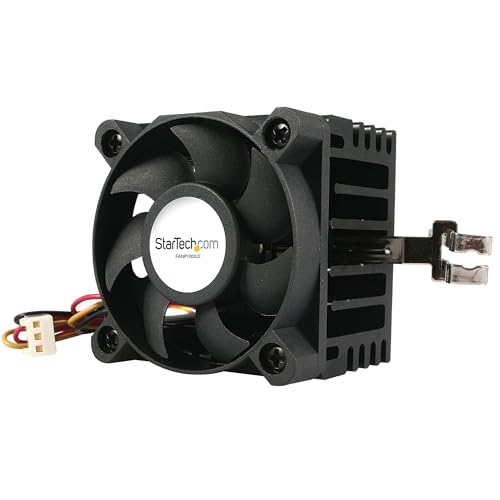
StarTech.com 50mm Socket 7/370 Aluminum Cooler
Best for: legacy Socket 7 and 370 motherboard maintenance
- Socket Compatibility
- Socket 370, Socket 7
- Fan Size
- 50 mm
- Color
- Black
- Material
- Aluminum
- Features
- Fan
- Dimensions
- 1.97 × 1.61 × 1.97 inches
View on Amazon: StarTech.com 50mm Socket 7/370 Aluminum Cooler
This StarTech.com cooling unit combines an aluminum heatsink with an integrated fan designed specifically for legacy Socket 7 and Socket 370 motherboards. It measures 1.97 inches long by 1.61 inches wide and 1.97 inches high, weighing 0.5 pounds. You receive both TX3 and LP4 power connections for flexible power delivery. This compact black cooler suits you if you need a direct-fit replacement for older computing hardware without modern bracket requirements.
Pros
- Supports legacy Socket 7 and Socket 370 platforms
- Includes both TX3 and LP4 power connections
- Constructed with an aluminum heatsink
- Compact footprint measuring 1.97 by 1.61 by 1.97 inches
Cons
- Lacks mounting hardware for modern CPU sockets
- Does not include copper base components or heatpipes
Good fit if
- You need a cooling solution for a Socket 7 or Socket 370 processor.
- You require connectivity via either TX3 or LP4 power connectors.
- You need a low-clearance cooler fitting within 1.97 inches of height.
Skip if
- You are building a system with modern desktop processor sockets.
- You require copper heatpipes or copper contact plates.
Verdict: StarTech.com 50mm Socket 7/370 CPU Cooler provides dedicated cooling for legacy Socket 7 and 370 setups with its integrated fan and aluminum heatsink. It offers direct connectivity via TX3 or LP4 leads for straightforward vintage system upkeep.
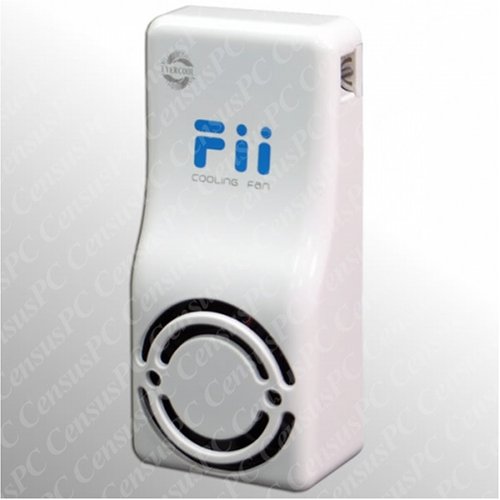
Evercool Wii Cooling Fan
Best for: cooling a Wii console system
- Features
- Fan
The Evercool Wii Cooling Fan is an external fan accessory built for the Wii console. If you are shopping for a standard PC CPU cooler, this unit is designed for console cooling rather than mounting over a computer processor. It features a fan mechanism intended to move air for console hardware. It suits you if you need a dedicated cooling fan specifically configured for a Wii system.
Pros
- Dedicated cooling fan designed for the Wii console
- Includes integrated fan functionality
- Turbo cooling fan configuration from Evercool
Cons
- Not compatible with standard desktop PC CPU sockets
- Omits detailed fan speed, airflow, and noise specifications
Good fit if
- You want a dedicated cooling fan designed for the Wii console.
- You need an active cooling fan accessory for console hardware.
Skip if
- You need a CPU cooler that mounts to a computer motherboard.
- You require detailed airflow, noise, or RPM specifications.
Verdict: Evercool Wii Cooling Fan is built strictly as a fan accessory for the Wii console rather than a desktop CPU heatsink. Choose it only if your cooling target is a Wii system.

Thermaltake 92mm Triple Heatpipe CPU Cooler
Best for: compact systems needing 92mm PWM side-flow cooling
- Heat Pipes
- 3
- Fan Size
- 92mm
- Features
- Fan
- Dimensions
- 3.62 × 3.62 × 0.98 inches
- Weight
- 1.05 pounds
The Thermaltake 92mm Triple Heatpipe CPU Cooler is an air cooler designed with three heatpipes and a copper and aluminum base. It uses two heatsink modules featuring sawtooth fins alongside a slim 92mm PWM fan with hydro dynamic bearings. If you need a compact side-flow cooling setup that regulates fan speeds automatically, this unit offers direct heat dissipation for your processor.
Pros
- Three heatpipes integrated into a copper and aluminum base
- Slim 92mm 4-pin PWM fan with hydro dynamic bearing
- Dual heatsink module architecture with sawtooth fins
- Weighs approximately 1.05 pounds
Cons
- Uses a 92mm fan rather than a standard 120mm size
- Supported CPU socket types are not specified in the published data
Good fit if
- You want a 4-pin PWM fan that adjusts speed automatically.
- You need a heatsink that combines three heatpipes with a copper base.
- You prefer hydro dynamic bearing technology for fan durability.
Skip if
- You require explicit socket compatibility listed in the specifications.
- You want a larger cooling setup built around 120mm or 140mm fans.
Verdict: Thermaltake 92mm Triple Heatpipe CPU Cooler pairs dual sawtooth fin stacks with three heatpipes and automated PWM speed control. It is a solid option if your system accommodates a 92mm side-flow configuration.
Specifications side by side
| Spec | Noctua SFF Foam CPU Cooler Fan Duct Kit | StarTech.com 65x60x45mm Socket 7/370 CPU Cooler | StarTech.com Socket 7/370 Bonded Fin Cooler | Ultra Socket 775 Copper Core CPU Cooler | Socket 478 Aluminum 70mm CPU Cooler | StarTech.com 50mm Socket 7/370 Aluminum Cooler | Evercool Wii Cooling Fan | Thermaltake 92mm Triple Heatpipe CPU Cooler |
|---|---|---|---|---|---|---|---|---|
| Socket Compatibility | not specified | Socket 7/370 | Socket 7/370 | Socket 775 | Socket 478 | Socket 370, Socket 7 | not specified | not specified |
| Heat Pipes | not specified | not specified | not specified | not specified | not specified | not specified | not specified | 3 |
| Fan Size | not specified | not specified | not specified | not specified | 70 mm | 50 mm | not specified | 92mm |
| Fan Speed | not specified | not specified | not specified | 3600 RPM | not specified | not specified | not specified | not specified |
| Color | Black | Black | not specified | not specified | not specified | Black | not specified | not specified |
| Material | not specified | not specified | not specified | Copper | not specified | Aluminum | not specified | not specified |
| Features | Fan | Fan | not specified | Fan | Fan | Fan | Fan | Fan |
| Dimensions | 4.72 × 3.9 × 1.89 inches | not specified | 8 × 6 × 4 inches | 9.7 × 3.7 × 7.1 inches | not specified | 1.97 × 1.61 × 1.97 inches | not specified | 3.62 × 3.62 × 0.98 inches |
| Weight | 1.9 ounces | 4.8 ounces | 4.8 ounces | 1 pounds | not specified | 8 ounces | not specified | 1.05 pounds |
| Size | One Size | 65x60x45mm | not specified | not specified | not specified | not specified | not specified | not specified |
| Model | NA-FD1 | FAN370PRO | FANP100PRO | ult31797 | not specified | FANP1003LD | not specified | CLP0538 |
Frequently asked questions
What is the purpose of a CPU cooler fan duct kit?
A fan duct kit bridges the open gap between your low-profile heatsink fan and your computer case intake panel. Products like the Noctua NA-FD1 use customizable EVA foam spacers to pull fresh outside air straight into the cooler. This setup prevents your CPU fan from recirculating hot air that gets trapped inside compact small-form-factor enclosures, which improves overall intake efficiency.
How do 3-pin and 4-pin PWM CPU fan connectors differ?
A 4-pin PWM connector allows your motherboard to automatically adjust fan speed using pulse-width modulation signals, as seen on the Ultra LGA 775 cooler. A 3-pin connector relies strictly on voltage variation to alter rotational speeds. While both power the fan motor, 4-pin PWM headers offer more precise acoustic control and prevent fans from running constantly at maximum speeds.
Can you install a dedicated console fan on a desktop CPU?
You cannot use a console fan on a desktop processor. Console accessories, such as the Evercool Wii Cooling Fan, are engineered solely for specific gaming console chassis rather than standardized motherboard mounting brackets. Desktop CPUs require matched retention clips, heatpipes or solid baseplates, and dedicated motherboard fan headers to conduct heat away from the processor core safely.
What is the advantage of an integrated copper core in an aluminum heatsink?
A copper core increases thermal conductivity directly over your processor's integrated heat spreader. Copper absorbs heat much faster than aluminum can at the point of contact. The surrounding aluminum fin array then dissipates that absorbed heat into the passing airflow. This hybrid configuration combines rapid core thermal transfer with the lighter overall weight of an aluminum heatsink frame.
How do heatpipes improve the performance of a CPU cooler?
Heatpipes rapidly transfer thermal energy away from your CPU baseplate into attached fin stacks. Inside each sealed copper pipe, liquid vaporizes over the hot processor base and travels to cooler sections where it condenses. Models like the Thermaltake CLP0538 triple heatpipe cooler use multiple heatpipes alongside dual fin stacks to distribute heat evenly across a larger cooling surface area.
What power connections do legacy Socket 7 and Socket 370 coolers require?
Legacy Socket 7 and Socket 370 CPU coolers typically rely on TX3 motherboard fan headers or LP4 power connections. For example, StarTech legacy coolers utilize TX3 or LP4 leads to draw direct electrical current from your power supply or vintage system boards. You should verify that your power supply or motherboard features these specific connectors before installing one.