15 Best CPU Coolers for Desktop, Compared
As an Amazon Associate we earn from qualifying purchases. Links on this page are affiliate links.
Selecting the right CPU cooler for desktop builds requires matching physical dimensions, socket compatibility, and thermal headroom to your hardware. This guide compares 15 models based on the specifications published on the listings.
The Thermaltake Gravity i2 92mm Intel CPU Cooler takes the top spot because its 95W thermal rating and 21.3 dB noise level handle low-power Intel desktop processors within a 4-inch height profile. This comparison helps you decide which model matches your motherboard socket, case clearance, and cooling requirements.
Quick picks
The best fit for you
- You need a quiet cooler for low-power Intel systems Thermaltake Gravity i2 92mm Intel CPU Cooler This cooler produces 21.3 dB of noise and handles 95W processors on LGA 1200 and 115x sockets.
- You build an ultra-slim Mini-ITX Intel LGA1700 desktop HIGH Power 28mm Low-Profile LGA1700 Cooler It stands 1.1 inches tall to fit compact 2U server cases while supporting 75W TDP CPUs.
- You want an all-white cooler with an integrated display Thermalright Burst Assassin 120 White Cooler It features an all-white design, six heat pipes, and a 2.4-inch IPS display screen.
- You need high airflow dual-tower cooling for modern sockets Thermalright Peerless Assassin 120 SE Dual Tower Dual 120 mm fans supply up to 66.17 CFM of airflow at 25.6 dB(A) maximum noise.
Our 15 picks

Thermaltake Gravity i2 92mm Intel CPU Cooler
Best for: low-power Intel desktop processors
- System Type
- Desktop (what this guide is about)
- Socket Compatibility
- LGA 1200/1156/1155/1150/1151
- Tower Design
- Low Profile
- Fan Size
- 92mm
- TDP Rating
- 95W
- Dimensions
- 4.25 × 4.25 × 4 inches
View on Amazon: Thermaltake Gravity i2 92mm Intel CPU Cooler
The Thermaltake Gravity i2 is a compact 92mm desktop air cooler designed for lower-power processors up to 95W. You get a 7-bladed fan that delivers 31.343 CFM of airflow while generating 21.3 decibels of noise. At four inches tall and weighing 0.71 pounds, it fits modest desktop chassis. It suits you if you need a straightforward Intel LGA 1200 or 115x cooling replacement.
Pros
- Low noise output rated at 21.3 decibels
- Delivers 31.343 CFM airflow with a 7-bladed 92mm fan
- Compact 4-inch height and 0.71-pound overall weight
- Supports Intel LGA 1200, 1156, 1155, 1150, and 1151 sockets
Cons
- Thermal capacity limited to 95W low-power processors
- No AMD socket compatibility listed
- Lacks support for newer Intel LGA 1700 sockets
Good fit if
- You use an Intel desktop build on LGA 1200, 1150, 1151, 1155, or 1156.
- You run a low-power processor rated at 95W or less.
- You need a compact cooler measuring 4 inches in height.
Skip if
- You use an AMD CPU or an Intel LGA 1700 processor.
- You require cooling for desktop processors exceeding 95W.
Verdict: Thermaltake Gravity i2 92mm CPU Cooler provides low-noise 21.3 dB cooling for standard Intel LGA 1200 and 115x systems. Its 95W thermal rating and 4-inch height make it a practical fit for low-power desktop builds.

Intel LGA115x Desktop CPU Heatsink and Fan
Best for: standard Intel LGA115x desktop processor cooling
- System Type
- Desktop (what this guide is about)
- Socket Compatibility
- LGA115x
- Features
- Fan
- Dimensions
- 4.7 × 4.1 × 2.8 inches
- Weight
- 6.4 ounces
This Intel desktop cooler combines a heat sink and fan for Intel Core i3, i5, and i7 desktop processors on LGA115x platforms. It connects through a 4-pin fan connector and stands 2.8 inches tall, with a footprint of 4.7 by 4.1 inches. Weighing 0.4 pounds, this unit suits you if you need a low-profile, standard cooling replacement for compatible Intel desktop processors without requiring large case clearances.
Pros
- 4-pin fan connector
- Compact 2.8-inch height fits tight desktop cases
- Lightweight build at 0.4 pounds (181.44 grams)
- Compatible with Intel Core i3, i5, and i7 desktop processors
Cons
- Compatibility limited strictly to Intel LGA115x desktop platforms
- No integrated heat pipes listed in specifications
Good fit if
- You use an Intel i3, i5, or i7 processor on an LGA115x motherboard.
- You need a compact heatsink under 3 inches tall for tight desktop enclosures.
- You require a standard 4-pin fan connection.
Skip if
- You run an AMD processor or a non-LGA115x Intel socket.
- You need a multi-pipe tower cooler for heavy desktop workloads.
Verdict: Intel LGA115x Desktop CPU Heatsink and Fan provides a standard 4-pin cooling solution for Intel Core i3, i5, and i7 processors. Its 2.8-inch height and 0.4-pound weight make it a direct, compact option for space-limited desktop builds.

JIUWU 92mm 4-Heatpipe Blue LED Cooler
Best for: LGA 775 desktop processors
- System Type
- Desktop (what this guide is about)
- Socket Compatibility
- LGA 775, 1150/1151/1155/1156, AM4
- Heat Pipes
- 4
- Fan Size
- 92mm
- Fan Speed
- 1800 RPM
- Lighting
- Blue LED
This compact desktop air cooler pairs a 92mm fan with four direct-contact heat pipes to pull heat away from your processor. It tops out at 1,800 RPM using a standard 3-pin power connector and features a hydraulic bearing. If you need a cooler for an older Intel LGA 775 build or legacy AMD setup, this unit gives you broad mounting compatibility and integrated blue LED illumination inside small chassis layouts.
Pros
- Four direct-contact heat pipes for thermal transfer
- Supports legacy sockets including Intel LGA 775 and AMD AM4
- Hydraulic bearing 92mm fan rated up to 1,800 RPM
- Native AMD bracket installation requires no extra hardware
Cons
- Uses 3-pin fan connection without 4-pin PWM control
- Lacks support for newer sockets like Intel LGA 1700
- Fixed blue LED lighting with no color customization
Good fit if
- You need a cooling replacement for an Intel LGA 775 or LGA 115x system.
- You want four direct-contact heat pipes matched with a 92mm fan footprint.
- You have an AMD setup that utilizes standard stock motherboard mounting brackets.
Skip if
- You require 4-pin PWM fan speed control from your motherboard.
- You run a modern Intel LGA 1700 or LGA 1200 processor.
- You prefer a build without fixed blue LED lighting.
Verdict: JIUWU 92mm 4 Heat Pipe CPU Cooler delivers dependable direct-contact cooling for legacy Intel LGA 775 platforms and compact desktop builds. Its 1,800 RPM hydraulic fan and broad older socket support make it an effective replacement option.
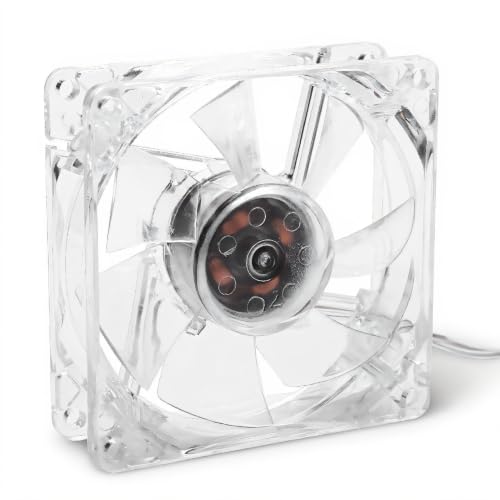
Serounder 80mm 5V USB Transparent Fan
Best for: low-noise USB-powered auxiliary ventilation
- System Type
- Desktop (what this guide is about)
- Fan Size
- 80mm
- Fan Speed
- 800 RPM ± 10%
- Lighting
- 4 color lamps
- Compatible Device
- Laptop
- Features
- Fan
The Serounder 80mm 5V USB Transparent Fan is a compact cooling unit designed for basic airflow in desktop setups. Operating via a 5V USB interface, it runs at 800 RPM while delivering 28 CFM of airflow at a 25 dB noise level. It features a transparent frame with built-in four-color lamps. This suits you if you need secondary low-speed circulation powered directly from USB.
Pros
- Operates via 5V USB power connection
- Delivers 28 CFM airflow at 800 RPM
- Low 25 dB operational noise rating
- Integrated 4-color lamps in red, blue, green, and orange
- 10,000-hour rated service life
Cons
- Lacks an integrated heatsink or socket mounting hardware
- Fixed 800 RPM operation without PWM speed regulation
- Uses USB connection rather than a motherboard fan header
Good fit if
- You need a quiet 25 dB fan powered via USB.
- You want an 80mm illuminated fan for auxiliary desktop ventilation.
- You have a custom setup fitting 8cm x 8cm x 2.5cm dimensions.
Skip if
- You need a dedicated heatsink cooler for high-TDP processors.
- You want motherboard PWM control to dynamically adjust RPM.
- You require airflow rates higher than 28 CFM.
Verdict: Serounder 80mm 5V USB Transparent Fan provides steady 28 CFM low-noise airflow using a standard USB connection. It serves well for auxiliary desktop ventilation when you do not need a mounted heatsink.

Thermaltake Gravity A2 92mm Top Flow Cooler
Best for: low-power desktop processors up to 95W
- System Type
- Desktop (what this guide is about)
- Socket Compatibility
- AM4, AM5
- Fan Size
- 92mm
- TDP Rating
- 95W
- Fan Speed
- 3500 RPM
- Material
- Aluminum
The Thermaltake Gravity A2 is a top-flow aluminum CPU cooler designed for desktop systems. It features a 92mm seven-bladed fan running between 1200 and 3500 RPM, paired with an aluminum extrusion heatsink. Rated for heat dissipation up to 95W, this cooler supports AM4, AM5, and LGA 1200 sockets. It suits you if you need a compact cooling replacement for low-power desktop processors in space-limited cases.
Pros
- Supports thermal dissipation up to 95W
- PWM fan speed ranges from 1200 to 3500 RPM
- Compatible with AM4, AM5, and LGA 1200 sockets
- Compact 60mm heatsink height fits smaller chassis
Cons
- Limited to 95W maximum thermal dissipation
- Lacks dedicated heat pipes
Good fit if
- You run a low-power processor requiring 95W or less.
- You need a compact top-flow cooler for AM4, AM5, or LGA 1200 sockets.
Skip if
- You use a high-draw desktop processor exceeding 95W.
- You require a tower heatsink with heat pipes for demanding workloads.
Verdict: Thermaltake Gravity A2 92mm Top Flow Cooler provides basic 95W cooling for low-power desktop CPUs on AM4, AM5, or LGA 1200 sockets.

Noctua 12cm Desktop Cooler with Black Cover
Best for: clean desktop builds needing black heatsink covers
- System Type
- Desktop (what this guide is about)
- Color
- Black
This desktop cooling unit pairs a 12cm width heatsink with a bundled black heatsink cover for a clean finish. It is built for standard desktop computer systems and accepts optional colored accessories like anti-vibration pads or cables. The heatsink cover adds extra height and width to the unit, so you must verify your case clearance. It suits you if you want a neat black setup.
Pros
- Includes bundled black heatsink cover
- Designed for desktop computer cases
- Works with chromax and industrialPPC line fans
- Supports optional color-accent pads and cables
Cons
- Heatsink cover increases overall cooler height and width
- Color accent accessories are optional and not included
Good fit if
- You need a 12cm width desktop cooler with a matching black cover.
- You want compatibility with industrialPPC or chromax fans.
- You plan to add custom color accents using optional accessories.
Skip if
- You have a compact case that cannot accommodate the added cover dimensions.
- You want colored accent pads included directly in the box.
Verdict: Noctua 12cm Desktop Cooler with Heatsink Cover provides a 12cm heatsink bundled with a black cover for a streamlined desktop appearance. It offers solid styling options if your computer case has enough clearance for the added height and width.

TRONWIRE 70mm Fan AMD CPU Cooler
Best for: Cooling legacy AMD desktop sockets
- System Type
- Desktop (what this guide is about)
- Socket Compatibility
- FM2, FM1, AM3, AM2, 1207, 940, 939, 754
- Fan Size
- 70mm
- Fan Speed
- 3500 RPM
- Material
- Aluminum
- Features
- Fan
This desktop cooler pairs an aluminum heatsink and copper heat pipes with a 70mm fan running at 3500 RPM. You connect it using a 4-pin PWM connector on a 9-inch cable for automated 12V DC speed control. It arrives with pre-applied thermal paste. This unit suits you if you need a replacement cooler for legacy AMD platforms like Socket AM2, AM3, FM1, FM2, 754, 939, 940, or 1207.
Pros
- Aluminum heatsink paired with copper heat pipes
- 4-pin PWM connector on a 9-inch cable for automated 12V speed control
- Pre-applied thermal paste eliminates manual compound application
- Supports multiple legacy AMD sockets from Socket 754 up to FM2
Cons
- No compatibility listed for Intel sockets
- No support for current AMD sockets like AM4 or AM5
- Uses a compact 70mm fan rather than a standard 92mm or 120mm size
Good fit if
- You need a dedicated heatsink for AMD socket FM2, FM1, AM3, AM2, 1207, 940, 939, or 754.
- You want pre-applied thermal paste ready on the base out of the box.
- You require 4-pin PWM speed control on a standard 12V motherboard header.
Skip if
- You run a modern AMD AM4 or AM5 motherboard.
- You use an Intel desktop platform.
Verdict: TRONWIRE 70mm Fan AMD CPU Cooler delivers heat pipe cooling and PWM control for older AMD desktop platforms. Pre-applied thermal paste ensures direct installation onto supported motherboards.

Thermalright Peerless Assassin 120 Mini Black
Best for: compact desktop builds needing dual-tower cooling
- System Type
- Desktop (what this guide is about)
- Heat Pipes
- 6
- Tower Design
- Dual-Tower
- Fan Size
- 120mm
- Fan Speed
- 1500 RPM
- Socket Compatibility
- AM4, AM5, LGA 1851, LGA 1200, LGA 1150, LGA 1151
View on Amazon: Thermalright Peerless Assassin 120 Mini Black
The Thermalright Peerless Assassin 120 Mini CPU Cooler gives you a compact dual-tower heatsink measuring 5.31 inches tall. It uses six heat pipes and a pure copper base to draw heat into two fin stacks with 48 aluminum fins each. A single 120mm PWM fan pushes up to 66.87 CFM of airflow at 25.6 dB(A). It suits you if you need dual-tower cooling inside a desktop case with limited vertical clearance.
Pros
- Compact 5.31-inch height fits cases with restricted cooler clearance
- Dual-tower design features six heat pipes and a pure copper base
- Single 120mm PWM fan moves up to 66.87 CFM with noise rated at 25.6 dB(A) or lower
- Supports modern desktop sockets including Intel LGA 1700/1851 and AMD AM4/AM5
Cons
- Includes one 120mm fan rather than a dual-fan configuration
- Fan bearing lifespan is rated for 20,000 hours
Good fit if
- You need a dual-tower desktop cooler that stays under 5.5 inches tall.
- You run an AMD AM4/AM5 or recent Intel LGA processor socket.
Skip if
- You want an out-of-the-box dual-fan configuration.
- You require integrated RGB lighting on your cooler.
Verdict: Thermalright Peerless Assassin 120 Mini CPU Cooler provides dual-tower thermal hardware in a reduced 5.31-inch profile. It is an effective option when standard 120mm tower coolers exceed your desktop case depth.
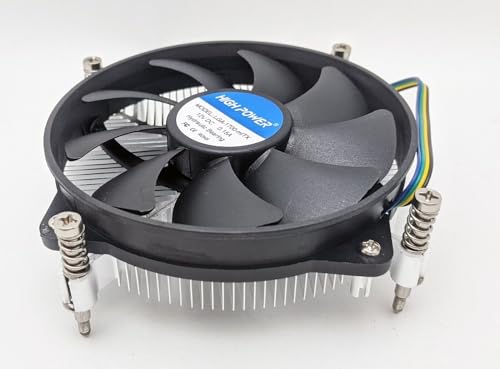
HIGH Power 28mm Low-Profile LGA1700 Cooler
Best for: compact Mini-ITX LGA1700 desktop builds
- System Type
- Desktop, ITX (what this guide is about)
- Socket Compatibility
- LGA1700
- Cooler Height
- 28mm
- Tower Design
- Low-Profile
- Fan Size
- 95mm
- TDP Rating
- 75W
The HIGH Power 28mm Low-Profile LGA1700 Cooler is an ultra-compact heatsink designed for space-constrained desktop and ITX builds. Measuring just 28mm in total height, it pairs an aluminum heatsink with a 95mm fan operating between 1100 and 3500 RPM. It handles processors with a thermal design power up to 75W and includes pre-applied thermal paste. This cooler suits you if you need a minimal-clearance solution for Intel LGA1700 processors.
Pros
- Ultra-low 28mm overall height fits tight enclosures and 2U chassis
- Pre-applied thermal paste simplifies mounting
- PWM fan speed control ranges from 1100 to 3500 RPM
- Secure screw-mount installation with included backplate
Cons
- Maximum rated cooling capacity is limited to 75W TDP
- Socket compatibility is restricted strictly to Intel LGA1700
- Uses a solid aluminum block without heat pipes
Good fit if
- You build inside a compact Mini-ITX or 2U server case requiring a 28mm height clearance.
- You run an Intel LGA1700 processor with a TDP of 75W or lower.
Skip if
- You use an AMD motherboard or a non-LGA1700 Intel socket.
- You operate a high-draw processor that requires more than 75W TDP cooling capacity.
Verdict: HIGH Power 28mm Low-Profile LGA1700 Cooler delivers an ultra-slim 28mm profile for space-constrained Intel LGA1700 systems. It provides reliable screw-mount cooling for desktop and ITX builds running chips up to 75W TDP.
Thermalright Peerless Assassin 120 Mini Black
Best for: Compact desktop builds needing dual-tower cooling
- System Type
- Desktop (what this guide is about)
- Socket Compatibility
- AM4, AM5, LGA1851, LGA1700, LGA1200
- Cooler Height
- 135mm
- Heat Pipes
- 6
- Tower Design
- Dual-Tower
- Fan Size
- 120mm
View on Amazon: Thermalright Peerless Assassin 120 Mini Black
The Thermalright Peerless Assassin 120 Mini Black is a compact dual-tower desktop air cooler designed for smaller chassis. Standing 135 mm tall, it pairs two fin stacks containing 48 aluminum fins each with six 6 mm heat pipes and a copper base. This layout suits you if you run modern Intel or AMD desktop processors on space-constrained motherboards and need dual-tower cooling without memory clearance issues.
Pros
- Compact 135 mm total height fits smaller desktop enclosures
- Dual-tower design with two stacks of 48 aluminum fins
- Six 6 mm AGHP heat pipes with a copper base
- Wide compatibility across Intel LGA 1700/1851 and AMD AM4/AM5 sockets
Cons
- Solid black finish includes no integrated lighting
- Wider 110 mm footprint than single-tower coolers
Good fit if
- You need a dual-tower cooler that fits cases with a 135 mm height limit.
- You want broad compatibility with current Intel LGA 1700/1851 or AMD AM4/AM5 sockets.
- You need clearance for memory modules on compact motherboards.
Skip if
- You want RGB or ARGB lighting on your heatsink.
- You use an older AMD socket prior to AM4.
Verdict: Thermalright Peerless Assassin 120 Mini Black delivers dual-tower cooling performance in a compact 135 mm profile suited for clearance-sensitive desktop builds. Its six heat pipes and copper base handle current Intel and AMD sockets without crowding your memory slots.

Thermalright Peerless Assassin 120 SE Dual Tower
Best for: dual-fan cooling on modern desktop sockets
- System Type
- Desktop (what this guide is about)
- Socket Compatibility
- LGA1150/1151/1200/1700/1851, AM4/AM5
- Cooler Height
- 155mm
- Heat Pipes
- 6
- Tower Design
- Dual Towers
- Fan Size
- 120mm
View on Amazon: Thermalright Peerless Assassin 120 SE Dual Tower
This desktop dual-tower air cooler uses six heat pipes and aluminum fins to draw heat from your processor. You get two 120 mm PWM fans that reach up to 1,550 RPM, pushing up to 66.17 CFM of airflow at 25.6 dB(A) maximum noise. It includes a Y-splitter cable for combined fan headers. This unit suits you if you need high-volume airflow across modern Intel LGA 1700, LGA 1851, or AMD AM5 sockets.
Pros
- Dual-tower heatsink equipped with six heat pipes
- Two 120 mm PWM fans delivering up to 66.17 CFM airflow
- Maximum rated fan sound level capped at 25.6 dB(A)
- Includes Y-type adapter cable for single motherboard header connection
Cons
- Requires 155 mm of vertical cooler height clearance
- Requires original AMD backplate for AM4 socket installation
Good fit if
- You use an Intel LGA 115x/1200/1700/1851 or AMD AM4/AM5 desktop socket.
- You have a PC chassis with at least 155 mm of heatsink clearance.
- You want dual 120 mm fans running from a single motherboard fan header.
Skip if
- You build in a compact PC enclosure with under 155 mm of cooler clearance.
- You no longer have the original AMD backplate for your AM4 board.
Verdict: Thermalright Peerless Assassin 120 SE Dual Tower delivers dual-fan airflow and six heat pipes for modern desktop platforms. Its dual 120 mm PWM fans push up to 66.17 CFM while keeping sound levels at or below 25.6 dB(A).
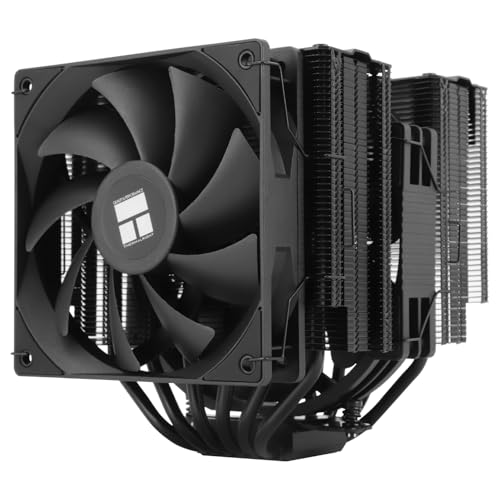
Thermalright Peerless Assassin 140 Dual Tower Cooler
Best for: desktop builds needing dual-fan twin-tower cooling
- System Type
- Desktop (what this guide is about)
- Socket Compatibility
- Intel 1700/1851/1150/1151/1200, AM4/AM5
- Cooler Height
- 158mm
- Heat Pipes
- 6
- Tower Design
- Dual Towers
- Fan Size
- 120mm, 140mm
View on Amazon: Thermalright Peerless Assassin 140 Dual Tower Cooler
The Thermalright Peerless Assassin 140 Dual Tower Cooler is a desktop air cooler built with six pure copper heat pipes and dual aluminum fin towers. It uses one 120mm fan and one 140mm fan reaching up to 1500 RPM while staying under 25.6 dB(A). At 158mm tall, it fits medium and large desktop cases. This cooler suits you if you need high-volume airflow across modern Intel or AMD sockets.
Pros
- Dual PWM fans combine a 120mm and a 140mm unit
- Six pure copper heat pipes with an aluminum dual-tower heatsink
- Rated maximum noise level under 25.6 dB(A)
- Compatible with Intel LGA 1851/1700 and AMD AM5/AM4 sockets
Cons
- 158mm heatsink height is too tall for small-form-factor or low-profile cases
- AM4 installation requires your motherboard's original backplate
Good fit if
- You have a medium or large PC case with at least 158mm of cooler clearance.
- You run a modern Intel LGA 1700/1851 or AMD AM4/AM5 processor.
- You want dual PWM fans with an included Y-adapter cable.
Skip if
- You are building in a compact mini-ITX or low-profile chassis.
- You lack the original AMD backplate for an AM4 motherboard build.
Verdict: Thermalright Peerless Assassin 140 Dual Tower Cooler delivers dual-fan airflow and six copper heat pipes inside a 158mm-tall footprint. It handles mainstream desktop builds with broad Intel and AMD socket compatibility.

Thermalright Royal Knight Dual-Tower Cooler
Best for: dual-tower cooling with tall RAM modules
- System Type
- Desktop (what this guide is about)
- Socket Compatibility
- Intel 1700/1851/115X/1200, AMD AM4/AM5
- Cooler Height
- 155mm
- Heat Pipes
- 6
- Tower Design
- Dual Towers
- Fan Size
- 120mm
The Thermalright Royal Knight Dual-Tower Cooler is a desktop air cooler featuring six heat pipes, dual aluminum fin stacks, and a copper base. You get a standard 25mm middle fan alongside a slim 15mm front fan running up to 1,800 RPM. This asymmetric configuration gives you full RAM clearance without raising the fan. At 155mm tall, it suits your build if you need dual-tower capacity inside standard mid-tower chassis.
Pros
- Slim 15mm front fan maintains clearance for tall memory modules
- Six electroplated heat pipes paired with a soldered copper base
- 155mm total height fits mid-tower desktop enclosures
- Dual PWM fans with S-FDB bearings and sub-27 dBA ratings
Cons
- Requires your original AMD motherboard backplate for AM4 or AM5 installation
- Uses mismatched fan thicknesses rather than two identical 25mm fans
Good fit if
- You run tall RAM modules and need clearance without offsetting fans.
- You have at least 155mm of cooler clearance in your desktop case.
- You want dual-tower cooling for Intel LGA 1700/1851 or AMD AM4/AM5.
Skip if
- You lost the original stock backplate for your AMD motherboard.
- You need an ultra-low-profile cooler for a compact small-form-factor case.
Verdict: Thermalright Royal Knight Dual-Tower Cooler delivers dual-stack cooling performance without creating RAM interference by using a slim outer fan. It is a solid multi-socket thermal solution for desktop chassis with 155mm of clearance.

Thermalright Burst Assassin 120 White Cooler
Best for: white desktop builds needing an LCD screen
- System Type
- Desktop (what this guide is about)
- Socket Compatibility
- LGA1851/1700/115X, AM4/AM5
- Cooler Height
- 156mm
- Heat Pipes
- 6
- Tower Design
- Dual-Tower
- Fan Size
- 120mm
View on Amazon: Thermalright Burst Assassin 120 White Cooler
This white desktop air cooler stands 156 mm tall and pairs six 6 mm copper heat pipes with dual 120 mm PWM fans reaching 1,500 RPM. A magnetic top cover integrates a 2.4-inch 320x240 IPS LCD screen to display system data through software. It fits LGA 1851, 1700, and AM5 sockets, making it a match if you want a dual-fan white cooler with hardware monitoring.
Pros
- Built-in 2.4-inch 320x240 IPS LCD screen on magnetic top cover
- Six 6 mm AGHP copper heat pipes with soldered copper base
- Dual 120 mm S-FDB fans delivering up to 66.17 CFM airflow
- Quiet operation rated at 25.6 dB(A) or lower
Cons
- Requires both an internal USB 9-pin header and SATA power connection
- Does not include an AMD backplate, requiring your motherboard original
- Overall 156 mm height requires compatible case clearance
Good fit if
- You want an all-white dual-fan tower with an integrated LCD screen.
- You have an open USB 9-pin motherboard header and SATA power connector.
- You build on modern desktop sockets including LGA 1700, LGA 1851, or AM5.
Skip if
- You lack the original AMD motherboard backplate for an AM4 or AM5 setup.
- You have a narrow desktop case with under 156 mm of CPU cooler clearance.
Verdict: Thermalright Burst Assassin 120 White Cooler provides strong dual-fan airflow, six copper heat pipes, and a customizable 2.4-inch IPS display in an all-white finish. It is an effective thermal solution if your case has 156 mm of clearance and the required internal cables.

Deal4GO Optiplex Micro CPU Blower Fan
Best for: replacing 5V micro desktop heatsink fans
- System Type
- Desktop (what this guide is about)
- TDP Rating
- 35W
- Features
- Fan
- Dimensions
- 6.5 × 3.6 × 1 inches
- Weight
- 2.47 ounces
This Deal4GO replacement cooling fan is built for select micro desktop systems. It provides 10.46 CFM of airflow using a 5-volt, 1.10-amp blower motor with a 4-pin wire-to-board connection. The unit fits existing 35-watt aluminum heatsinks and includes thermal grease for reassembly. If you need a direct blower replacement for compatible compact micro desktop hardware, this dedicated unit restores targeted internal cooling without replacing the original heatsink.
Pros
- Delivers 10.46 CFM airflow rating
- Uses a standard 4-pin 4-wire connection
- Includes thermal grease in the package
Cons
- Does not include the aluminum heatsink
- Incompatible with 12V fan systems
- Does not fit Optiplex 3070, 5070, 7070, or 7090 series
Good fit if
- You need a 5V 1.10A replacement fan for an Optiplex 3080, 3090, 5080, 5090, or 7080 micro desktop.
- You already have the original 35W aluminum heatsink mounted.
Skip if
- You require a complete heatsink and fan assembly.
- You have a system configured for 12V fan power.
- You are building a standard desktop PC with standard socket mounts.
Verdict: Deal4GO Optiplex Micro CPU Blower Fan is a dedicated 5V replacement blower engineered specifically for compatible 35W micro desktop units. It supplies a focused 10.46 CFM airflow to restore cooling without requiring a new heatsink.
Specifications side by side
| Spec | Thermaltake Gravity i2 92mm Intel CPU Cooler | Intel LGA115x Desktop CPU Heatsink and Fan | JIUWU 92mm 4-Heatpipe Blue LED Cooler | Serounder 80mm 5V USB Transparent Fan | Thermaltake Gravity A2 92mm Top Flow Cooler | Noctua 12cm Desktop Cooler with Black Cover | TRONWIRE 70mm Fan AMD CPU Cooler | Thermalright Peerless Assassin 120 Mini Black | HIGH Power 28mm Low-Profile LGA1700 Cooler | Thermalright Peerless Assassin 120 Mini Black | Thermalright Peerless Assassin 120 SE Dual Tower | Thermalright Peerless Assassin 140 Dual Tower Cooler | Thermalright Royal Knight Dual-Tower Cooler | Thermalright Burst Assassin 120 White Cooler | Deal4GO Optiplex Micro CPU Blower Fan |
|---|---|---|---|---|---|---|---|---|---|---|---|---|---|---|---|
| Socket Compatibility | LGA 1200/1156/1155/1150/1151 | LGA115x | LGA 775, 1150/1151/1155/1156, AM4 | not specified | AM4, AM5 | not specified | FM2, FM1, AM3, AM2, 1207, 940, 939, 754 | not specified | LGA1700 | AM4, AM5, LGA1851, LGA1700, LGA1200 | LGA1150/1151/1200/1700/1851, AM4/AM5 | Intel 1700/1851/1150/1151/1200, AM4/AM5 | Intel 1700/1851/115X/1200, AMD AM4/AM5 | LGA1851/1700/115X, AM4/AM5 | not specified |
| Cooler Height | not specified | not specified | not specified | not specified | not specified | not specified | not specified | not specified | 28mm | 135mm | 155mm | 158mm | 155mm | 156mm | not specified |
| Heat Pipes | not specified | not specified | 4 | not specified | not specified | not specified | not specified | 6 | not specified | 6 | 6 | 6 | 6 | 6 | not specified |
| Tower Design | Low Profile | not specified | not specified | not specified | not specified | not specified | not specified | Dual-Tower | Low-Profile | Dual-Tower | Dual Towers | Dual Towers | Dual Towers | Dual-Tower | not specified |
| Fan Size | 92mm | not specified | 92mm | 80mm | 92mm | not specified | 70mm | 120mm | 95mm | 120mm | 120mm | 120mm, 140mm | 120mm | 120mm | not specified |
| TDP Rating | 95W | not specified | not specified | not specified | 95W | not specified | not specified | not specified | 75W | not specified | not specified | not specified | not specified | not specified | 35W |
| Fan Speed | not specified | not specified | 1800 RPM | 800 RPM ± 10% | 3500 RPM | not specified | 3500 RPM | 1500 RPM | 1100-3500 RPM | not specified | 1550rpm±10% | 1500RPM | 1800RPM | 1500RPM | not specified |
| Lighting | not specified | not specified | Blue LED | 4 color lamps | not specified | not specified | not specified | not specified | not specified | not specified | not specified | not specified | not specified | not specified | not specified |
| System Type | Desktop | Desktop | Desktop | Desktop | Desktop | Desktop | Desktop | Desktop | Desktop, ITX | Desktop | Desktop | Desktop | Desktop | Desktop | Desktop |
| Color | Black | not specified | not specified | default | Top Flow | Black | not specified | Black | not specified | Black | Black | Black | not specified | White | Black |
| Compatible Device | not specified | not specified | not specified | Laptop | not specified | not specified | not specified | not specified | not specified | not specified | not specified | not specified | not specified | not specified | not specified |
| Server Height | not specified | not specified | not specified | not specified | not specified | not specified | not specified | not specified | 2U | not specified | not specified | not specified | not specified | not specified | not specified |
| Material | not specified | not specified | not specified | not specified | Aluminum | not specified | Aluminum | not specified | not specified | not specified | not specified | not specified | not specified | not specified | not specified |
| Features | not specified | Fan | Fan | Fan | Fan | not specified | Fan | not specified | Fan | not specified | not specified | not specified | not specified | not specified | Fan |
| Dimensions | 4.25 × 4.25 × 4 inches | 4.7 × 4.1 × 2.8 inches | 3.9 × 3.62 × 1.02 inches | 3.15 × 3.15 × 0.98 inches | 4.02 × 2.36 × 3.74 inches | not specified | not specified | 4.92 × 4.33 × 5.31 inches | 3.74 × 3.74 × 1.1 inches | 4.72 × 0.98 × 4.72 inches | 4.92 × 6.1 × 5.31 inches | 6.22 × 6.18 × 6.22 inches | 4.8 × 4.49 × 6.1 inches | 4.88 × 4.02 × 6.14 inches | 6.5 × 3.6 × 1 inches |
| Weight | 11.4 ounces | 6.4 ounces | not specified | not specified | 1 pounds | not specified | not specified | not specified | not specified | not specified | not specified | not specified | not specified | not specified | 2.47 ounces |
| Size | Intel | not specified | not specified | not specified | AM4 | not specified | not specified | not specified | not specified | not specified | not specified | not specified | not specified | not specified | not specified |
| Model | CLP0556-D | 8541601779 | DNFS004 | Serounder7ch5x8y0ig | CL-P078-AL09WT-A | not specified | not specified | PA120 MINI BLACK D6 | LGA-1700-mITX | not specified | PA120SE BLACK | PA140 BLACK D6 | not specified | not specified | Optiplex Micro Desktop |
Is a Desktop CPU Cooler Worth It?
When you choose a desktop-specific cooler, you get mounting and clearance designed for standalone computer cases and motherboards. Listings show desktop coolers range from 1.1-inch low-profile heatsinks for Mini-ITX cases to 6.22-inch dual-tower models with six heat pipes. They feature dedicated socket compatibility for desktop platforms such as LGA 1700, LGA 1200, AM4, and AM5. Selecting a cooler built for desktop systems ensures your cooler height, width, and mounting fit your motherboard without exceeding your computer case clearance.
Worth it if
- You assemble a tower or Mini-ITX desktop build using standard sockets like AM4, AM5, or LGA 1700.
- You have a desktop chassis with enough clearance to accommodate heatsinks between 1.1 and 6.22 inches tall.
Skip it if
- You need auxiliary cooling for a laptop or USB-powered device without a standard motherboard socket.
- You maintain a compact micro desktop requiring a specialized 5V blower fan rather than a standard heatsink.
How We Picked Desktop Coolers
To select items for this guide, we check manufacturer listings for desktop system compatibility. A product qualifies when its listing states this desktop feature in the title or specifications list. We show only one variant from each product family. Products are not physically handled, and all details come directly from published product data.
The 15 models here allow you to evaluate key specifications, including socket support, cooler height, and fan size. On this page, products in stock appear first to show available units. You can use these specs to find the right fit for your desktop setup in 2026.
How to Choose a Desktop CPU Cooler
-
Match Processor Thermal Ratings
Check your processor TDP against the cooler thermal capacity rating. For instance, the Thermaltake Gravity A2 is rated for low-power desktop CPUs up to 95W. If your processor exceeds the rated wattage of a heatsink, the system cannot dissipate heat effectively under heavy computing tasks. Review the manufacturer specification sheet for your specific CPU power consumption before buying. Standard basic heatsinks usually target 65W to 95W ranges, whereas heavy-duty multithreaded processors demand coolers engineered for higher thermal ceilings.
-
Compare Fan Dimensions and Airflow
Look at the fan diameter and airflow metrics on the product listing. Larger fans move more air at lower rotation speeds to manage sound. For example, the Serounder 80mm 5V USB Transparent Fan lists an airflow volume of 28 CFM. Desktop models range widely, featuring 70mm, 80mm, 92mm, 120mm, or 140mm fans. Smaller fans must rotate faster to move air, which can raise operational pitch. Check the specified CFM output and diameter to balance your chassis airflow needs against component space.
-
Check Total Cooler Height
Measure the distance between your motherboard socket and the side panel of your computer case. Coolers on this list vary significantly in height. The HIGH Power 28mm Low-Profile LGA1700 Cooler measures 1.1 inches tall for space-constrained ITX configurations, while full-sized twin-tower models reach over 6 inches tall. Choosing a heatsink that exceeds your case clearance prevents the side panel from closing properly. Check the height specification in inches or millimeters before purchasing to guarantee your chassis accommodates the heatsink.
-
Evaluate RAM and Width Clearance
Large heatsinks can overhang memory slots on compact motherboards. You need to inspect the width and length specifications to avoid blocking tall RAM heatspreaders. The Thermalright Royal Knight Dual-Tower Cooler specifies a slim outer fan design specifically to prevent interference with your memory modules. If you install memory sticks with tall decorative fins, check whether the cooler footprint extends across the DIMM slots. Selecting an offset or slim fan layout keeps your RAM accessible without requiring hardware adjustments.
-
Verify Thermal Interface Application
Examine whether the package includes pre-applied thermal interface material or requires a separate thermal compound purchase. Some units, like the TRONWIRE 70mm Fan AMD CPU Cooler, come with pre-applied thermal paste directly on the base for faster assembly onto your motherboard. Other models omit paste or supply a separate tube in the box. If your cooler lacks pre-applied paste, you must source a compatible thermal compound separately to complete installation. Checking this spec simplifies your assembly process and prevents setup delays.
-
Assess Finish and Integrated Displays
Review the exterior specifications if visual appearance matters for your desktop build. Coolers come in standard bare aluminum, coated matte black, or pure white finishes. Certain modern designs also add integrated electronics. For example, the Thermalright Burst Assassin 120 White Cooler incorporates a 2.4-inch IPS display screen alongside its all-white finish. If you choose a model with an integrated LCD or LED elements, verify that your motherboard supplies the required internal USB headers and power connections to run the display.
Frequently asked questions
How do you prevent CPU cooler interference with tall desktop RAM?
You should choose coolers engineered with recessed fin stacks or slim front fans. The Thermalright Royal Knight Dual-Tower Cooler uses a slim outer fan specifically to avoid crowding tall RAM modules on motherboards. This layout preserves access to your memory slots while delivering dual-stack heatsink cooling across supported AMD AM4, AM5, and Intel LGA 1700 or LGA 1851 platforms.
Can a USB fan replace a desktop CPU cooler?
A USB fan cannot replace a dedicated CPU cooler. Auxiliary units like the Serounder 80mm 5V USB Transparent Fan deliver 28 CFM of airflow for supplemental case ventilation, but they do not mount to a processor socket. Proper CPU cooling requires a heatsink base, mechanical mounting pressure, and direct heat dissipation from the integrated heat spreader.
What features should you check for cooling older desktop processors?
You must verify retention bracket support and socket naming for legacy motherboards. For vintage Intel systems, the JIUWU 92mm Cooler features four heat pipes and a 1,800 RPM hydraulic fan that attaches to legacy LGA 775 motherboards. For older AMD motherboards, options like the TRONWIRE 70mm Fan provide integrated PWM control and pre-applied thermal paste to simplify mounting.
What are the clearance requirements for coolers with integrated LCD screens?
Coolers with integrated displays require adequate vertical case depth and available internal motherboard connections. The Thermalright Burst Assassin 120 White Cooler features a customizable 2.4-inch IPS display, six copper heat pipes, and dual fans. Installing this unit requires at least 156 mm of vertical clearance inside your desktop chassis alongside the necessary internal data and power cables.
Do micro desktop computers use standard desktop CPU coolers?
Micro desktops use proprietary blower fans rather than standard heatsink towers. Compact enclosures cannot accommodate standard desktop coolers due to tight spatial limits. For example, the Deal4GO Optiplex Micro CPU Blower Fan operates on a 5V connection to provide 10.46 CFM of directed airflow across compatible 35W micro desktop units without replacing the fixed factory heatsink.
How do dual-fan desktop tower coolers manage noise levels?
Dual-fan coolers manage noise by using pulse-width modulation (PWM) control to scale fan speed based on thermal demand. The Thermalright Peerless Assassin 120 SE Dual Tower runs two 120 mm PWM fans moving up to 66.17 CFM of air while restricting sound levels to 25.6 dB(A) or lower. PWM headers allow your desktop motherboard to regulate airflow automatically.
Are desktop heatsinks supplied with thermal paste already applied?
Some desktop coolers include factory-applied paste, while others require manual application from a separate tube. Coolers such as the TRONWIRE 70mm Fan AMD CPU Cooler arrive with pre-applied thermal compound on the contact plate. This lets you mount the heatsink directly onto compatible desktop processors without measuring out thermal paste during the hardware installation process.