Thermaltake TOUGHAIR 110 140W TDP Top Flow CPU Cooler Review: Who It Fits and Who Should Skip It
As an Amazon Associate we earn from qualifying purchases. Links on this page are affiliate links.
In this thermaltake toughair 110 140w tdp top flow CPU cooler review, we look at a compact air solution. It stands 114 mm tall and supports up to 140 W of TDP. The design directs airflow upward, which helps cool nearby motherboard components. It uses four 6 mm copper heat pipes for direct contact with the CPU. The included fan spins up to 2000 RPM for high static pressure. This cooler fits Intel sockets like LGA 1700 and LGA 1200. It is a straightforward option for users who need efficient heat dissipation without taking up much vertical space.
What stands out
- 140 W TDP support for moderate power CPUs
- 114 mm height fits in many mid-tower cases
- Four 6 mm copper heat pipes for direct heat transfer
- Top-flow design aids cooling of surrounding motherboard components
- 120 mm fan reaches 2000 RPM for high static pressure
Who it fits
Good fit for
This cooler suits builders with Intel LGA 1700 or LGA 1200 processors that draw up to 140 W. It is ideal for cases with limited CPU cooler height, given its 114 mm profile. You will appreciate the top-flow design if your motherboard has VRMs or capacitors near the socket that need airflow. The four heat pipes provide solid contact for efficient heat transfer. It is a practical choice for standard desktop builds where case clearance is a primary concern.
Who should skip it
You should skip this option if you use AMD sockets, as the data lists only Intel compatibility. It will not fit LGA 115x, AM4, or AM5 motherboards. If your CPU exceeds 140 W TDP, this cooler may struggle to maintain safe temperatures. Users who need RGB lighting or software control will find no features for that here. It is also not suitable for those requiring very low noise, as the fan can reach 2000 RPM for performance.
Verdict: The Thermaltake TOUGHAIR 110 is a capable, height-conscious cooler for Intel systems under 140 W. It delivers solid performance for standard builds where case clearance matters.
Thermaltake TOUGHAIR 110 Key Specs Explained
140 W TDP
This rating indicates the maximum heat output the cooler can dissipate. You should match this number to your CPU's thermal design power. It suits mid-range processors that generate moderate heat. If your CPU exceeds this limit, the cooler may struggle to maintain low temperatures. Always check your processor's official TDP before purchasing.
120 mm Fan Speed 2000 RPM
This speed determines how fast the fan blades rotate. Higher RPMs move more air through the fins, improving cooling efficiency. At 2000 RPM, you get strong airflow but potentially more noise. Compare this to standard fans that run at 1500 RPM. It is ideal for users who prioritize cooling performance over silent operation.
4 x Ø6 mm Heat Pipes
These copper tubes transfer heat from the base to the fins. Four pipes provide a larger surface area for heat exchange. The 6 mm diameter is standard for effective thermal conduction. More pipes generally mean better heat spreading across the cooler block. This setup helps keep the CPU base cooler during heavy workloads.
LGA 1700, LGA 1200 Sockets
These are the compatible mounting points for Intel processors. LGA 1700 supports newer 12th, 13th, and 14th Gen CPUs. LGA 1200 covers 10th and 11th Gen models. Ensure your motherboard uses one of these sockets before buying. This cooler does not support AMD AM4 or AM5 sockets based on the listed data.
Design and Build Analysis
The listing describes the Thermaltake TOUGHAIR 110 as a top-flow air cooler with a compact footprint. It stands 114 mm tall, which allows it to fit inside cases with limited clearance. The overall dimensions are 5.42 inches in length, 4.87 inches in width, and 4.49 inches in height. According to the listing, the unit weighs 1 pound. This light weight reduces stress on your motherboard socket during installation.
The heat sink utilizes four 6 mm copper heat pipes. These pipes make direct contact with the CPU surface to transfer heat efficiently. The base material is listed as copper, which offers good thermal conductivity. The fins feature an asymmetric structure. This layout directs airflow upward through the fan. This design choice helps cool surrounding components on the motherboard, not just the processor itself.
The cooler includes a 120 mm fan that spins up to 2000 RPM. This fan is designed for high static pressure. The finish comes in black and silver colors. The mounting hardware supports both Intel LGA 1700 and LGA 1200 sockets. It also lists AMD compatibility. The top-flow design ensures that air moves away from the CPU area. This helps maintain lower temperatures for nearby capacitors and VRMs. The build focuses on practical airflow management rather than aesthetic complexity.
Installation And Daily Operation
Setting up this cooler involves mounting it to your motherboard. The listing confirms support for Intel LGA 1700 and LGA 1200 sockets. It also notes AMD compatibility, though specific AMD socket types are not listed in the data. You will need to ensure your case allows for a 114 mm height clearance. The base uses four 6 mm copper heat pipes. These pipes make direct contact with the CPU surface. You must apply thermal paste to create a proper thermal bridge. The cooler includes a fan. It is a 120 mm unit with a maximum speed of 2000 RPM. This fan provides high static pressure. This specification helps push air through the fin stack efficiently. The top-flow design moves heat away from the CPU socket area. This airflow direction can assist in cooling nearby VRMs and capacitors on the motherboard. In daily use, the fan runs at varying speeds depending on system load. At 2000 RPM, the fan will generate audible noise. You should expect a noticeable sound level under heavy processing tasks. The cooler weighs 1 pound. This weight is manageable for standard mounting brackets. The overall dimensions are 5.42 inches long, 4.87 inches wide, and 4.49 inches high. These measurements help you plan cable routing and component placement. The black and silver color scheme matches standard hardware aesthetics. The unit supports up to 140 W of heat dissipation. This rating fits mid-range processors that do not exceed this thermal limit.
Before You Buy This Cooler
You should verify case clearance before purchasing. The cooler stands 114 mm tall, which is compact but may interfere with tall RAM modules. Check your motherboard’s RAM height limits to ensure the fan does not block memory slots. You must also confirm socket compatibility. The listing specifies support for Intel LGA 1700 and LGA 1200. It mentions AMD compatibility but does not list specific AMD sockets. You need to check your current socket type to avoid mounting issues. Daily upkeep is minimal. The fan runs at 2000 RPM, so you may need to clean dust from the fins periodically to maintain performance. This unit fits best in builds with moderate thermal needs. It complements other options in the 1 CPU Air Coolers & Thermal Paste guide by offering top-flow airflow for motherboard component cooling. Choose it if you prioritize compact size and secondary component cooling over extreme single-CPU performance.
Check before you buy
- Check RAM height clearance against the 114 mm fan height.
- Confirm your CPU socket is LGA 1700 or LGA 1200.
- Verify AMD socket compatibility if you use an AMD processor.
- Ensure your case supports 114 mm cooler height.
The product at a glance
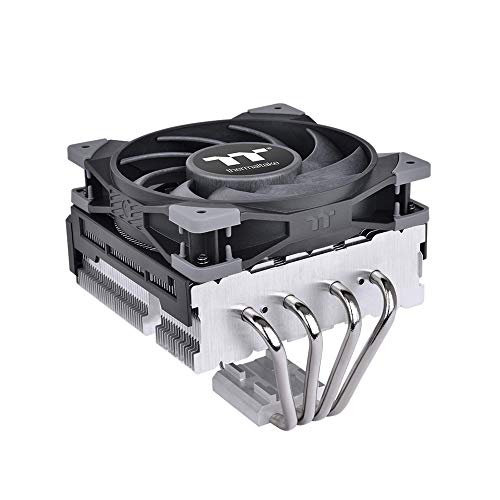
Thermaltake TOUGHAIR 110 Top Flow Cooler
Best for: Low-profile builds with LGA 1700/1200
- Socket Compatibility
- LGA 1700, 1200
- Cooler Height
- 114 mm
- Heat Pipes
- 4
- Fan Size
- 120mm
- TDP Rating
- 140 W
- Fan Speed
- 2000 RPM
View on Amazon: Thermaltake TOUGHAIR 110 Top Flow Cooler Affiliate link
The Thermaltake TOUGHAIR 110 is a 114 mm top-flow air cooler supporting up to 140 W TDP. It uses four 6 mm copper heat pipes and a 120 mm fan running at 2000 RPM. The design helps cool other motherboard components. It fits LGA 1700 and LGA 1200 sockets. You should choose this if you need a low-profile solution that directs airflow upward.
Pros
- Top-flow design aids motherboard component cooling
- Four 6 mm copper heat pipes for direct contact
- High static pressure fan reaches 2000 RPM
- Asymmetric fin structure for efficient heat dissipation
Cons
- Limited socket compatibility excludes newer platforms
- 140 W TDP limit restricts high-end CPUs
- No PWM control mentioned in specifications
Good fit if
- You have a case with low CPU cooler clearance
- You use an Intel LGA 1200 or LGA 1700 socket
- You want airflow directed away from RAM slots
Skip if
- You need support for AMD AM4 or AM5 sockets
- Your CPU exceeds 140 W TDP
- You require a dual-tower or larger cooler
Verdict: Thermaltake TOUGHAIR 110 Top Flow fits users with LGA 1700 or LGA 1200 CPUs under 140 W who need a low-profile cooler. It directs heat upward, making it ideal for cases with tight clearance above the CPU socket.
Specifications side by side
| Spec | Thermaltake TOUGHAIR 110 Top Flow Cooler |
|---|---|
| Socket Compatibility | LGA 1700, 1200 |
| Cooler Height | 114 mm |
| Heat Pipes | 4 |
| Fan Size | 120mm |
| TDP Rating | 140 W |
| Fan Speed | 2000 RPM |
| Material | Copper |
| Features | Fan |
| Dimensions | 5.42 × 4.87 × 4.49 inches |
| Weight | 1 pounds |
| Size | AMD/Intel |
| Color | Black, Silver |
| Model | CL-P073-AL12BL-A |
Frequently asked questions
Does the Thermaltake TOUGHAIR 110 support LGA 1700?
Yes, it supports LGA 1700. The product data explicitly lists LGA 1700 as a compatible socket. It also supports LGA 1200. This makes it suitable for newer Intel platforms. You do not need an adapter for these sockets. The mounting hardware is designed for these specific Intel layouts. This ensures a secure fit on compatible motherboards.
What is the maximum TDP this cooler handles?
It handles up to 140 W of TDP. This rating indicates the maximum heat output the cooler can dissipate. You should match this number to your CPU's thermal design power. It suits mid-range processors that generate moderate heat. If your CPU exceeds this limit, you might need a larger solution. The 140 W limit is a key specification for this model.
How tall is the Thermaltake TOUGHAIR 110?
The cooler stands 4.49 inches tall. This compact height allows it to fit inside cases with limited clearance. It is designed for low-profile builds. You should verify case clearance before purchasing. The compact size helps it fit in smaller chassis. This dimension is critical for users with tight cases or tall RAM modules.
Does it use a copper base?
Yes, the material is listed as copper. Copper is a highly conductive metal for heat transfer. This helps move heat away from the CPU quickly. The listing confirms copper as the primary material. This construction aids in efficient cooling performance. Copper bases are standard for effective air cooling solutions.
What color options are available?
It is available in Black and Silver. These are the two color options listed. You can choose based on your case aesthetics. The fan and heatsink likely match these colors. This allows for a coordinated look inside your build. Check your specific product listing for the exact finish available.
Is it compatible with AMD sockets?
The data lists the size as AMD/Intel. This suggests it supports AMD sockets. However, specific AMD socket types are not detailed. You should check the manual for exact compatibility. The listing confirms Intel support clearly. AMD support is implied by the size label. Verify your specific AMD socket before buying.
How much does the cooler weigh?
It weighs 1 pound. This is the total weight of the unit. The weight is manageable for most cases. It does not put excessive strain on the motherboard. The 1-pound weight is typical for this size. You can install it without worrying about heavy mounting stress.