Geekworm 12mm Aluminum CM4 Heatsink Review (2026): A Spec-Based Look
As an Amazon Associate we earn from qualifying purchases. Links on this page are affiliate links.
This geekworm 12mm thickness aluminum alloy review focuses on the C235 heatsink designed for the Raspberry Pi Compute Module 4. It is a passive cooling solution built from aluminum alloy to manage heat without fans. The unit measures 54 by 39 by 12 mm and weighs 30 grams. These dimensions allow it to fit compact cases while providing surface area for heat dissipation. You receive a single piece of thermal pad that you must cut to size. This approach keeps the design simple and low profile for embedded projects.
What stands out
- 12 mm thick aluminum alloy construction
- Compact footprint of 54 x 39 mm
- Lightweight design at 30 grams
- Supports optional 30 mm fan mounting
- Includes pre-cut thermal pad
Who it fits
Good fit for
This heatsink suits users with Raspberry Pi CM4 modules who need a low-profile cooling solution. It is ideal for embedded projects or compact enclosures where space is limited. The 12 mm height allows for slim case designs. If you plan to add a 30 mm fan later, this base supports that upgrade. It is also suitable for users who prefer passive cooling to eliminate noise. The included thermal pad simplifies initial installation for hobbyists.
Who should skip it
You should look at another option if you need active cooling out of the box. This product does not include a fan, so you must purchase one separately if desired. It is also not compatible with the Raspberry Pi CM5; you need model C519 for that device. If you require a pre-applied thermal solution that does not need cutting, this may be inconvenient. Users seeking a complete fan and heatsink combo in one package should choose a different product.
Verdict: The Geekworm C235 provides a solid, compact passive cooling base for the CM4. It is a practical choice for low-profile builds where you can manage the thermal pad yourself.
Geekworm C235 Key Specs Explained
Material: Aluminum Alloy
Aluminum conducts heat well and stays light. This material absorbs thermal energy from the CPU and spreads it across the fins. You get efficient passive cooling without adding heavy components. It is a standard choice for small form factor builds. Compare this to copper options if you need maximum conductivity, though aluminum offers a good balance of performance and weight for most users.
Dimensions: 54 x 39 x 12 mm
These measurements define the physical footprint and height of the heatsink. The 12 mm height is quite low, allowing it to fit in tight cases or under low-profile covers. You must verify your case clearance before installation. Smaller dimensions mean less surface area for heat dissipation. Check your chassis specs to ensure this compact size fits your specific Raspberry Pi Compute Module 4 enclosure.
Compatible Device: Raspberry Pi Compute Module 4 CM4
This heatsink is engineered specifically for the CM4 module. The base dimensions and thermal pad placement align with the CPU location on this board. You do not need to guess compatibility. Using it on other models may result in poor contact or fitment issues. Verify your module version matches this requirement to ensure proper thermal transfer and secure installation on your hardware.
Weight: 0.71 ounces
This is a very light component, weighing less than an ounce. The low mass reduces stress on the motherboard connectors and the CM4 socket. You can handle it easily during installation without special tools. It adds negligible weight to your overall project. This makes it ideal for portable or suspended builds where extra mass is undesirable or impractical for the mounting structure.
Design and Build Analysis
The Geekworm C235 uses aluminum alloy for its main body. This material choice keeps the unit light while providing reliable heat conduction. The listing notes a net weight of 30 grams. You get a solid passive block that absorbs thermal energy from the Compute Module 4 CPU. The design relies on surface area rather than active airflow. This approach suits builds where noise must remain zero. You do not need to manage fan curves or power cables for the cooler itself.
Dimensions are listed as 54 by 39 by 12 mm. This compact footprint fits directly over the CM4 motherboard without blocking adjacent ports. The 12 mm thickness provides sufficient mass to act as a heat sink. You can install a 30 mm fan above the unit if you need active cooling later. The listing mentions support for 3007 or 3010 fan sizes. This flexibility allows you to upgrade the airflow without changing the base mount.
The package includes one piece of thermal pad. You must cut this pad to match the CPU size on your Raspberry Pi. This step requires care to ensure full coverage. The finish is a standard aluminum alloy surface. It offers no special coatings or anodization according to the data. This simple construction focuses entirely on function. You get a straightforward mounting solution for your CM4 project.
Setup and Everyday Use Guide
Installing this heatsink requires careful preparation. The listing includes one piece of thermal pad, but it is not pre-cut for your specific module. You must measure the CPU area on your Raspberry Pi Compute Module 4 and cut the pad to fit. This step is critical for effective heat transfer. If you skip this, thermal performance will suffer. The unit measures 54 by 39 by 12 mm. This compact footprint fits standard CM4 layouts without blocking adjacent ports or components. You can place it directly on the processor die after applying the custom-cut thermal interface material. For daily use, this is a passive solution. It relies on ambient airflow to dissipate heat. If your system runs in a confined space, you might want to add a fan. The design supports a 30 mm fan, such as a 3007 or 3010 model, mounted above the fins. Adding a fan improves heat dissipation significantly. Without one, the aluminum alloy block absorbs and spreads heat slowly. This setup is ideal for quiet environments where noise is a concern. You get silent operation with no moving parts. Just ensure the thermal pad is correctly sized and firmly attached. The lightweight nature, at 30 grams, means it does not stress the motherboard. Check the Geekworm Wiki for model C235 if you need visual guidance during the cutting and installation process.
Before You Buy This Heatsink
You need to check if your Raspberry Pi Compute Module 4 fits the 54 by 39 by 12 mm footprint. The listing supports a 30 mm cooling fan for active cooling. If you want lower temperatures, you must buy a separate 3007 or 3010 fan. This unit does not include the fan, so add that to your parts list. You also need to cut the included thermal pad. The single piece is not pre-sized for the CM4 CPU. Measure carefully to avoid excess material. This heatsink is a passive solution. It works well alongside other aluminum blocks in our guide if you prefer silence. If you need more airflow, look at the fan-compatible options. Keep the unit clean. Dust can reduce heat transfer over time. Wipe the fins gently with a dry cloth. Check compatibility with your specific CM4 revision. The listing mentions a different model for the CM5. Do not confuse the two. This is a simple, spec-driven choice for quiet operation.
Check before you buy
- Verify CM4 compatibility, not CM5 which needs C519
- Buy a separate 30 mm fan for active cooling
- Measure CPU area to cut thermal pad correctly
- Ensure 12 mm height fits your case clearance
- Check if you need additional thermal paste
The product at a glance
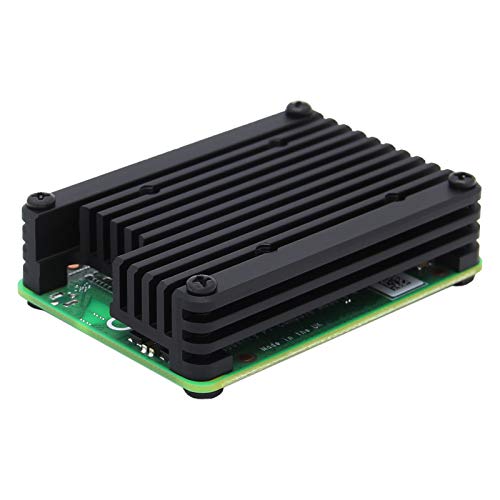
Geekworm 12mm Aluminum CM4 Heatsink
Best for: Custom CM4 cooling with added fan
- Material
- Aluminum alloy
- Cooling Method
- Passive Cooling
- Compatible Device
- Raspberry Pi Compute Module 4 CM4
- Dimensions
- 54 x 39 x 12 mm
- Features
- Fan
- Weight
- 0.71 ounces
View on Amazon: Geekworm 12mm Aluminum CM4 Heatsink Affiliate link
This is a 12 mm thick aluminum alloy heatsink designed for the Raspberry Pi Compute Module 4. It measures 54 x 39 x 12 mm and weighs 30 g. The unit includes a single thermal pad that you must cut to fit the CPU. You can mount a 30 mm cooling fan above it for improved heat dissipation. It is a passive cooling solution that relies on its mass and optional active airflow.
Pros
- 12 mm thick aluminum alloy construction for heat absorption
- Compact 54 x 39 x 12 mm footprint fits CM4
- Supports 30 mm (3007 or 3010) fan for active cooling
- Lightweight at 30 g net weight
Cons
- Includes only one thermal pad that requires manual cutting
- No fan included in the package
- Passive cooling may be insufficient for heavy workloads
Good fit if
- You need a low-profile heatsink for the CM4
- You plan to add a 30 mm fan for active cooling
- You want a simple aluminum block for passive heat dissipation
Skip if
- You require a pre-cut thermal pad for easy installation
- You need a complete cooling kit with a fan included
- You are using a Raspberry Pi Compute Module 5
Verdict: Geekworm 12mm Aluminum CM4 Heatsink is a solid passive cooling base for the CM4 that works well when paired with a 30 mm fan. It suits builders who want to customize their airflow setup rather than those seeking a plug-and-play solution.
Specifications side by side
| Spec | Geekworm 12mm Aluminum CM4 Heatsink |
|---|---|
| Material | Aluminum alloy |
| Cooling Method | Passive Cooling |
| Compatible Device | Raspberry Pi Compute Module 4 CM4 |
| Dimensions | 54 x 39 x 12 mm |
| Features | Fan |
| Weight | 0.71 ounces |
| Model | C235 |
Frequently asked questions
Does the Geekworm C235 heatsink fit all Raspberry Pi Compute Module 4 versions?
The listing specifies compatibility with the Raspberry Pi. You should verify that your specific CM4 model matches the 54 by 39 by 12 mm footprint. The aluminum alloy body is designed to sit directly over the processor area. Ensure your module aligns with these dimensions before installation.
How thick is the Geekworm aluminum heatsink block?
The heatsink has a height of 12 mm, which equals 0.47 inches. This thickness provides a solid base for passive heat dissipation. The overall dimensions are 1.54 inches wide and 2.13 inches long. These measurements ensure it covers the CPU area effectively on the Compute Module 4.
What material is the Geekworm CM4 heatsink made from?
The unit is constructed from aluminum alloy. This material conducts heat efficiently while keeping the overall weight low at 0.71 ounces. Aluminum absorbs thermal energy from the CPU and spreads it across the surface. This makes it a standard and reliable choice for small form factor cooling.
Can I add a fan to this Geekworm heatsink?
Yes, the design supports the addition of a 30 mm fan for active cooling. The heatsink acts as a base that benefits from forced airflow. Adding a fan helps lower temperatures further than passive cooling alone. This setup is ideal for builders who want to customize their airflow configuration.
Does the Geekworm C235 come with thermal pads pre-cut?
The listing includes one piece of thermal pad, but it is not pre-cut for your specific module. You must measure the CPU area on your Raspberry Pi Compute Module 4 and cut the pad to fit. Proper contact between the pad and the CPU is essential for effective heat transfer.
Is the Geekworm 12mm heatsink suitable for heavy workloads?
This passive aluminum block is best for custom setups where you add a fan. It works well when paired with a 30 mm fan to manage higher thermal loads. Without active airflow, it serves as a solid base. It suits builders who prioritize customizable airflow over a simple plug-and-play solution.
What are the exact dimensions of the Geekworm C235?
The heatsink measures 1.54 inches in width, 2.13 inches in length, and 0.47 inches in height. These dimensions correspond to 54 by 39 by 12 mm. The compact size allows it to fit securely on the Compute Module 4 without obstructing nearby components on the board.