Geekworm 12mm Aluminum CM4 Heatsink vs Geekworm Aluminum Passive Raspberry Pi (2026): Key Differences
As an Amazon Associate we earn from qualifying purchases. Links on this page are affiliate links.
You are comparing the geekworm 12mm aluminum cm4 heatsink vs aluminum passive raspberry pi models to decide which cooling solution fits your build. Both units are aluminum alloy passive heatsinks from Geekworm designed for silent operation. The main difference lies in their target hardware and physical footprint. One is built specifically for the Raspberry Pi Compute Module 4, while the other targets the standard Raspberry Pi 5. Their dimensions and mounting styles also vary significantly.
Key differences
| Aspect | Geekworm 12mm Aluminum CM4 Heatsink | Geekworm Aluminum Passive Raspberry Pi 5 Heatsink |
|---|---|---|
| Compatible Device | Raspberry Pi Compute Module 4 | Raspberry Pi 5 |
| Dimensions | 54 x 39 x 12 mm | 63.5 x 42 x 15 mm |
| Mounting Type | Thermal pad | Nylon screws |
| Fan Support | Supports 30 mm fan | Fanless design |
Which one should you choose?
Choose Geekworm 12mm Aluminum CM4 Heatsink if
- You need a heatsink for a Raspberry Pi Compute Module 4.
- You want the option to add a 30 mm fan for active cooling.
- You require a lower profile that fits within 12 mm height.
Choose Geekworm Aluminum Passive Raspberry Pi 5 Heatsink if
- You are building with a standard Raspberry Pi 5 board.
- You prefer a secure mounting method using nylon screws.
- You want larger wave-shaped fins for increased surface area.
Verdict: Choose the 12mm model if you are working with a Compute Module 4 and might want to add a fan later. Pick the passive model if you are using a Raspberry Pi 5 and want a larger, screw-mounted heatsink for silent operation.
CM4 vs Pi 5 Heatsink Comparison
Compatible Device
Product A is designed specifically for the Raspberry Pi Compute Module 4 (CM4). Its model number is C235. It also notes compatibility with the CM5 under model C519. Product B is built for the Raspberry Pi 5. Its model number is H509. It lists compatibility with all Pi 5 memory variants, including 2GB, 4GB, 8GB, and 16GB. It explicitly states it is not compatible with various other Geekworm models. You must choose the heatsink that matches your specific board generation. Using the wrong one will prevent proper installation and heat transfer.
Dimensions
Product A measures 54 x 39 x 12 mm. This equals roughly 2.13 x 1.54 x 0.47 inches. Product B is larger at 63.5 x 42 x 15 mm. This equals 2.5 x 1.65 x 0.59 inches. The Pi 5 heatsink is wider, longer, and thicker. The extra thickness provides more material for heat dissipation. You need to check your case clearance carefully. The larger footprint of Product B may not fit in compact enclosures designed for the smaller CM4 module. Measure your available space before ordering.
Weight
Product A weighs 30 grams, or 0.71 ounces. Product B weighs 44 grams, or 1.55 ounces. The heavier unit has more mass to absorb and hold heat. This extra mass can help stabilize temperatures during short bursts of high load. However, the additional weight puts more stress on the mounting points of your Raspberry Pi. Ensure your board and case can support the heavier load without sagging or bending the PCB over time.
Cooling Method
Both units are passive aluminum alloy heatsinks. They rely on natural convection to dissipate heat. Product A supports the addition of a 30 mm fan for active cooling if needed. You must cut the included thermal pad to fit the CPU. Product B is a pure passive solution with wave-shaped fins. These fins increase the surface area for better heat spread. It includes a pre-sized 6W thermal pad and nylon screws for mounting. Neither unit requires a power source for its base cooling function.
Mounting Hardware
Product B includes two M2.5 x 6 mm nylon screws for secure attachment. This provides a rigid mechanical connection to the board. Product A includes one piece of thermal pad that you must cut. It does not list screws in its packing list. You may need to source your own fasteners for Product A. The included screws in Product B ensure consistent pressure on the thermal interface. This can lead to more reliable long-term thermal performance compared to a cut pad alone.
Port Access
Product B explicitly guarantees easy access to all Raspberry Pi 5 ports. This includes GPIO, USB-C, HDMI, USB, Ethernet, SD card, power button, and MIPI ports. Product A does not list specific port clearance details. It focuses on the CM4 motherboard footprint. You should verify that the lower profile of Product A does not obstruct the CM4 connectors. The detailed port access claim for Product B offers more confidence for users with tight cases.
Choose based on your board
CM4 or CM5 user needing fan support
You are using a Compute Module 4 or 5. This unit measures 54 x 39 x 12 mm. It supports a 30 mm cooling fan for active heat dissipation. It includes a thermal pad that you must cut to fit. It is the only option compatible with these specific modules.
Pi 5 user wanting silent passive cooling
You own a Raspberry Pi 5. This heatsink is 63.5 x 42 x 15 mm. It uses wave-shaped fins to increase surface area for passive cooling. It provides noiseless operation without fan life issues. It includes nylon screws and a 6W thermal pad. It allows full access to all ports.
Pi 5 user needing port access
You need easy access to GPIO, USB-C, HDMI, and Ethernet ports. This model ensures clear access to all Raspberry Pi 5 connectors. It is designed specifically for the Pi 5 form factor. It includes mounting screws and a thermal pad for immediate installation.
The products compared
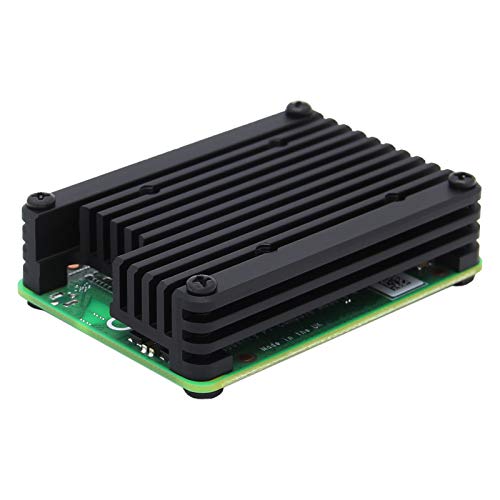
Geekworm 12mm Aluminum CM4 Heatsink
Best for: CM4 passive cooling with optional fan
- Material
- Aluminum alloy
- Cooling Method
- Passive Cooling
- Compatible Device
- Raspberry Pi Compute Module 4 CM4
- Dimensions
- 54 x 39 x 12 mm
- Features
- Fan
- Weight
- 0.71 ounces
View on Amazon: Geekworm 12mm Aluminum CM4 Heatsink Affiliate link
This Geekworm C235 heatsink is a 12 mm thick aluminum alloy block designed for the Raspberry Pi Compute Module 4. It measures 54 x 39 x 12 mm and weighs 30 grams. The unit includes a thermal pad that you must cut to size for the CPU. It supports a 30 mm fan for active cooling. This passive solution suits users needing a low-profile, durable mount for their CM4 board.
Pros
- 12 mm thick aluminum alloy construction
- Compact dimensions of 54 x 39 x 12 mm
- Lightweight at only 30 grams
- Supports 30 mm fan for active cooling
Cons
- Thermal pad requires manual cutting to fit
- Passive design limits heat dissipation without a fan
- No included mounting hardware listed in specs
Good fit if
- You need a low-profile heatsink for the CM4
- You plan to add a 30 mm fan later
- You want a simple aluminum passive solution
Skip if
- You require a pre-cut thermal pad
- You need active cooling built into the unit
- You are using a standard Raspberry Pi 4 board
Verdict: Geekworm 12mm Aluminum CM4 Heatsink provides a sturdy, low-profile base for the CM4. It fits users who plan to add a 30 mm fan for active cooling.
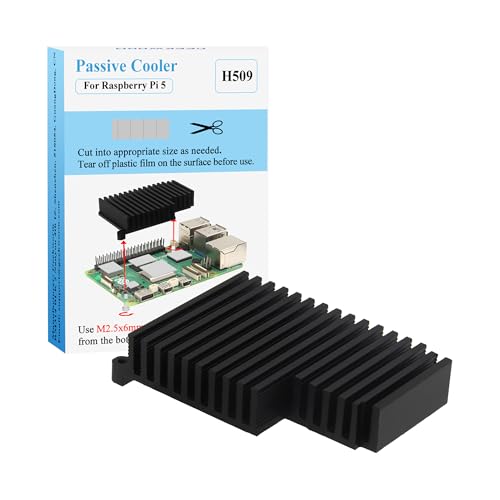
Geekworm Aluminum Passive Raspberry Pi 5 Heatsink
Best for: Silent Raspberry Pi 5 cooling with full port access
- Material
- Aluminum alloy
- Cooling Method
- Passive
- Compatible Device
- Raspberry Pi 5
- Dimensions
- 63.5 x 42 x 15 mm
- Mounting Type
- Nylon screws
- Weight
- 1.55 ounces
View on Amazon: Geekworm Aluminum Passive Raspberry Pi 5 Heatsink Affiliate link
The Geekworm H509 is a passive aluminum alloy heatsink designed for the Raspberry Pi 5. It measures 63.5 x 42 x 15 mm and weighs 44 g. The wave-shaped fins increase surface area for heat dissipation without fans. You get full access to all ports, including GPIO and USB-C. It includes a 6W thermal pad and nylon screws for mounting. This silent solution suits users who prioritize noise-free operation and compact dimensions.
Pros
- Wave-shaped fins increase cooling surface area
- Fanless design ensures silent operation
- Full access to all Raspberry Pi 5 ports
- Includes 6W thermal pad and mounting screws
Cons
- 15 mm thickness may limit clearance in tight enclosures
- Passive cooling only, no active fan for high loads
- Not compatible with specific Geekworm cases like X1000
Good fit if
- You need a silent cooling solution for the Raspberry Pi 5
- You require full port accessibility without obstruction
- You prefer a lightweight aluminum heatsink under 50 g
Skip if
- You use a Geekworm case model X1000 or X1003
- You need active fan cooling for sustained high performance
- You require a heatsink thinner than 15 mm
Verdict: Geekworm H509 Aluminum Passive Heatsink is a compact, silent option for Raspberry Pi 5 users who need port access and noise-free operation in a small form factor.
Specifications side by side
| Spec | Geekworm 12mm Aluminum CM4 Heatsink | Geekworm Aluminum Passive Raspberry Pi 5 Heatsink |
|---|---|---|
| Material | Aluminum alloy | Aluminum alloy |
| Cooling Method | Passive Cooling | Passive |
| Compatible Device | Raspberry Pi Compute Module 4 CM4 | Raspberry Pi 5 |
| Dimensions | 54 x 39 x 12 mm | 63.5 x 42 x 15 mm |
| Mounting Type | not stated | Nylon screws |
| Features | Fan | not stated |
| Weight | 0.71 ounces | 1.55 ounces |
| Model | C235 | H509 |
| Color | not stated | black |
Frequently asked questions
Does the Geekworm CM4 heatsink include a fan?
No, the Geekworm 12mm Aluminum CM4 Heatsink does not include a fan. It is designed as a passive base that supports the addition of a 30 mm fan for active cooling. You must purchase the fan separately if you need forced airflow. The unit itself is a solid aluminum block measuring 1.54 by 2.13 inches.
Is the Geekworm Pi 5 heatsink silent?
Yes, the Geekworm Aluminum Passive Raspberry Pi 5 Heatsink is silent. It uses a passive cooling method with no moving parts. This makes it ideal for users who need noise-free operation. The black aluminum unit measures 1.65 by 2.5 inches and weighs 1.55 ounces, providing heat dissipation without generating any sound.
What is the weight difference between the two heatsinks?
The Geekworm Pi 5 heatsink is more than twice as heavy as the CM4 version. The CM4 heatsink weighs 0.71 ounces. The Pi 5 heatsink weighs 1.55 ounces. This difference reflects the larger surface area and mass of the Pi 5 model, which measures 2.5 inches in length compared to the CM4's 2.13 inches.
Can I use the CM4 heatsink on a Raspberry Pi 5?
No, you should not use the CM4 heatsink on a Raspberry Pi 5. The CM4 unit is specifically designed for the Compute Module 4 and 5. Its dimensions are 1.54 by 2.13 inches. The Raspberry Pi 5 requires the dedicated H509 model, which is larger and shaped to fit the Pi 5 board properly.
Which heatsink offers better port access?
The Geekworm Pi 5 heatsink is designed for full port access. It is compact and allows you to connect cables without obstruction. The CM4 heatsink is a low-profile base that focuses on mounting a fan. It does not emphasize port accessibility in the same way, as it is primarily a foundation for the CM4 form factor.
What material are both Geekworm heatsinks made of?
Both heatsinks are made of aluminum. The CM4 model is a 12mm thick aluminum alloy block. The Pi 5 model is also an aluminum passive heatsink. Aluminum provides good thermal conductivity for passive cooling. Both units rely on the metal to draw heat away from the processor without the need for fans.
How tall is the Geekworm CM4 heatsink?
The Geekworm CM4 heatsink is 0.47 inches tall. It has a height of 12 mm. This low profile makes it suitable for small enclosures. It serves as a sturdy base for the Compute Module 4. You can add a 30 mm fan on top if you require active cooling for higher performance.