Tower Design in CPU Coolers: What It Is and Is It Worth It?
As an Amazon Associate we earn from qualifying purchases. Links on this page are affiliate links.
Tower Design Explained For Buyers
The tower design is the core structural element of most air cooling solutions. It houses the heat pipes and the aluminum fins that dissipate heat. You will typically see two main configurations on the market: single tower and dual tower. Understanding this spec helps you match the cooler to your thermal needs.
A single tower design features one block of fins and one set of heat pipes. This is the most common style for standard desktop builds. It usually supports one fan. The design is compact. It fits easily into mid-tower cases without interfering with RAM or motherboard VRM heatsinks. If your case has limited clearance or you use tall memory modules, this is often the safer choice.
A dual tower design stacks two fin blocks vertically. This doubles the surface area available for heat exchange. These coolers typically support two fans. The increased mass and surface area allow for better heat dissipation under heavy loads. However, the physical footprint is larger. You must check your case dimensions carefully. Tall RAM sticks may not fit in the space between the tower and the motherboard slot.
How is this measured on listings? Look for terms like "single tower" or "dual tower" in the product title or key features. Some listings may specify the number of heat pipes, such as six or eight pipes, which often correlates with the tower type. More pipes generally mean faster heat transfer from the copper base to the fins.
Why does this matter to you? Your choice depends on your processor’s thermal design power and your case constraints. High-end processors with high TDP values often benefit from the extra cooling capacity of a dual tower. If you are building a compact PC or using high-profile memory, a single tower is more practical. The tower design explained helps you avoid compatibility issues and ensures efficient cooling without unnecessary bulk.
Single Tower vs Dual Tower
Single Tower
A single tower design features one block of fins and one fan. This configuration reduces the overall height and width of the cooler. You benefit from improved compatibility with tall RAM modules and smaller cases. The Noctua NH-U9S exemplifies this approach, measuring just 4.92 inches in height. It weighs 1.36 pounds, making it easy to install in tight spaces. However, you trade some cooling capacity for this compactness. The single fan must move more air to dissipate the same heat. This can lead to higher noise levels under heavy loads. The Scythe Kotetsu Mark 2 offers 120mm fan support in a single tower, balancing airflow and clearance. Choose this if your case has low RAM clearance or limited height. It suits users who prioritize fit over maximum thermal performance.
Dual Tower
A dual tower design uses two fin stacks and often two fans. This setup doubles the surface area for heat dissipation. You gain significant cooling performance, which helps handle high-TDP processors. The Noctua NH-D15 is a prime example, featuring a 140mm fan and a large footprint. It measures 6.5 inches in height and weighs 2.87 pounds. The increased size requires a spacious case to avoid blocking other components. The Noctua NH-D9L shows that dual towers can fit in small cases, standing 4.33 inches tall. It uses 92mm fans to reduce the height while keeping two towers. This design is ideal for users who need maximum cooling efficiency. You accept the trade-off of potential RAM interference and larger case requirements. It is best for high-performance builds where thermal headroom is critical.
Is Tower Design Worth It
Who needs it
You should prioritize the tower configuration if you run high-TDP processors that generate significant heat during sustained loads. A dual tower setup with two heat sink blocks and fans offers superior surface area for dissipation. This matters if you overclock or run heavy workloads like video rendering. The extra fins and heat pipes help keep temperatures lower under stress. If your case supports taller coolers and your RAM allows for clearance, this design provides a tangible performance advantage. Single tower models are sufficient for mid-range CPUs with moderate power draws. Check your motherboard manual for maximum cooler height. Ensure the tower fits without blocking other components. This spec is critical for thermal headroom in compact builds where airflow is limited.
Who can skip it
You can ignore detailed tower comparisons if you use low-power mobile CPUs or office chips with small thermal envelopes. Integrated graphics and light tasks do not require massive heat dissipation. In these cases, focus on socket compatibility and fan noise levels instead. Small form factor builds may force you into single tower options due to height restrictions. Prioritize RAM clearance and case dimensions over raw cooling potential. If you already have a functional cooler that keeps temperatures within safe limits, upgrading the tower design yields diminishing returns. Look at fan bearing types for longevity. Consider PWM control for quiet operation. The tower type is secondary to overall system airflow and ambient temperature in these scenarios. Stick to what fits your physical constraints first.
Tower Design Glossary
Heat Pipes
Hollow metal tubes filled with liquid that transfer heat from the CPU base to the fins. More pipes generally mean better thermal conductivity and cooling performance.
Single Tower
A cooler with one fin stack and one fan. This design offers lower height, making it easier to fit inside compact cases or alongside tall RAM sticks.
Dual Tower
A cooler with two fin stacks and two fans. This setup provides more surface area for heat dissipation, ideal for high-performance processors under heavy loads.
Socket Compatibility
The list of CPU mounts a cooler supports, such as Intel LGA 1700 or AMD AM5. You must verify this spec before buying to ensure a proper fit.
Fan Size
The diameter of the cooling fan, typically 120mm or 140mm. Larger fans move more air at lower speeds, reducing noise while maintaining effective heat removal.
TDP
Thermal Design Power, measured in watts. It indicates the maximum heat a CPU generates. Higher TDP values require coolers with larger towers and more heat pipes.
System Type
The category of your computer, such as a desktop tower or a small form factor build. This determines the physical space available for installing a tower cooler.
Compatible Device
The specific motherboards or CPU models the cooler is designed to work with. Checking this ensures the mounting hardware matches your existing processor socket type.
Quick picks
| # | Product | Best for | Price |
|---|---|---|---|
| 1 | Noctua Dual-Tower 140mm CPU Cooler | High-performance cooling in spacious cases | Check price of Noctua Dual-Tower 140mm CPU Cooler on Amazon |
| 2 | Noctua 92mm Single Tower CPU Cooler | ITX and small form factor builds | Check price of Noctua 92mm Single Tower CPU Cooler on Amazon |
| 3 | Noctua NH-D9L 92mm Dual Tower Cooler | ITX and HTPC builds with limited height | Check price of Noctua NH-D9L 92mm Dual Tower Cooler on Amazon |
| 4 | Scythe Kotetsu Mark 2 120mm CPU Cooler | RAM clearance and mainstream cooling | Check price of Scythe Kotetsu Mark 2 120mm CPU Cooler on Amazon |
| 5 | Noctua 92mm Dual-Tower CPU Cooler | small form factor and ITX builds | Check price of Noctua 92mm Dual-Tower CPU Cooler on Amazon |
| 6 | Noctua 120mm Dual Fan Single Tower Cooler | compact builds requiring strong single-tower cooling performance | Check price of Noctua 120mm Dual Fan Single Tower Cooler on Amazon |
Our 6 picks
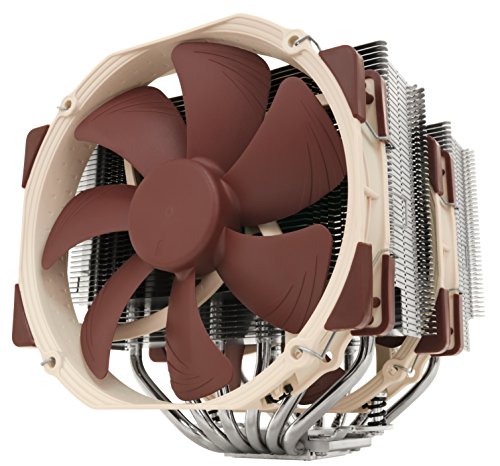
Noctua Dual-Tower 140mm CPU Cooler
Best for: High-performance cooling in spacious cases
- Tower Design
- Dual Tower (what this guide is about)
- Socket Compatibility
- LGA1851/1700/1200/115x, AM4, AM5
- Cooler Height
- 168mm
- Heat Pipes
- 6
- Fan Size
- 140mm
- Dimensions
- 6.34 × 5.91 × 6.5 inches
View on Amazon: Noctua Dual-Tower 140mm CPU Cooler Affiliate link
The Noctua NH-D15 is a dual-tower air cooler with six heat pipes and two 140mm fans. This design delivers high cooling performance for demanding tasks. It fits Intel LGA1851 and AMD AM5 sockets. The unit includes NT-H1 thermal paste and a secure mounting system. You get reliable heat dissipation for overclocking or quiet operation.
Pros
- Dual tower design with six heat pipes
- Includes two 140mm NF-A15 fans
- Fits Intel LGA1851 and AMD AM5 sockets
- Includes NT-H1 thermal paste and SecuFirm2 mounting
Cons
- Large dimensions require spacious cases
- Heavy build at 2.87 pounds
- Brown color may not match all builds
Good fit if
- You need high cooling performance for overclocking
- You want near-silent operation with large fans
- You have a spacious case for large coolers
Skip if
- You have a small form factor case
- You prefer a compact single tower design
- You want a cooler that fits in tight spaces
Verdict: Noctua NH-D15 Dual Tower Cooler offers class-leading performance for high-end processors. It suits users with spacious cases who prioritize cooling efficiency over compact size.
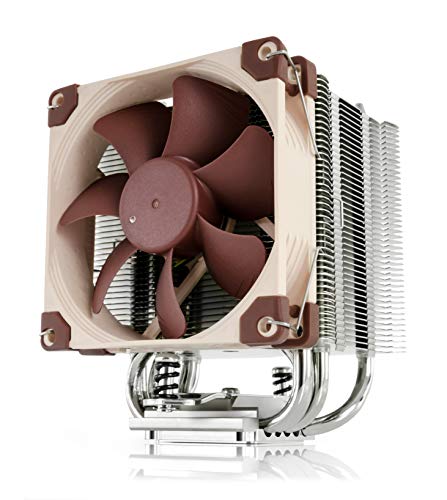
Noctua 92mm Single Tower CPU Cooler
Best for: ITX and small form factor builds
- Tower Design
- Single Tower (what this guide is about)
- Cooler Height
- 125mm
- Fan Size
- 92mm
- System Type
- ITX
- Compatible Device
- RAM
- Features
- Fan
View on Amazon: Noctua 92mm Single Tower CPU Cooler Affiliate link
The Noctua NH-U9S is a single-tower air cooler designed for compact builds. It stands 125mm tall and uses a 92mm NF-A9 fan. This low profile fits ITX cases and HTPCs without blocking RAM or PCIe slots. It supports modern Intel and AMD sockets. The included thermal paste and mounting hardware simplify installation for small form factor systems.
Pros
- 125mm height ideal for small cases
- 92mm fan with PWM support
- Includes NT-H1 thermal paste
- Supports LGA1700 and AM5 sockets
Cons
- 92mm fan offers less airflow than 120mm options
- Single tower design limits peak cooling capacity
- Compact size restricts use in high-TDP builds
Good fit if
- You build in an ITX case
- You need low RAM clearance
- You prioritize quiet operation over raw power
Skip if
- You require dual-tower performance
- You have a high-TDP CPU
- You need 120mm or larger fans
Verdict: Noctua NH-U9S Compact Single Tower Cooler is a precise fit for small form factor builds where height is the main constraint. It delivers reliable cooling for moderate loads in tight spaces.
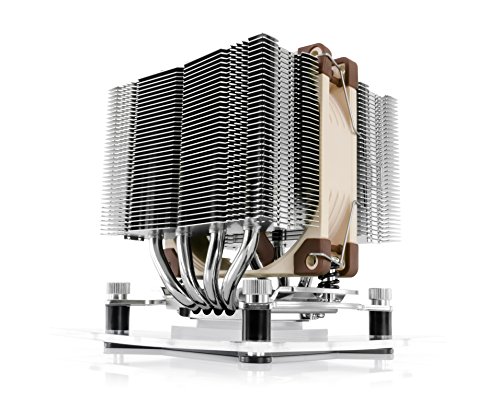
Noctua NH-D9L 92mm Dual Tower Cooler
Best for: ITX and HTPC builds with limited height
- Tower Design
- Dual Tower (what this guide is about)
- Cooler Height
- 110mm
- Fan Size
- 92mm
- Dimensions
- 3.74 × 3.74 × 4.33 inches
- Weight
- 1.17 pounds
View on Amazon: Noctua NH-D9L 92mm Dual Tower Cooler Affiliate link
The Noctua NH-D9L is a compact dual-tower air cooler measuring 110mm in height. It uses 92mm fans to provide high cooling performance in small enclosures. This design protects RAM and PCIe slots, making it suitable for ITX builds. It includes NT-H1 thermal paste and supports Intel LGA1700 and AMD AM5 sockets for easy installation.
Pros
- Dual-tower design fits in 110mm height cases
- 92mm fans offer low noise and PWM control
- Includes NT-H1 thermal paste and SecuFirm2 mount
- Protects RAM and PCIe slots from obstruction
Cons
- 92mm fans have lower airflow than 120mm or 140mm options
- Limited to small form factor and HTPC builds
- Brown color may not match all builds
Good fit if
- You need a dual-tower cooler under 110mm height
- You are building an ITX or small form factor PC
- You want to avoid blocking RAM or PCIe slots
Skip if
- You require maximum cooling performance for high-end CPUs
- You have a standard ATX case with tall clearance
- You prefer larger 120mm or 140mm fans for quieter operation
Verdict: Noctua NH-D9L Compact Dual Tower Cooler is the right choice for ITX builders who need dual-tower cooling in a tight 110mm space. It fits small cases without blocking components.

Scythe Kotetsu Mark 2 120mm CPU Cooler
Best for: RAM clearance and mainstream cooling
- Tower Design
- Single Tower (what this guide is about)
- Socket Compatibility
- LGA1200, LGA1151, AM4, LGA2066
- Cooler Height
- 154 mm
- Heat Pipes
- 4
- Fan Size
- 120 mm
- Fan Speed
- 1,200 RPM
View on Amazon: Scythe Kotetsu Mark 2 120mm CPU Cooler Affiliate link
The Scythe Kotetsu Mark 2 is a single-tower air cooler with a 120mm fan and four 6mm heat pipes. Its slim 136mm width prevents RAM overhang, while the 154mm height fits most cases. It supports modern sockets like AM4 and LGA1200. This cooler suits users needing reliable mainstream cooling without the bulk of dual-tower designs.
Pros
- Four 6mm heat pipes for efficient heat transfer
- Slim 136mm width avoids RAM blockage
- Supports AM4 and LGA1200 sockets
- Quiet 120mm PWM fan operation
Cons
- Single tower design limits peak cooling capacity
- Only one fan included in the box
- Heavier build at 645g compared to lighter options
Good fit if
- You need a cooler that clears tall RAM modules
- You prefer a single tower for easier installation
- You use mainstream processors with moderate TDP
Skip if
- You require maximum cooling for high-end overclocking
- You want a dual tower for extra headroom
- You need a cooler under 150mm in height
Verdict: Scythe Kotetsu Mark 2 Single Tower is a practical choice for builders prioritizing RAM clearance and socket compatibility over raw thermal performance. It fits well in standard cases where space is a concern.
Noctua 92mm Dual-Tower CPU Cooler
Best for: small form factor and ITX builds
- Tower Design
- Dual Tower (what this guide is about)
- Socket Compatibility
- LGA1851/1700/1200/115x, AM4, AM5
- Cooler Height
- 110mm
- Fan Size
- 92mm
- System Type
- ITX
- Compatible Device
- RAM
View on Amazon: Noctua 92mm Dual-Tower CPU Cooler Affiliate link
The Noctua NH-D9L is a dual-tower air cooler standing 110mm tall. It uses a 92mm NF-A9 fan with PWM support for quiet operation. The design avoids overhanging RAM or PCIe slots on most motherboards. It includes NT-H1 thermal paste and a SecuFirm2 mounting system. This cooler fits Intel LGA1851, LGA1700, LGA1200, LGA115x, and AMD AM5 and AM4 sockets.
Pros
- 110mm height suits HTPC and SFF builds
- Dual-tower design with 92mm NF-A9 fan
- Includes NT-H1 thermal paste and SecuFirm2 mount
- PWM support with Low-Noise Adaptor for quiet use
Cons
- 92mm fan size limits max airflow compared to 120mm or 140mm fans
- 110mm height restricts compatibility with tall RAM sticks
- Brown color may not match all aesthetic preferences
Good fit if
- You need a dual-tower cooler under 115mm height
- You build in small form factor or ITX cases
- You want quiet operation with PWM fan control
Skip if
- You require maximum cooling performance for high TDP CPUs
- You have tall RAM that exceeds 110mm clearance
- You prefer larger 120mm or 140mm fans for better airflow
Verdict: Noctua NH-D9L Compact Dual Tower Cooler is a specialized solution for small cases where standard dual towers do not fit. It offers reliable cooling in a compact form factor for users prioritizing case compatibility over raw fan size.

Noctua 120mm Dual Fan Single Tower Cooler
Best for: compact builds requiring strong single-tower cooling performance
- Tower Design
- Single Tower (what this guide is about)
- Cooler Height
- 158mm
- Heat Pipes
- 7
- Fan Size
- 120mm
- Compatible Device
- RAM
- Dimensions
- 4.92 × 4.41 × 6.22 inches
View on Amazon: Noctua 120mm Dual Fan Single Tower Cooler Affiliate link
The Noctua NH-U12A is a single-tower air cooler that uses a 120mm form factor to deliver performance typically found in larger 140mm units. It features seven heat pipes and two NF-A12x25 fans. This design helps it fit in most cases without blocking RAM or PCIe slots. It includes the NT-H1 thermal paste and supports multiple modern sockets. You get reliable cooling in a compact footprint.
Pros
- Seven heat pipes provide increased surface area for heat transfer
- Dual NF-A12x25 fans offer high performance with low noise
- Compact 120mm size fits most tower cases up to 158mm height
- Includes NT-H1 thermal paste and SecuFirm2 mounting system
- Compatible with Intel LGA1851, LGA1700, LGA1200, LGA115x and AMD AM5/AM4
Cons
- Single-tower design may struggle with extreme overclocking compared to dual-tower rivals
- 158mm height requires checking case clearance before purchase
- Brown color scheme may not match all aesthetic preferences
Good fit if
- You need high cooling performance in a compact single-tower design
- You have RAM or PCIe slots that might be blocked by larger coolers
- You want a cooler that includes high-quality thermal paste
Skip if
- You require a dual-tower design for maximum heat dissipation
- Your case cannot accommodate a cooler taller than 158mm
- You prefer a cooler that does not include pre-applied thermal paste
Verdict: Noctua NH-U12A Single Tower Cooler fits users who need strong cooling in a compact 120mm footprint. It is ideal for builds where RAM clearance or case height is a constraint. The seven heat pipes and dual fans ensure efficient heat removal without excessive noise.
Specifications side by side
| Spec | Noctua Dual-Tower 140mm CPU Cooler | Noctua 92mm Single Tower CPU Cooler | Noctua NH-D9L 92mm Dual Tower Cooler | Scythe Kotetsu Mark 2 120mm CPU Cooler | Noctua 92mm Dual-Tower CPU Cooler | Noctua 120mm Dual Fan Single Tower Cooler |
|---|---|---|---|---|---|---|
| Socket Compatibility | LGA1851/1700/1200/115x, AM4, AM5 | not stated | not stated | LGA1200, LGA1151, AM4, LGA2066 | LGA1851/1700/1200/115x, AM4, AM5 | not stated |
| Cooler Height | 168mm | 125mm | 110mm | 154 mm | 110mm | 158mm |
| Heat Pipes | 6 | not stated | not stated | 4 | not stated | 7 |
| Tower Design | Dual-Tower | Single-Tower | Dual-Tower | Single-Tower | Dual-Tower | Single-Tower |
| Fan Size | 140mm | 92mm | 92mm | 120 mm | 92mm | 120mm |
| Fan Speed | not stated | not stated | not stated | 1,200 RPM | not stated | not stated |
| System Type | not stated | ITX | not stated | not stated | ITX | not stated |
| Compatible Device | not stated | RAM | not stated | not stated | RAM | RAM |
| Features | not stated | Fan | not stated | not stated | Fan | not stated |
| Dimensions | 6.34 × 5.91 × 6.5 inches | 3.74 × 3.74 × 4.92 inches | 3.74 × 3.74 × 4.33 inches | 6.06 × 5.12 × 3.27 inches | 3.74 × 3.74 × 4.33 inches | 4.92 × 4.41 × 6.22 inches |
| Weight | 2.87 pounds | 1.36 pounds | 1.17 pounds | 1.42 pounds | 1 pounds | 2.69 pounds |
| Color | Brown | Brown | brown | Noir | Brown | brown |
| Model | NH-D15 | NH-U9S | NH-D9L | SCKTT-2000 | NH-D9L | NH-U12A |
| Size | not stated | not stated | not stated | not stated | not stated | 10 Unità (Confezione da 1) |
Frequently asked questions
What is the main difference between single and dual tower designs?
A single tower uses one fin stack and one fan, while a dual tower uses two fin stacks and two fans. The dual tower design provides more surface area for heat dissipation. This extra surface area allows for better cooling performance under heavy loads. Single towers are generally shorter and narrower.
Do dual tower coolers fit in all computer cases?
No, dual tower coolers are larger and may not fit in small cases. The Noctua NH-D15 measures 6.5 inches in height and 5.91 inches in width. You need a spacious case to accommodate this size. Some compact dual towers, like the NH-D9L, are designed for ITX builds with limited height.
Which tower design is better for tall RAM sticks?
Single tower designs usually offer better RAM clearance. They have a smaller footprint that avoids blocking memory modules. The Noctua NH-U9S is a compact single tower ideal for tight spaces. Dual towers often sit closer to the RAM slots, which can cause interference with large memory heatsinks.
How does tower design affect CPU cooling performance?
Dual tower designs typically provide superior cooling due to increased surface area. The Noctua NH-D15 offers class-leading performance for high-end processors. More fins and heat pipes help dissipate heat faster. Single towers are sufficient for moderate loads but may struggle with high-TDP CPUs under sustained stress.
Are single tower coolers lighter than dual tower ones?
Yes, single tower coolers are generally lighter due to fewer components. The Noctua NH-U9S weighs 1.36 pounds, while the NH-D15 weighs 2.87 pounds. Lighter coolers put less stress on the motherboard socket. However, dual towers provide more thermal capacity for demanding workloads.
Can I use a dual tower cooler in a small form factor build?
Standard dual towers are too large for most small form factor builds. However, specialized compact models exist for these cases. The Noctua NH-D9L is a dual tower designed for ITX builds with limited height. It fits in tight spaces without blocking other components, offering reliable cooling in a compact form.
What is the height limit for single tower coolers?
Single tower coolers vary in height but are generally under 5 inches. The Noctua NH-U9S is 4.92 inches tall. The Scythe Kotetsu Mark 2 is 3.27 inches tall. These heights ensure compatibility with many cases and RAM modules. Always check your case’s maximum cooler height before purchasing.