Noctua Dual-Tower 140mm CPU Cooler or Noctua Asymmetric Dual-Tower 140mm CPU Cooler? Which Noctua Model to Buy
As an Amazon Associate we earn from qualifying purchases. Links on this page are affiliate links.
When you compare the noctua nh d15 vs nh d15s, you see two premium air coolers with distinct layouts. Both use a dual-tower design with six heat pipes and 140mm fans. They share socket support for Intel LGA1851 through 115x and AMD AM5/AM4. The main difference lies in the fan configuration. The NH-D15 uses two fans, while the NH-D15S uses a single asymmetric fan. This changes how they fit in your case and how they interact with RAM modules.
Key differences
| Aspect | Noctua Dual-Tower 140mm CPU Cooler | Noctua Asymmetric Dual-Tower 140mm CPU Cooler |
|---|---|---|
| Fan Count | 2 fans | 1 fan |
| Height | 6.5 inches | 6.3 inches |
| Weight | 2.87 pounds | 2.5 pounds |
| Length | 6.34 inches | 5.32 inches |
| Socket Compatibility | LGA1851/1700/1200/115x, AM5/AM4 | LGA1851/1700/1200/115x, AM5/AM4 |
Which one should you choose?
Choose Noctua Dual-Tower 140mm CPU Cooler if
- You need maximum cooling headroom for overclocking
- You have ample case space and RAM clearance
- You prefer the proven dual-fan airflow design
Choose Noctua Asymmetric Dual-Tower 140mm CPU Cooler if
- You have low-profile RAM sticks
- You want a shorter cooler for better airflow in tight cases
- You need to clear tall PCIe slots or components
Verdict: The NH-D15 offers higher cooling potential due to its second fan, making it ideal for high-TDP CPUs. The NH-D15S provides better compatibility with tall RAM and shorter cases due to its single-fan layout. Choose the NH-D15 for raw performance, or the NH-D15S for fitment flexibility.
NH-D15 vs NH-D15S Comparison
Fan Configuration
The Noctua NH-D15 includes two NF-A15 140mm fans in its dual-tower setup. This provides broader airflow coverage across both heat sinks. The Noctua NH-D15S uses a single NF-A15 140mm fan. It places the fan on one side of the dual towers. Both models support PWM for speed control and include low-noise adaptors. The dual-fan design of the NH-D15 offers more total air volume. The single-fan NH-D15 reduces power draw slightly. You get better cooling potential with the extra fan on the standard model.
Height and Clearance
The Noctua NH-D15 stands 6.5 inches tall. The Noctua NH-D15S is slightly shorter at 6.3 inches. This two-tenths of an inch difference matters in tight cases. The NH-D15S also has a shorter length of 5.32 inches compared to 6.34 inches for the NH-D15. Both share the same width of 5.91 inches. The reduced height and length of the NH-D15S make it easier to fit in smaller chassis. You should check your case specifications if space is limited. The standard NH-D15 requires more vertical clearance for installation.
Weight
The Noctua NH-D15 weighs 2.87 pounds. The Noctua NH-D15S weighs 2.5 pounds. The difference is 0.37 pounds. This extra weight comes from the second fan and slightly larger dimensions. Both coolers use the SecuFirm2 mounting system for secure attachment. The lighter NH-D15S places less stress on your motherboard socket. This can be important for long-term stability. The heavier NH-D15 is still well within safe limits for standard mounts. You might prefer the lighter unit if you move your PC often.
Socket Compatibility
Both coolers support the same socket range. They work with Intel LGA1851, LGA1700, LGA1200, and LGA115x. They also support AMD AM5 and AM4. The NH-D15 mentions an offset mounting option for best efficiency on AMD. The NH-D15S does not explicitly list this offset option in the provided data. Both include NT-H1 thermal paste. The mounting hardware is identical for the shared sockets. You will have no compatibility issues with either model on modern platforms. The support list is identical for current processors.
Tower Design
Both models feature a dual-tower design with six heat pipes. The NH-D15 uses a symmetric dual-tower layout with fans on both sides. The NH-D15S uses an asymmetric design with a single fan. This asymmetry improves RAM clearance. High-profile memory sticks fit more easily next to the single fan. The NH-D15’s second fan may interfere with tall RAM modules. If you use high-end DDR5 sticks, the NH-D15S is the safer choice. The cooling cores are similar, but the fan placement changes fitment.
Which Noctua Cooler Fits Your Build
Users with tall RAM or wide GPUs
The NH-D15S uses an asymmetric design with a single fan. This layout reduces height on one side, improving clearance for high-profile memory modules and large graphics cards. Its shorter length of 5.32 inches also helps in compact cases. You get the same six heat pipes for cooling, but with better physical compatibility for crowded motherboards.
Enthusiasts seeking maximum cooling potential
The NH-D15 features two NF-A15 fans, providing broader airflow across both towers. This dual-fan setup offers superior heat dissipation for heavy workloads or overclocking. Although it is slightly taller at 6.5 inches, the additional fan ensures lower temperatures under load. It is the better choice if you prioritize peak thermal performance over single-fan simplicity.
Builds with low-profile memory and ample space
If your RAM modules are low-profile and your case has generous clearance, the dual-fan NH-D15 is ideal. It delivers consistent cooling across the entire dual-tower structure. The extra fan allows for quieter operation at lower speeds while maintaining high performance. You gain the benefit of Noctua’s classic design with proven thermal efficiency for high-end CPUs.
The products compared
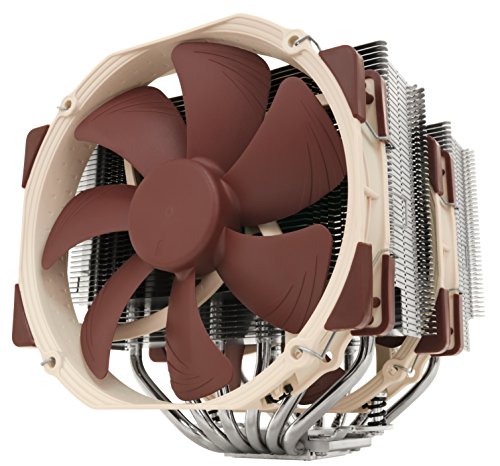
Noctua Dual-Tower 140mm CPU Cooler
Best for: High-performance cooling in standard ATX cases
- Socket Compatibility
- LGA1851/1700/1200/115x, AM4, AM5
- Cooler Height
- 168mm
- Heat Pipes
- 6
- Tower Design
- Dual-Tower
- Fan Size
- 140mm
- Dimensions
- 6.34 × 5.91 × 6.5 inches
View on Amazon: Noctua Dual-Tower 140mm CPU Cooler Affiliate link
The Noctua NH-D15 uses a dual-tower design with six heat pipes and two 140mm NF-A15 fans. This configuration delivers high cooling performance suitable for overclocking or quiet systems. It includes the NT-H1 thermal paste and SecuFirm2 mounting hardware for easy installation on Intel and AMD sockets. The unit measures 6.5 inches in height and weighs 2.87 pounds.
Pros
- Dual-tower design with six heat pipes
- Two 140mm NF-A15 fans with PWM support
- Includes NT-H1 thermal paste and SecuFirm2 mounting system
- Low-Noise Adaptors for automatic speed control
- 6-year manufacturer warranty
Cons
- Height of 6.5 inches may block tall RAM modules
- Weight of 2.87 pounds requires sturdy motherboard support
- Brown color option may not match all builds
Good fit if
- You need high cooling performance for overclocking
- You want near-silent operation with large fans
- You have space for a 6.5-inch tall cooler
Skip if
- You have a small form factor case
- You prefer compact single-tower designs
- You need a cooler under 6 inches tall
Verdict: Noctua NH-D15 140mm Dual Tower is ideal for users prioritizing maximum cooling capacity and quiet operation in standard ATX cases. It suits those building high-end Intel or AMD systems who can accommodate its large physical footprint.
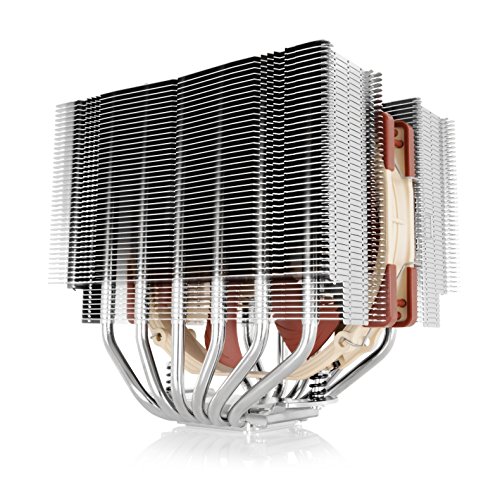
Noctua Asymmetric Dual-Tower 140mm CPU Cooler
Best for: Users with tall RAM needing clearance
- Socket Compatibility
- LGA1851/1700/1200/115x, AM4, AM5
- Cooler Height
- 160mm
- Heat Pipes
- 6
- Tower Design
- Dual-Tower
- Fan Size
- 140mm
- Compatible Device
- RAM
View on Amazon: Noctua Asymmetric Dual-Tower 140mm CPU Cooler Affiliate link
The Noctua NH-D15S is a dual-tower air cooler with six heat pipes and a 140mm fan. Its asymmetric design protects RAM and PCIe slots, unlike the standard NH-D15. It includes the NT-H1 thermal paste and supports Intel LGA1851 and AMD AM5 sockets. This model suits users who need high cooling performance without blocking memory modules.
Pros
- Asymmetric single fan design for better RAM compatibility
- Six copper heat pipes for efficient heat transfer
- Includes NT-H1 thermal paste for easy setup
- Supports latest Intel LGA1851 and AMD AM5 platforms
Cons
- Single fan limits total airflow compared to dual-fan models
- Heavier build at 2.5 pounds requires sturdy motherboard support
- No software control for fan speed adjustments
Good fit if
- You have tall RAM sticks that block standard coolers
- You want quiet operation with a 140mm fan
- You use an AMD AM5 or Intel LGA1851 motherboard
Skip if
- You need dual fans for maximum cooling headroom
- You have a small ITX case with tight clearance
- You prefer RGB lighting or software fan control
Verdict: Noctua NH-D15S 140mm Dual-Tower Cooler is the right pick if your RAM blocks the standard NH-D15. It delivers strong cooling while keeping your memory accessible.
Specifications side by side
| Spec | Noctua Dual-Tower 140mm CPU Cooler | Noctua Asymmetric Dual-Tower 140mm CPU Cooler |
|---|---|---|
| Socket Compatibility | LGA1851/1700/1200/115x, AM4, AM5 | LGA1851/1700/1200/115x, AM4, AM5 |
| Cooler Height | 168mm | 160mm |
| Heat Pipes | 6 | 6 |
| Tower Design | Dual-Tower | Dual-Tower |
| Fan Size | 140mm | 140mm |
| Compatible Device | not stated | RAM |
| Features | not stated | Fan |
| Dimensions | 6.34 × 5.91 × 6.5 inches | 5.32 × 5.91 × 6.3 inches |
| Weight | 2.87 pounds | 2.5 pounds |
| Color | Brown | not stated |
| Model | NH-D15 | NH-D15S |
Frequently asked questions
Is the NH-D15S cooler than the NH-D15?
The NH-D15 generally offers slightly better cooling performance due to its dual-fan configuration. It includes two NF-A15 140mm fans for broader airflow coverage across both heat sinks. The NH-D15S uses only one fan, which may result in marginally higher temperatures under heavy loads, though it remains highly effective for most users.
Which Noctua cooler is better for tall RAM?
The NH-D15S is the better choice if you have tall RAM modules. Its asymmetric design places the single fan on one side, reducing height and improving clearance for high-profile memory. The standard NH-D15 has a symmetrical dual-tower layout that can obstruct access to memory slots, making the NH-D15S the practical pick for builds with large heat spreaders.
Do both coolers support AMD AM5 sockets?
Yes, both the NH-D15 and NH-D15S support AMD AM5 sockets. They also share compatibility with Intel LGA1851 and older 115x sockets. This broad socket support ensures that either cooler will fit your motherboard, allowing you to choose based on case size and RAM clearance rather than socket compatibility issues.
Which model is lighter?
The NH-D15S is lighter, weighing 2.5 pounds. The standard NH-D15 weighs 2.87 pounds. This weight difference comes from the NH-D15S using a single fan instead of two. The lighter mass may be easier to handle during installation, though both units are substantial and require secure mounting to prevent sagging on the CPU socket.
Which cooler is shorter in length?
The NH-D15S is shorter, measuring 5.32 inches in length. The NH-D15 measures 6.34 inches. This reduced length on the NH-D15S helps it fit in smaller cases or avoids interference with rear exhaust fans. If your case has tight constraints near the CPU area, the shorter footprint of the NH-D15S provides a clearer fit.
Does the NH-D15S have two fans?
No, the NH-D15S has only one fan. It uses a single NF-A15 140mm fan placed on one side of the dual-tower heatsink. The standard NH-D15 includes two fans for balanced airflow. This single-fan design on the NH-D15S contributes to its lower weight and asymmetric profile, which aids in RAM clearance.
Which Noctua cooler is taller?
The NH-D15 is taller, standing at 6.5 inches. The NH-D15S is 6.3 inches tall. The extra height on the NH-D15 accommodates its second fan and dual-tower symmetry. You should check your case’s maximum cooler height limit before buying. Both models fit within standard ATX case specifications, but the NH-D15 requires slightly more vertical space.