KINGCOOL Iron Wind 120 ARGB Review: Who It Fits and Who Should Skip It
As an Amazon Associate we earn from qualifying purchases. Links on this page are affiliate links.
This kingcool iron wind 120 argb review covers a white dual-tower air cooler designed for high-performance builds. It uses six copper heat pipes and a nickel-plated base to move heat away from the CPU. The cooler includes two 120mm fans that spin at up to 1800 RPM. These fans provide 59.63 CFM of airflow while keeping noise levels manageable. The unit stands 154mm tall, which requires checking your case clearance. It supports modern Intel and AMD sockets. The all-painted finish helps prevent oxidation over time. This design aims to balance cooling efficiency with aesthetic appeal for compatible systems.
What stands out
- Dual tower design with two separate heatsink blocks
- Six copper heat pipes for efficient heat transfer
- 120mm fans with 1800 RPM max speed and 59.63 CFM airflow
- 5V 3-pin ARGB sync for motherboard lighting control
- Full paint protection on fins and exterior to resist oxidation
Who it fits
Good fit for
You should consider this cooler if you have a high TDP processor and a mid-tower case with at least 154mm of CPU cooler clearance. Gamers and content creators running Intel LGA1700 or AMD AM5 platforms will benefit from the dual-tower layout. The white finish suits builds with matching aesthetics. The ARGB feature works well if your motherboard supports 5V 3-pin headers. Verify RAM height compatibility before buying, as the dual fans may block tall memory modules.
Who should skip it
Skip this option if your PC case cannot accommodate a 154mm tall cooler. Users with very tall RAM sticks might face compatibility issues with the dual 120mm fans. If you prefer a single-fan low-profile design for small form factor cases, this dual-tower unit is too large. The cooler relies on motherboard ARGB headers, so you need a compatible board for lighting sync. It is not suitable for silent PC builds if you require passive cooling or significantly lower airflow rates.
Verdict: The KINGCOOL Iron Wind 120 offers solid cooling performance for high-TDP CPUs in compatible cases. Its dual-tower design and ARGB lighting make it a practical choice for white-themed builds.
Key specs explained for this cooler
Fan Size: 120mm
This dimension indicates the fan blades span 120 millimeters across. You get a balance of airflow and noise that standard 120mm fans provide. Smaller 92mm fans are louder for the same air moved, while larger 140mm fans move more air but need deeper cases. This size fits most mid-tower and full-tower cases, making it a versatile choice for standard builds.
Lighting: ARGB
Addressable RGB allows individual LEDs to change color independently. You sync this with motherboard software for custom patterns. Standard RGB only changes all LEDs to one color at a time. If you want detailed lighting effects, ARGB is the better choice. Ensure your motherboard has a 5V 3-pin header to control these lights properly.
Heat Pipes: 6
Six copper heat pipes transfer heat from the CPU base to the fins. More pipes generally mean better heat spreading across the heatsink. Four-pipe coolers struggle with high TDP CPUs. Six pipes help keep temperatures lower under load. This setup supports high-performance processors without requiring liquid cooling solutions.
Tower Design: Dual Tower
Two separate heatsink stacks double the surface area for air cooling. This design handles higher heat output than single-tower models. You get better thermal performance for gaming or rendering. However, the dual structure takes up more vertical space in your case. Verify your RAM height and case clearance before buying.
Cooler Height: 154mm
The cooler stands 154 millimeters tall from the base to the top of the fans. This height determines if it fits in your PC case. Many standard cases support up to 160mm. If your case limit is lower, this cooler will not fit. Check your case specifications to ensure this height clearance is available.
Design and Build Details
The listing describes a dual-tower layout with two separate heatsink stacks. This design places fans on top of each tower, leaving more room for heat pipes and fins. You get six copper heat pipes connected to a nickel-plated copper base plate. This setup aims to move heat away from the CPU efficiently. The cooler uses two 120mm fans. Each fan measures 120x120x25mm. They spin at 1800rpm, plus or minus ten percent. You connect them via a 4-pin port. The listing notes a 5V 3-pin connector for ARGB lighting. This allows you to sync the lights with your motherboard.
The physical dimensions are 125mm in length and width, with a height of 154mm. You must check your case clearance for this size. The listing states the weight is 2.54 pounds. This adds some mass to your motherboard area. The entire unit is white. The outer casing and the fin stack are fully painted. This paint protects against oxidation. You get lasting performance without rust affecting the fins. It supports Intel LGA1851, 1700, 1200, and 115X sockets. It also fits AMD AM4 and AM5. You should verify your RAM height fits under the twin towers. The high DRAM compatibility claim suggests it works with most sticks. You get a sturdy build for high TDP CPUs.
Setup And Daily Use Guide
Installing the KINGCOOL Iron Wind 120 ARGB requires careful planning due to its physical footprint. The cooler measures 125 by 125 by 154 millimeters. You must verify that your PC case can accommodate this height before purchase. The dual-tower design occupies space above the CPU socket. This layout leaves more room for heat pipes and fins, but it may interfere with tall RAM modules. You should check the clearance between the cooler and your memory sticks. The unit supports most modern Intel and AMD sockets. It fits LGA 1851, 1700, 1200, and 115X for Intel. For AMD, it works with AM4 and AM5 platforms. This broad compatibility means you do not need special adapters for recent builds. Setup involves mounting the dual fans onto the separate heatsink towers. The fans connect via a standard 4-pin PWM port for speed control. You also connect the 5V 3-pin ARGB cable to your motherboard for lighting sync. Daily use relies on the cooler’s efficient heat dissipation. The six copper heat pipes transfer heat from the nickel-plated base to the fins. The fans move 59.63 CFM of air to cool the system. The all-over paint protection guards against oxidation, ensuring long-term performance. You benefit from stable temperatures even under heavy loads. The white finish and ARGB lighting integrate seamlessly into matching builds. You get improved airflow at lower noise levels compared to older designs. This cooler suits gamers and content creators who need reliable thermal management.
Before You Buy This Cooler
You need to verify case clearance before purchasing. The cooler stands 154 millimeters tall. Your PC case must support this height. You also need to check motherboard RAM clearance. The dual towers sit close to memory slots. Ensure your RAM sticks fit below the fins. The fans sync via a 5V 3-pin ARGB header. You need an available header on your motherboard. If your board lacks this, you cannot control the lighting. The white finish resists oxidation. The fins are fully painted. This helps maintain efficiency over time. You do not need special cleaning tools. A soft brush removes dust. This cooler fits high TDP CPUs. It suits gamers and content creators. It competes with other dual-tower air coolers. You get strong cooling performance. It does not require liquid cooling. It is a practical choice for air cooling enthusiasts.
Check before you buy
- Verify your PC case supports 154mm cooler height.
- Check motherboard RAM clearance under the dual towers.
- Confirm your motherboard has a 5V 3-pin ARGB header.
- Ensure socket compatibility with LGA1700 or AM5.
The product at a glance
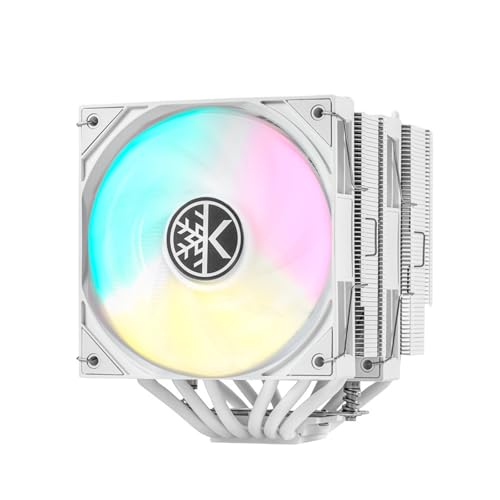
KINGCOOL Iron Wind 120 White ARGB
Best for: White builds with high TDP CPUs
- Socket Compatibility
- LGA1851/1700/1200/115X, AM4/AM5
- Cooler Height
- 154mm
- Heat Pipes
- 6
- Tower Design
- Dual Tower
- Fan Size
- 120mm
- Fan Speed
- 1800rpm±10%
View on Amazon: KINGCOOL Iron Wind 120 White ARGB Affiliate link
This dual-tower CPU air cooler features six copper heat pipes and a nickel-plated base for efficient heat dissipation. It includes two 120mm ARGB fans running at 1800 RPM with 59.63 CFM airflow. The unit stands 154mm tall and supports Intel LGA1851/1700/1200/115X and AMD AM4/AM5 sockets. The white finish and full paint protection guard against oxidation. It suits high TDP CPUs for gaming or content creation.
Pros
- Dual tower design with six copper heat pipes
- ARGB lighting syncs via 5V 3-pin motherboard connector
- Full paint protection on fins and outer shell
- Supports latest Intel LGA1851 and AMD AM5 sockets
Cons
- 154mm height may block tall RAM sticks
- Fan speed capped at 1800 RPM for lower noise
- Requires manual 4-pin fan power connection
Good fit if
- You need a white cooler for a matching build
- You want ARGB lighting synced to your motherboard
- You have a case with sufficient CPU cooler clearance
Skip if
- You use low-profile RAM that exceeds 154mm clearance
- You prefer a single-tower design for compact cases
- You need silent operation below 1800 RPM fan speeds
Verdict: KINGCOOL Iron Wind 120 ARGB White fits builders seeking a white, dual-tower cooler with ARGB support. It handles high TDP loads well but requires checking RAM clearance due to its 154mm height.
Specifications side by side
| Spec | KINGCOOL Iron Wind 120 White ARGB |
|---|---|
| Socket Compatibility | LGA1851/1700/1200/115X, AM4/AM5 |
| Cooler Height | 154mm |
| Heat Pipes | 6 |
| Tower Design | Dual Tower |
| Fan Size | 120mm |
| Fan Speed | 1800rpm±10% |
| Lighting | ARGB |
| Color | White |
| Dimensions | 5.4 × 5 × 6.1 inches |
| Weight | 2.54 pounds |
| Model | IRON WIND |
Frequently asked questions
Does the KINGCOOL Iron Wind 120 ARGB fit in standard mid-tower cases?
You must verify your case supports a height of 154 millimeters. The cooler measures 6.1 inches tall. Many mid-tower cases accommodate this size, but you need to check your specific model's specifications. If your case limits height to 150 millimeters, this dual-tower cooler will not fit.
Will this cooler block my RAM sticks?
The dual-tower design sits close to memory slots, which may cause clearance issues. You need to check your motherboard's RAM clearance limit. If your RAM modules exceed the available space between the heatsink and the slot, you will not be able to install them. Low-profile memory is recommended.
Is the ARGB lighting synchronized with other components?
Yes, the cooler includes ARGB lighting. This allows you to sync the fans and heatsink LEDs with other compatible RGB components in your build. You can create a unified white aesthetic for your system. Ensure your motherboard has an ARGB header to control the lighting effects.
What is the weight of the KINGCOOL Iron Wind 120?
The cooler weighs 2.54 pounds. This substantial weight is due to the dual-tower aluminum fins and six copper heat pipes. You should ensure your CPU socket can support this load. Using the included mounting hardware helps distribute the weight evenly to protect the motherboard.
Does the white finish look good in a build?
The cooler features a clean white finish. This color matches well with white PC cases and white RAM modules. It creates a cohesive look for enthusiasts building white-themed systems. The nickel-plated base also complements the white aesthetic while providing corrosion resistance for long-term use.
How does the dual-tower design affect airflow?
The dual-tower layout uses two separate heatsink stacks with fans on top. This design increases surface area for heat dissipation. You get better cooling performance for high TDP CPUs compared to single-tower designs. The six heat pipes transfer heat efficiently from the nickel-plated base to the fins.