The Best Ocypus CPU Coolers in 2026: 3 Picks
As an Amazon Associate we earn from qualifying purchases. Links on this page are affiliate links.
You need the best Ocypus CPU coolers for your specific build constraints. This guide compares 3 models based strictly on published specifications. Ocypus offers dual-tower, compact, and ARGB options in white and black finishes. The top pick is the Ocypus Dual-Tower CPU Cooler with Digital Display. It leads because it supports high-TDP AM5 builds while providing modern digital feedback. These selections focus on size, socket compatibility, and thermal design power. We evaluate each unit by its physical dimensions and listed features. This approach ensures you find a cooler that fits your case and motherboard requirements without guesswork.
Quick picks
| # | Product | Best for | Price |
|---|---|---|---|
| 1 | Ocypus Dual-Tower CPU Cooler with Digital Display Best overall | High-TDP AM5 builds with digital display preference | Check price of Ocypus Dual-Tower CPU Cooler with Digital Display on Amazon |
| 2 | Ocypus Gamma A40 BK 133mm Compact Tower Best budget | Small cases and mainstream CPUs | Check price of Ocypus Gamma A40 BK 133mm Compact Tower on Amazon |
| 3 | Ocypus Delta A40 SE ARGB Air Cooler Best argb | ARGB sync and 190W TDP support | Check price of Ocypus Delta A40 SE ARGB Air Cooler on Amazon |
Our 3 picks
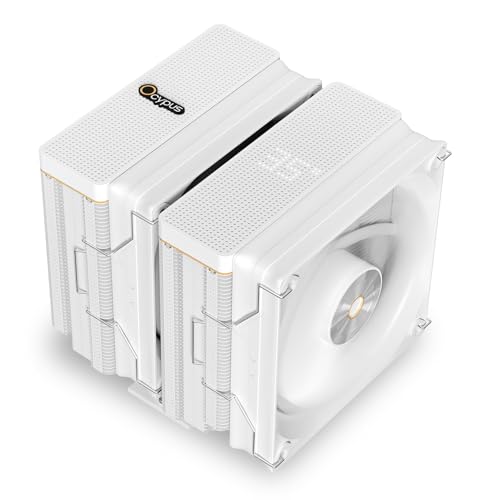
Ocypus Dual-Tower CPU Cooler with Digital Display
Best for: High-TDP AM5 builds with digital display preference
- Socket Compatibility
- AM4/AM, LGA 115X/1200/1700/1851
- Heat Pipes
- 6
- Tower Design
- Dual-Tower
- Fan Size
- 120mm
- TDP Rating
- 260W
- Fan Speed
- 2000 ±10% RPM
View on Amazon: Ocypus Dual-Tower CPU Cooler with Digital Display Affiliate link
The Ocypus Iota A62 is a dual-tower air cooler rated for 260W TDP. It includes a 120mm PWM fan that moves 77 CFM at up to 2000 RPM. A key feature is the matrix digital display on the top, which requires the Ocypus app. It supports AM5 and Intel LGA 1851 sockets. This cooler suits users needing high performance with modern connectivity.
Pros
- Dual-tower design supports up to 260W TDP
- Matrix digital display on the top plate
- 120mm fan reaches 2000 RPM with 77 CFM airflow
- Compatible with AMD AM5 and Intel LGA 1851 sockets
Cons
- Digital display requires downloading the Ocypus app
- Single 120mm fan limits airflow compared to dual-fan towers
- 5.35-inch width may not fit all compact cases
Good fit if
- You need an AM5-compatible cooler for high-end builds
- You want a digital display to monitor system status
- You prefer a dual-tower design for better heat dissipation
Skip if
- You need a cooler without requiring a mobile app
- You require a fan size larger than 120mm
- You are building in a case with strict width limits under 5.35 inches
Verdict: The Ocypus Iota A62 Dual-Tower Air Cooler fits users who need high TDP support and modern digital feedback. Its app-dependent display and single fan make it less ideal for those avoiding software or seeking maximum airflow.
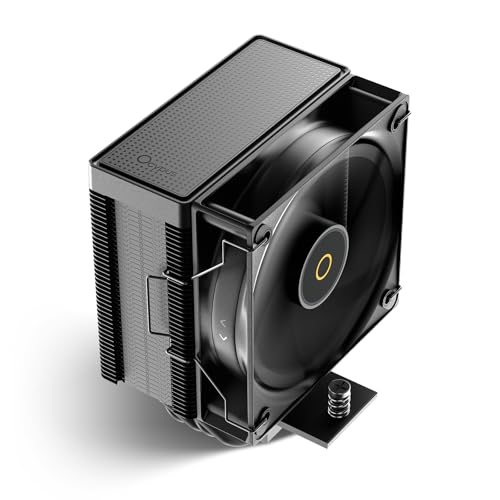
Ocypus Gamma A40 BK 133mm Compact Tower
Best for: Small cases and mainstream CPUs
- Socket Compatibility
- AM4, AM5, LGA 115X/1200/1700/1851
- Cooler Height
- 133mm
- Heat Pipes
- 4
- Tower Design
- Compact Tower
- Fan Size
- 100mm
- TDP Rating
- 200W
View on Amazon: Ocypus Gamma A40 BK 133mm Compact Tower Affiliate link
The Ocypus Gamma A40 BK is a compact air cooler with a 133mm height. It supports up to 200W TDP using four 6mm heat pipes. The 100mm fan provides cooling efficiency in a small footprint. This design fits most cases and mainstream Intel and AMD platforms. It is a practical option for builds where space is limited but decent performance is still required.
Pros
- Compact 133mm height fits most cases
- Supports up to 200W TDP
- Four 6mm direct-touch heat pipes
- Compatible with mainstream Intel and AMD platforms
Cons
- Only a 100mm fan size
- No RGB lighting on the base model
- Single fan configuration limits airflow potential
Good fit if
- You need a low-profile cooler for small cases
- You use a mainstream CPU under 200W
- You want easy installation on standard platforms
Skip if
- You require ARGB lighting effects
- You run high-end CPUs exceeding 200W
- You prefer larger 120mm or 140mm fans
Verdict: Ocypus Gamma A40 BK Compact Tower is a space-saving solution for standard builds. It suits users who prioritize case compatibility over maximum cooling headroom.

Ocypus Delta A40 SE ARGB Air Cooler
Best for: ARGB sync and 190W TDP support
- Socket Compatibility
- AM4, AM5, LGA 115X/1200/1700/1851
- Heat Pipes
- 4
- Fan Size
- 120mm
- TDP Rating
- 190W
- Fan Speed
- 800-1800 RPM ± 10%
- Lighting
- ARGB
View on Amazon: Ocypus Delta A40 SE ARGB Air Cooler Affiliate link
The Ocypus Delta A40 SE is a black air cooler rated for 190W TDP. It uses four 6mm direct-touch heatpipes and a family fin array for heat dissipation. The included PWM fan runs up to 1800 RPM with a maximum noise level of 31 dB. It features ARGB lighting that syncs with 5V 3-pin motherboards or runs statically on 12V 4-pin connections.
Pros
- Supports up to 190W TDP
- Four 6mm direct-touch heatpipes
- ARGB lighting with motherboard sync
- Fan speed up to 1800 RPM
Cons
- Lighting effects cannot be adjusted on 12V 4-pin connection
- No digital display for monitoring
- Fan noise reaches 31 dB at max speed
Good fit if
- You want ARGB lighting that syncs with your motherboard
- You need a cooler rated for 190W TDP
- You prefer a black finish for your build
Skip if
- You need full lighting control without a motherboard header
- You require a digital display for temperature monitoring
- You need a cooler rated above 190W TDP
Verdict: Ocypus Delta A40 SE ARGB Cooler is a solid choice for users who want ARGB lighting and 190W TDP support. It fits builds where motherboard sync is available and display screens are not required.
Specifications side by side
| Spec | Ocypus Dual-Tower CPU Cooler with Digital Display | Ocypus Gamma A40 BK 133mm Compact Tower | Ocypus Delta A40 SE ARGB Air Cooler |
|---|---|---|---|
| Socket Compatibility | AM4/AM, LGA 115X/1200/1700/1851 | AM4, AM5, LGA 115X/1200/1700/1851 | AM4, AM5, LGA 115X/1200/1700/1851 |
| Cooler Height | not stated | 133mm | not stated |
| Heat Pipes | 6 | 4 | 4 |
| Tower Design | Dual-Tower | Compact Tower | not stated |
| Fan Size | 120mm | 100mm | 120mm |
| TDP Rating | 260W | 200W | 190W |
| Fan Speed | 2000 ±10% RPM | not stated | 800-1800 RPM ± 10% |
| Lighting | not stated | not stated | ARGB |
| Color | White | Black | Black |
| Material | Copper | not stated | not stated |
| Features | Fan | Fan | Fan |
| Dimensions | 5 × 5.35 × 6.22 inches | 3.94 × 0.98 × 3.94 inches | 4.84 × 2.6 × 5.79 inches |
| Weight | not stated | 13.8 ounces | 1.01 pounds |
| Size | Dual-Tower | not stated | not stated |
| Model | Air Iota A62 WH | Gamma A40 BK | Delta A40 SE BK ARGB |
Ocypus CPU Cooler Lineup
The Ocypus Iota A62 stands out for AM5 sockets. Its dual-tower design and white finish suit high-TDP builds. The included digital display offers feedback, though it requires app control. This model prioritizes cooling capacity over compactness. Its dimensions are 5.35 inches wide and 6.22 inches tall. You should consider this for large cases. The Ocypus Gamma A40 BK is a compact alternative. It measures just 0.98 inches wide. This space-saving design fits small form-factor builds. It lacks advanced lighting or large towers. The Ocypus Delta A40 SE ARGB provides black aesthetics. It supports 190W TDP and includes ARGB lighting. This model suits users wanting motherboard sync. It balances size with visual appeal. Each cooler targets different build needs.
Where Ocypus Fits Your Build
Ocypus covers a narrow but practical spectrum. You can choose between a tall dual-tower for high thermal loads and a compact single-tower for tight cases. Lighting options are limited to ARGB sync or a standalone digital display. You will not find RGB fans or silent passive coolers here. The range prioritizes functional specs over aesthetic variety. If you need a specific socket not listed, or prefer a non-ARGB fan, this brand may not suit you. Stick to their white or black finishes for consistent looks.
How to choose the right one
-
Check socket compatibility first
You must verify that the cooler supports your motherboard socket before purchasing. The Ocypus Iota A62 is explicitly listed for AM5 sockets. If you are building with a different platform, this specific model may not fit your hardware. Always cross-reference the listed socket compatibility with your CPU board. Mismatched sockets prevent installation and void warranties. Ensure the mounting hardware matches your specific CPU type to avoid thermal issues or physical damage during assembly.
-
Measure case clearance
Case dimensions dictate which cooler fits inside your chassis. The Ocypus Iota A62 measures 5.35 inches in width, which requires a spacious case. In contrast, the Gamma A40 BK is significantly smaller at 0.98 inches wide. You should measure your case’s maximum cooler width and height. If you have a small form factor case, the compact Gamma model is a safer choice. Always leave extra space for RAM clearance and front fans.
-
Evaluate tower design needs
Your thermal demands determine whether you need a dual-tower or single-tower design. The Iota A62 uses a dual-tower structure for high TDP support. This design provides more surface area for heat dissipation. The Gamma A40 and Delta A40 SE use compact or single-tower designs suitable for mainstream CPUs. If you run high-end processors, prioritize the dual-tower option. For standard office or gaming builds, the smaller towers offer sufficient cooling with less weight and noise.
-
Consider lighting preferences
Lighting features add aesthetic value but require specific motherboard headers. The Delta A40 SE includes ARGB lighting for sync with compatible boards. The Iota A62 features a digital display that needs app control. The Gamma A40 focuses on function without lighting extras. Decide if you want visual customization or a clean look. ARGB requires a 5V 3-pin header. A digital display may need software installation. Choose based on your motherboard’s connectivity and your visual preference.
-
Match color to build
Color choices help unify your system’s appearance. The Iota A62 comes in white, which suits light-themed builds. The Delta A40 SE is black, fitting darker or standard setups. The Gamma A40 BK is also black. Select a color that matches your case and other components. Mismatched colors can look disjointed in a visible build. White coolers often pair well with white GPUs and cases. Black options provide a stealthy, professional look. Check the available color options for each model to ensure visual harmony.
Frequently asked questions
Which Ocypus CPU cooler is best for AM5 motherboards?
The Ocypus Iota A62 is the top choice for AM5 builds. It is explicitly compatible with the AM5 socket. This dual-tower model supports high thermal loads. It also features a digital display for system monitoring. You should verify your case height before installation.
Does the Ocypus Iota A62 include a fan?
The Iota A62 is described as a single-fan model in its verdict. It uses one fan to drive airflow through its dual-tower heatsink. This design balances cooling performance with space constraints. You can control the display via an app, though the fan operation relies on standard motherboard headers.
What is the best budget Ocypus air cooler?
The Ocypus Gamma A40 BK is the recommended budget option. It is a compact tower designed for small cases. Its small footprint makes it suitable for mainstream CPUs. You get a space-saving solution that prioritizes case compatibility over maximum cooling headroom.
Does the Ocypus Gamma A40 weigh less than the Delta model?
Yes, the Gamma A40 BK weighs 13.8 ounces. The Delta A40 SE ARGB weighs 1.01 pounds. The Gamma is significantly lighter due to its compact single-tower design. This makes it easier to install in smaller chassis where weight distribution matters.
Which Ocypus cooler supports ARGB lighting?
The Ocypus Delta A40 SE ARGB is the model with lighting features. It supports ARGB sync for motherboard integration. This black cooler handles up to 190W TDP. It is ideal for builds where you want visual effects without needing a digital temperature display.
How tall is the Ocypus Iota A62 cooler?
The Iota A62 stands 6.22 inches tall. Its width is 5.35 inches and length is 5 inches. You must check your case’s maximum CPU cooler height before buying. This dual-tower design requires vertical clearance that compact coolers do not need.