92mm Fan vs 140mm Fan CPU Coolers: Which Should You Buy?
As an Amazon Associate we earn from qualifying purchases. Links on this page are affiliate links.
Choosing between a 92mm Fan vs 140mm Fan CPU cooler depends on your case size and thermal needs. Both options use heat pipes to move heat away from the processor. The main difference lies in the fan dimensions and resulting airflow capacity. One design prioritizes compactness for small builds, while the other focuses on high-volume cooling for demanding tasks. You must weigh physical constraints against thermal performance when selecting the right hardware for your system.
Key differences
| Aspect | SilverStone AR06 58mm Low-Profile CPU Cooler | Thermaltake Frio Dual 140mm CPU Cooler |
|---|---|---|
| Fan Size | 92mm | 140mm |
| Heat Pipes | Four 6mm | Six 6mm |
| TDP Rating | 95W | 250W |
| Height | 2.5 inches | 7 inches |
| Socket Compatibility | LGA 1150, LGA 1155 | Intel Socket 2011, 1366, 1156, 1155, 775 |
Which one should you choose?
Choose SilverStone AR06 58mm Low-Profile CPU Cooler if
- You have a small form factor case with limited clearance above the CPU socket.
- Your processor has a lower thermal design power around 95W.
- You need a cooler that fits within a 2.5-inch height limit.
Choose Thermaltake Frio Dual 140mm CPU Cooler if
- You plan to overclock a high-performance CPU with a TDP up to 250W.
- You have a standard mid-tower or full-tower case with ample vertical space.
- You want dual fans in a push-pull configuration for maximum airflow efficiency.
Verdict: The 92mm option suits builders with tight space constraints or low-power systems. The 140mm model is better for high-TDP processors and overclocking where maximum cooling capacity is required. Your choice depends on whether you prioritize physical fit or thermal headroom.
92mm vs 140mm Cooler Specs
fan size
Product A, the SilverStone AR06, uses a single 92mm PWM fan. This compact fan generates 40.2 CFM of airflow at 28.3 decibels. Product B, the Thermaltake Frio, features dual 140mm VR/PWM fans. These larger fans operate in a push-pull configuration. The 140mm design moves more air volume than the 92mm unit. Larger fans generally spin slower for the same airflow, which can reduce noise. You get significantly higher static pressure and airflow capacity with the 140mm option. This makes the larger fan size better for dense heatsinks.
heat pipes
Thermal transfer relies on heat pipes in both coolers. Product A includes four 6mm heat pipes. It uses heat-pipe direct contact technology to touch the CPU surface. Product B has six 6mm heat pipes. The extra two pipes in the Thermaltake unit provide more surface area for heat conduction. This allows faster transfer from the base to the fins. The SilverStone design is efficient for its low-profile size, but the Thermaltake has more hardware dedicated to moving heat away from the processor.
tdp rating
Cooling capacity is measured by TDP ratings. Product B is rated for up to 250W TDP. It is designed for ultimate overclocking support. Product A is suitable for CPUs up to 95W or more. The data does not list a specific TDP number for the SilverStone cooler. The Thermaltake handles much higher thermal loads. If you have a high-power processor or plan to overclock, the 250W rating of the Thermaltake is a clear advantage over the lower limit of the SilverStone.
socket compatibility
Both coolers support major CPU sockets. Product A works with Intel LGA1150, LGA1155, LGA1156, and AMD AM2, AM3, FM1, FM2. Product B supports Intel Socket 2011, 1366, 1156, 1155, 775, and AMD AM3+, AM3, AM2+, AM2, FM1. The Thermaltake includes support for older LGA775 and LGA1366 sockets, which the SilverStone lacks. It also covers the newer LGA2011 platform. Both cover common modern Intel and AMD sockets. The Thermaltake has a slightly broader range of legacy and high-end support.
tower design
Physical dimensions determine case fitment. Product A is a low-profile cooler measuring 2.5 inches in height. It is 5.5 inches wide and 6.5 inches long. It weighs 1 pound. Product B is a tower cooler measuring 7 inches in height. It is 7.5 inches wide and 8.75 inches long. It weighs 3 pounds. The SilverStone fits in small cases with limited RAM clearance. The Thermaltake requires a larger case with more internal space. You must choose based on your case dimensions and RAM height.
Which CPU Cooler Fits Your Build
Small form factor builders with tight clearance
The SilverStone AR06 stands just 58 mm tall. This low profile fits inside compact cases where larger coolers will not. It uses four 6mm heat pipes for direct contact. The single 92mm fan keeps noise at 28.3 decibels. You get reliable cooling for CPUs up to 95W without sacrificing case space.
Overclockers needing high thermal performance
The Thermaltake Frio handles up to 250W TDP. It uses six 6mm heat pipes and dual 140mm fans. These fans run in push-pull configuration for maximum airflow. This setup removes heat faster than smaller fans. You get the cooling headroom needed for aggressive overclocking on high-end processors.
Users with standard mid-tower cases
Standard cases easily fit the 7-inch height of the Thermaltake cooler. The dual 140mm fans provide superior airflow compared to single 92mm units. You benefit from the push-pull setup and six heat pipes. This cooler supports a wide range of sockets. It is the better choice for standard builds.
Quick picks
| # | Product | Best for | Price |
|---|---|---|---|
| 1 | SilverStone AR06 58mm Low-Profile CPU Cooler | compact cases with mid-range CPUs | Check price of SilverStone AR06 58mm Low-Profile CPU Cooler on Amazon |
| 2 | Thermaltake Frio Dual 140mm CPU Cooler | High TDP overclocking in spacious cases | Check price of Thermaltake Frio Dual 140mm CPU Cooler on Amazon |
The products compared
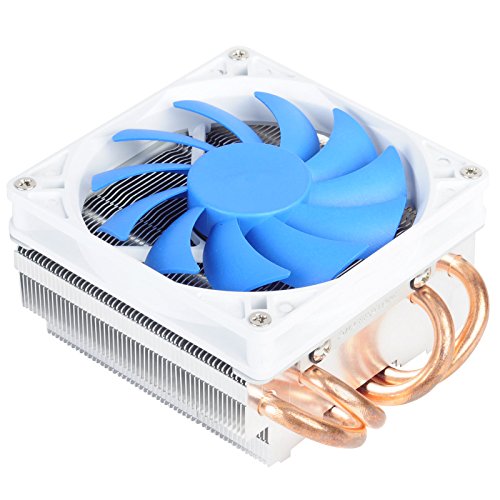
SilverStone AR06 58mm Low-Profile CPU Cooler
Best for: compact cases with mid-range CPUs
- Fan Size
- 92mm Fan (what this guide is about)
- Cooler Height
- 58 mm
- Tower Design
- Low-Profile
- TDP Rating
- 95W
- Socket Compatibility
- LGA 1150, LGA 1155
- Dimensions
- 6.5 × 5.5 × 2.5 inches
View on Amazon: SilverStone AR06 58mm Low-Profile CPU Cooler Affiliate link
This SilverStone AR06 is a 58 mm tall low-profile heatsink designed for compact cases. It uses four 6mm heat pipes with direct contact technology to transfer heat from the CPU to the aluminum fins. The included 92 mm PWM fan moves 40.2 CFM of air at 28.3 decibels. It supports Intel LGA1150/1155 and AMD AM2/AM3 sockets for CPUs up to 95W.
Pros
- 58 mm height fits low-profile cases
- Four 6mm heat pipes for efficient heat transfer
- 92 mm PWM fan provides 40.2 CFM airflow
- Noise level is rated at 28.3 decibels
Cons
- 92 mm fan size offers less cooling potential than 140 mm options
- Limited to Intel LGA1150/1155 and AMD AM2/AM3 sockets
- Rated for CPUs up to 95W, which may limit high-end builds
Good fit if
- You need a cooler that fits in a case with limited height
- You are building a compact system with a mid-range CPU
- You prefer a low-noise operation around 28.3 decibels
Skip if
- You require support for modern Intel sockets like LGA1700
- You need a 140 mm fan for maximum cooling performance
- You are using a high-TDP CPU exceeding 95W
Verdict: SilverStone AR06 Low-Profile Cooler is a compact solution for small form factor builds. It suits users with mid-range CPUs who prioritize case compatibility over maximum thermal headroom.
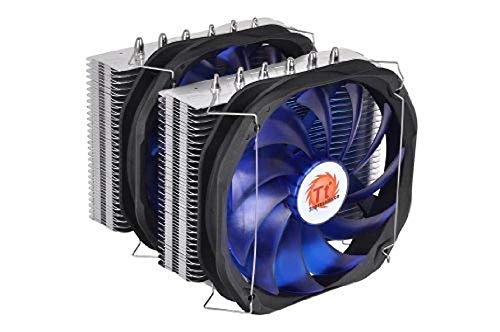
Thermaltake Frio Dual 140mm CPU Cooler
Best for: High TDP overclocking in spacious cases
- Fan Size
- 140mm Fan (what this guide is about)
- Socket Compatibility
- Intel Socket 2011, 1366, 1156, 1155, 775
- Heat Pipes
- 6
- TDP Rating
- 250W
- Dimensions
- 8.75 × 7.5 × 7 inches
- Weight
- 3 pounds
View on Amazon: Thermaltake Frio Dual 140mm CPU Cooler Affiliate link
This cooler uses two 140mm fans in a push-pull setup to move air efficiently across six 6mm heat pipes. It supports a 250W TDP rating, which helps manage heat during heavy overclocking. The universal mounting bracket fits Intel and AMD sockets. You get a large 7.5-inch width and 8.75-inch length. It includes premium thermal compound for better heat transfer.
Pros
- Dual 140mm fans in push-pull configuration
- Six 6mm heat pipes for heat transfer
- 250W TDP rating for overclocking
- Universal socket compatibility
Cons
- Large 8.75-inch length may block RAM
- Heavy 3-pound build requires sturdy mounting
- No mention of RGB lighting options
Good fit if
- You need high cooling capacity for overclocking
- You have a spacious case for large coolers
- You want universal socket support
Skip if
- You have a small ITX case
- You prefer compact low-profile coolers
- You want silent operation without fan control
Verdict: Thermaltake Frio 140mm Dual Fan Cooler is a robust option for enthusiasts who prioritize raw cooling performance and have the case space to accommodate its large dimensions.
Specifications side by side
| Spec | SilverStone AR06 58mm Low-Profile CPU Cooler | Thermaltake Frio Dual 140mm CPU Cooler |
|---|---|---|
| Socket Compatibility | not stated | Intel Socket 2011, 1366, 1156, 1155, 775 |
| Cooler Height | 58 mm | not stated |
| Heat Pipes | not stated | 6 |
| Tower Design | Low-Profile | not stated |
| Fan Size | 92mm | 140mm |
| TDP Rating | 95W | 250W |
| Features | Fan | not stated |
| Dimensions | 6.5 × 5.5 × 2.5 inches | 8.75 × 7.5 × 7 inches |
| Weight | 1 pounds | 3 pounds |
| Size | 0 | not stated |
| Color | AR06 - 58mm tall | not stated |
| Model | AR06 | CLP0587 |
Frequently asked questions
Does a 140mm fan cool better than a 92mm fan?
Yes, larger fans generally provide better cooling performance. The Thermaltake Frio uses dual 140mm fans to move more air. This setup handles high TDP overclocking more effectively than smaller fans. You get higher airflow capacity with the larger dimensions.
Which fan size fits in small cases?
A 92mm fan is the better choice for compact builds. The SilverStone AR06 stands only 58mm tall. This low profile fits inside small form factor cases. Larger 140mm coolers often exceed the clearance limits of tight chassis designs.
Are 140mm fans quieter than 92mm fans?
Larger fans can operate at lower speeds for the same airflow. The Thermaltake Frio uses dual 140mm fans for robust cooling. Bigger blades move more air with less noise per unit of volume. This often results in a quieter system under load.
What is the weight difference between 92mm and 140mm coolers?
140mm coolers are significantly heavier due to their size. The Thermaltake Frio weighs three pounds. The SilverStone AR06 with a 92mm fan weighs one pound. Heavier coolers require stronger motherboard mounting support and careful handling during installation.
Do 140mm fans require more case space?
Yes, 140mm fans need more physical clearance. The Thermaltake Frio measures 8.75 inches in length. You need a spacious case to accommodate these larger dimensions. Compact cases will likely only fit the smaller 92mm fan options.
Is a 92mm fan sufficient for mid-range CPUs?
Yes, a 92mm fan works well for mid-range processors. The SilverStone AR06 is designed for this specific use case. It provides adequate thermal headroom for standard tasks. You prioritize case compatibility over maximum cooling performance with this size.