120mm Fan vs 140mm Fan CPU Coolers in 2026: Key Differences
As an Amazon Associate we earn from qualifying purchases. Links on this page are affiliate links.
This 120mm Fan vs 140mm Fan CPU cooler comparison looks at the Scythe Kotetsu and the Thermaltake Frio. Both are air coolers designed to manage heat from your processor. The main difference is the fan size. The Scythe uses a single 120mm fan, while the Thermaltake uses dual 140mm fans. These fans move air differently. You need to know which setup fits your case and cooling needs.
Key differences
| Aspect | Scythe Kotetsu 120mm CPU Cooler | Thermaltake Frio Dual 140mm CPU Cooler |
|---|---|---|
| Fan Size | 120mm | 140mm (dual) |
| Heat Pipes | not listed | 6 |
| TDP Rating | not listed | 250W |
| Weight | 1.1 pounds | 3 pounds |
| Height | 6.3 inches | 7 inches |
Which one should you choose?
Choose Scythe Kotetsu 120mm CPU Cooler if
- You need a lighter cooler that weighs 1.1 pounds.
- You have a smaller case with limited height clearance.
- You prefer a single fan design for simpler installation.
Choose Thermaltake Frio Dual 140mm CPU Cooler if
- You want support for high TDP processors up to 250W.
- You need compatibility with many Intel and AMD sockets.
- You want dual fans for increased air movement.
Verdict: The Scythe Kotetsu is a compact choice for smaller builds or cases with height restrictions. The Thermaltake Frio offers more cooling capacity and broader socket support for high-performance systems. Choose the Scythe for size constraints and the Thermaltake for raw cooling potential.
120mm vs 140mm Fan Cooler Specs
fan size
The Scythe Kotetsu uses a single 120mm PWM fan. This standard size fits most mid-tower cases. The Thermaltake Frio uses dual 140mm VR/PWM fans. These larger fans move more air at lower speeds. Dual fans in a push-pull configuration increase cooling efficiency. Larger fans also tend to run quieter than smaller ones. The 140mm fans on the Thermaltake provide a distinct advantage in airflow volume. The 120mm fan on the Scythe is a more compact solution.
heat pipes
The Thermaltake Frio includes six 6mm heat pipes. These pipes transfer heat from the CPU base to the aluminum fins efficiently. The Scythe Kotetsu data does not list the number of heat pipes. Without this specific detail, you cannot compare the heat transfer capacity directly. However, the Thermaltake explicitly highlights its six pipes for overclocking support. This suggests a robust thermal pathway. The lack of data for the Scythe makes it a tie in this specific comparison based on available facts.
tdp rating
The Thermaltake Frio is rated for up to 250W TDP. This high rating supports extreme overclocking scenarios. The Scythe Kotetsu data does not list a TDP rating. You must assume the 120mm cooler handles lower power loads. The Thermaltake clearly targets high-performance builds. The 250W rating is a significant specification for thermal management. The Scythe lacks this published metric, making the Thermaltake the clear choice for high TDP processors.
socket compatibility
The Thermaltake Frio supports a wide range of sockets. It includes Intel Socket 2011, 1366, 1156, 1155, 775, and AMD AM3+, AM3, AM2+, AM2, and FM1. The Scythe Kotetsu data does not list specific socket compatibility. Universal mounting is mentioned for the Thermaltake. The Scythe is a standard air cooler, but you must verify its socket support separately. The Thermaltake provides explicit broad compatibility in its specifications.
tower design
The Thermaltake Frio features a dual fan push-pull design. This setup accelerates cooling efficiency by pulling air through and pushing it out. The Scythe Kotetsu uses a single fan design. The Thermaltake is taller at 7 inches compared to the Scythe's 6.3 inches. The Thermaltake is also wider and deeper. The Scythe is more compact at 16 cm height. The dual fan design of the Thermaltake offers better airflow dynamics for larger towers.
Choose Your CPU Cooler Based On Specs
Small case or low-profile build users
The Scythe Kotetsu stands 6.3 inches tall. This compact height allows it to fit into smaller computer cases where space is tight. You get a single 120mm fan that provides adequate airflow for standard processing tasks without requiring excessive room around the CPU socket area.
High performance overclocking enthusiasts
The Thermaltake Frio supports up to 250W TDP. This high rating handles intense heat from heavily overclocked processors. It uses dual 140mm fans in a push-pull setup. This configuration moves large volumes of air efficiently. Six 6mm heat pipes transfer heat quickly from the CPU to the fins.
Users with older or wide socket compatibility needs
The Thermaltake Frio supports a wide range of sockets. It works with Intel 2011, 1366, 1156, 1155, 775 and AMD AM3+, AM3, AM2+, AM2 and FM1. This universal mounting design ensures it fits older systems or specific workstation builds that require legacy socket support.
Quick picks
| # | Product | Best for | Price |
|---|---|---|---|
| 1 | Scythe Kotetsu 120mm CPU Cooler | standard mid-tower builds with RAM clearance limits | Check price of Scythe Kotetsu 120mm CPU Cooler on Amazon |
| 2 | Thermaltake Frio Dual 140mm CPU Cooler | High TDP cooling on older Intel platforms | Check price of Thermaltake Frio Dual 140mm CPU Cooler on Amazon |
The products compared

Scythe Kotetsu 120mm CPU Cooler
Best for: standard mid-tower builds with RAM clearance limits
- Fan Size
- 120mm Fan (what this guide is about)
- Cooler Height
- 16 cm
- Dimensions
- 5.12 × 2.28 × 6.3 inches
- Weight
- 1.1 pounds
View on Amazon: Scythe Kotetsu 120mm CPU Cooler Affiliate link
The Scythe Kotetu is a 120mm fan CPU cooler designed for standard tower installations. It stands 16 cm tall and weighs 480 g. This compact height allows it to fit in many mid-tower cases without blocking RAM slots. The 120mm fan provides airflow suitable for mainstream processors. You should consider this unit if you need a reliable, space-efficient air cooler for your build.
Pros
- 120mm PWM fan for standard airflow
- 16 cm height fits most cases
- 480 g weight keeps load light
Cons
- 120mm fan moves less air than 140mm options
- 16 cm height may limit extreme overclocking headroom
- No RGB lighting mentioned in specifications
Good fit if
- You have a mid-tower case with standard RAM clearance
- You are building a mainstream desktop PC
- You prefer a low-profile cooler that does not block memory
Skip if
- You need maximum cooling for high-end overclocking
- Your case has tight RAM clearance under 60 mm
- You want the highest possible static pressure
Verdict: Scythe Kotetu 120mm CPU Cooler is a solid, space-saving choice for users who prioritize case compatibility and standard airflow over maximum cooling potential.
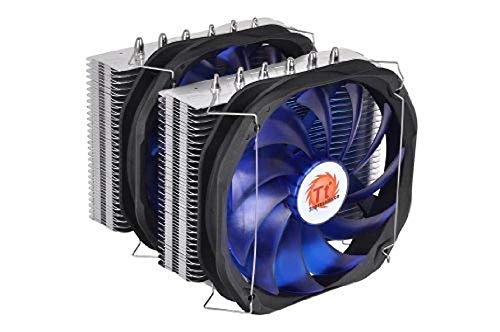
Thermaltake Frio Dual 140mm CPU Cooler
Best for: High TDP cooling on older Intel platforms
- Fan Size
- 140mm Fan (what this guide is about)
- Socket Compatibility
- Intel Socket 2011, 1366, 1156, 1155, 775
- Heat Pipes
- 6
- TDP Rating
- 250W
- Dimensions
- 8.75 × 7.5 × 7 inches
- Weight
- 3 pounds
View on Amazon: Thermaltake Frio Dual 140mm CPU Cooler Affiliate link
This cooler uses two 140mm fans in a push-pull setup to move air efficiently through the fin stack. It features six 6mm heat pipes to transfer heat from the CPU base. The unit supports up to 250W TDP. It fits Intel sockets 2011, 1366, 1156, 1155, and 775. You get a large heatsink with premium thermal compound included. This is a heavy-duty air cooler for high-performance builds.
Pros
- Dual 140mm fans in push-pull configuration
- Six 6mm copper heat pipes
- 250W TDP rating
- Universal socket compatibility
Cons
- Large 8.75-inch length may block RAM
- Heavy 3-pound build requires sturdy case support
- Only supports older Intel sockets
Good fit if
- You need high cooling capacity for overclocking
- You have a spacious mid-tower or full-tower case
- You use older Intel platforms like LGA 1155
Skip if
- You use a small form factor case
- You have a modern Intel socket like LGA 1700
- You prefer compact single-fan designs
Verdict: Thermaltake Frio Extreme 140mm Dual Fan delivers serious cooling power for older Intel systems. It suits users who prioritize raw thermal performance over modern socket support or compact size.
Specifications side by side
| Spec | Scythe Kotetsu 120mm CPU Cooler | Thermaltake Frio Dual 140mm CPU Cooler |
|---|---|---|
| Socket Compatibility | not stated | Intel Socket 2011, 1366, 1156, 1155, 775 |
| Cooler Height | 16 cm | not stated |
| Heat Pipes | not stated | 6 |
| Fan Size | 120mm | 140mm |
| TDP Rating | not stated | 250W |
| Features | Fan | not stated |
| Dimensions | 5.12 × 2.28 × 6.3 inches | 8.75 × 7.5 × 7 inches |
| Weight | 1.1 pounds | 3 pounds |
| Model | FBA_4571225054094 | CLP0587 |
Frequently asked questions
Which cooler fits better in small cases?
The Scythe Kotetsu fits better in small cases. It stands 6.3 inches tall and weighs only 1.1 pounds. Its compact dimensions allow it to clear low-profile RAM modules. The Thermaltake Frio is much larger at 7.5 inches wide and 7 inches tall. It weighs 3 pounds and requires significantly more internal space.
Does the 140mm fan cool better than the 120mm fan?
The Thermaltake Frio offers higher thermal performance for older Intel platforms. It uses dual 140mm fans to move more air at lower speeds. The Scythe Kotetsu uses a single 120mm fan. This design prioritizes space savings over maximum cooling potential. You choose the 140mm model if you need raw heat dissipation power.
Is a 120mm fan sufficient for standard builds?
Yes, the 120mm fan is sufficient for standard mid-tower builds. The Scythe Kotetsu provides adequate airflow for typical usage. It is a solid choice if you prioritize case compatibility. The fan size fits most standard computer cases without obstructing other components. It balances performance with a smaller physical footprint.
How much space does a 140mm cooler take up?
A 140mm cooler like the Thermaltake Frio takes up considerable space. It measures 8.75 inches in length and 7.5 inches in width. The dual fan setup increases its overall volume. You must ensure your case has enough clearance for these larger dimensions. It is not suitable for compact or mini-ITX builds.
Can I install a 140mm fan in any case?
No, you cannot install a 140mm fan in any case. The Thermaltake Frio requires specific clearance for its 7-inch height and 8.75-inch length. Standard mid-tower cases may lack the necessary room. You must check your case specifications before purchasing. The smaller 120mm cooler is more universally compatible with various chassis sizes.
What is the weight difference between these coolers?
The Thermaltake Frio weighs 3 pounds, while the Scythe Kotetsu weighs 1.1 pounds. The larger cooler is nearly three times heavier due to its dual fans and larger heatsink. This weight difference affects mounting stress on your motherboard. Heavier coolers require robust mounting brackets to prevent sagging over time.
Which cooler is better for older Intel systems?
The Thermaltake Frio is better for older Intel systems. It is specifically designed to deliver serious cooling power for high TDP processors on these platforms. The Scythe Kotetsu is a more general-purpose cooler. It suits users who need a balance of performance and size. Choose the Thermaltake if you prioritize thermal headroom for legacy hardware.